
Updated:
A model release form is signed consent to use a person's photos. This page gives you a free PDF template, an online builder, and field-by-field filling steps. Photographers ask for one mainly before using a person's photo in ads or to promote a product.

Build Your Document
Answer a few simple questions to make your document in minutes
Save and Print
Save progress and finish on any device, download and print anytime
Sign and Use
Your valid, lawyer-approved document is ready
A photographer asks for a model release form when a recognizable person's photo may appear in an ad, promote a product or service, or be used in another commercial way. Many photographers also get one for stock sales, client campaigns, a website or a portfolio, so the signed release shows what the person agreed to.
Written consent matters most for advertising and other commercial uses of a person's likeness. News, editorial and some art or print uses are often treated differently, and the rules on privacy and likeness differ from place to place, so check the rules where the photo will be used before relying on it without a release.
Sometimes a photographer thinks a signed form is not needed, for example when they do not plan to license the photos after the shoot. Plans change, though. You might later want to use a photo to advertise your photography services on your website. A release signed before the photoshoot keeps that option open.
A signed release comes in handy when you want to use a photo for:
Fashion, corporate and stock photography are where a signed release appears most. The form fits paid shoots and unpaid ones alike. Typical sessions include:
Taking a photo of a passerby and using that photo in an ad are two separate decisions. A signed release shows the person agreed to the second one. Without it, the photographer has nothing in writing if the person later objects to how the image was used.
Guests at weddings, birthdays and other private gatherings do not expect to see themselves in a photographer's promotion. Ask any guest you want to feature to sign a release, or pick a photo without them.
A model release form names the model and the photographer, gives the place and date of the shoot, says how the photos may be used, and ends with the model's signature. A short release stops there. A detailed release also covers payment and an acknowledgment from the model.
A detailed release usually has these parts:
The payment part of a model release says what the model gets in return for signing. It might be a fee, prints of photos given for free, or another option the parties agree to. When the model receives nothing, write that plainly, so no one has to guess later.
The usage part is the core of the release: it lists where and how the photographer may use the images. A broad release allows any use, including commercial publications. A narrow release names only the uses the model agreed to, such as:
A model release form might also include the provision about the right to use the photos to represent an imaginary person. Some releases also allow editing and retouching of the images.
Write any special conditions on use in this part, for example no use in political ads. Have both the model and the photographer sign or initial next to each special condition.
In the acknowledgment, the model confirms they have read and understood the release and will make no claims over the images it covers. An adult model signs alone. A minor cannot give this consent alone, so a parent or guardian signs too. The template's only line for them is the Parent/Guardian's Signature line, so add the parent's or guardian's printed name, address and contact details on a separate signed page if you want them kept with the release. The age of adulthood and whether a minor can later undo a paid modeling agreement differ from place to place, so check the local rules before relying on a minor's release.
The model signs and dates the release. A minor's release also carries the signature of a parent or guardian. When a recognizable private property, such as a building, will be used commercially, stock agencies and publishers often ask for a separate property release signed by the owner. No general rule calls for a release for every photo of a building, so check the local rules and the buyer's terms. This template covers people only.
A model release form is signed by the person in the photo and lets the photographer use their image. The name photo release form is used for two documents: the same consent from the person in the photo (the Model Photo Release Form on this page), and a print release, which the photographer signs so a client can print the photos. The table compares the model release with the print release.
| Model release form | Print release | |
|---|---|---|
| Who signs | The model, plus a parent or guardian for a minor | The photographer |
| Who gets permission | The photographer | The client |
| What it allows | Using the person's image in the listed ways | Printing copies of the photos |
| Typical shoots | Fashion, stock, advertising, portfolio | Weddings, portraits, family sessions |
Both forms are often signed at the same shoot. The model's release lets the photographer use the images in a portfolio or in ads. The photographer's print release lets the model make copies of the photos for personal use.
A model release also differs from a general release of liability form. That form covers injury claims from an activity, not the use of someone's image.
FormsPal offers a free model release form template for photography that you can create online with the document builder or download as a PDF to print or fill in on your device.
| Document Name | Model Release Form |
| Other Names | Photography Model Release, Model Release for Photographers |
| Avg. Time to Fill Out | 5 minutes |
| # of Fillable Fields | 8 |
| Available Formats | Adobe PDF |
You can get the template in any of these ways:
The builder asks about the photographer, the model and the photos, then turns your answers into a customized release you can download.
To fill out the release, enter the model's and the photographer's names, the place and date of the shoot, then date the form and collect the signatures. The FormsPal model release template is a one-page PDF with eight fillable fields. Fill it in on your device with the PDF editor or print it and write by hand. Follow the two steps below, and use the screenshots to see where each answer goes.
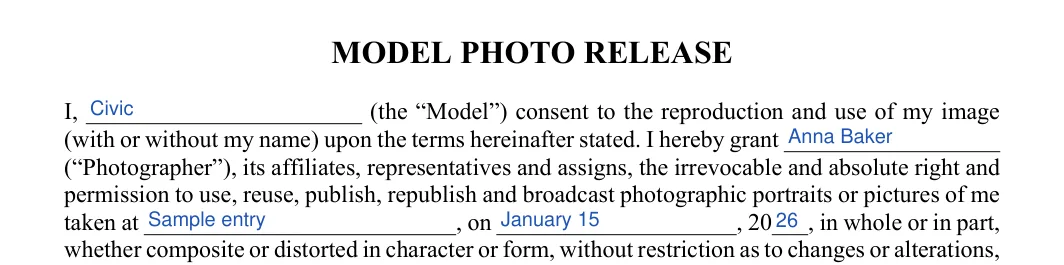
The screenshots under each step show the FormsPal Model Release template filled with sample entries in blue, so you can see where each answer goes. The names, addresses, dates and amounts are examples only.
The template asks for these entries:
Step 1: Model, photographer, place and date of the photos
In the opening paragraph, write the model's name on the first line, then the photographer's name. Next fill in the place where the photos were taken, then the day, month and year of the shoot.


Step 2: Date and signatures
Read the printed release paragraphs, then write the date on the Dated line and have the model sign on the Model's Signature line. The last line, Parent/Guardian's Signature, is for a parent or guardian when the model is a minor.


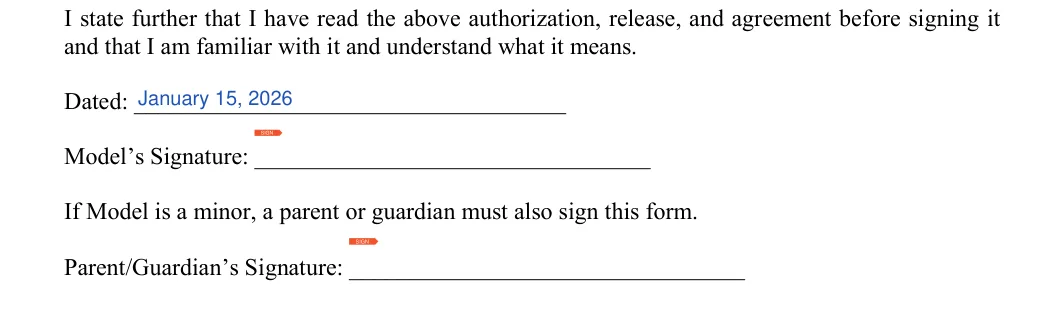
The printed template has no lines for payment or limits on use. To add them, write the terms on a separate page, have the model and the photographer sign and date it, and keep it with the release.
The FormsPal template takes about 5 minutes. It has 8 fillable fields: the model's name, the photographer's name, the place, the day, month and year of the shoot, the date, and the signature lines.
Yes. Use the FormsPal document builder at the top of this page. Answer a few questions about the photographer, the model and the photos, then download your customized document to your device.
Yes. The model release PDF on this page is free to download, and you can print it or fill it in on your device with the PDF editor.
The date of the shoot goes in the opening paragraph, right after the place. The Dated line sits just above the Model's Signature line near the end of the form.
Have the model sign before the shoot starts, or shortly after it, while everyone remembers what was agreed about the photos.
A parent or guardian signs on the Parent/Guardian's Signature line, the last line of the template, below the model's own signature.
Keep a signed copy with your photo files, and give the model a copy if they ask for one.
General information, not legal or tax advice.
