SSA 3288 Form: Social Security Consent for Release of Information
Updated:
The SSA 3288 form is a Social Security consent form for release of information. It lets you allow other people and organizations to get personal information about you from the agency. Typical recipients are doctors, medical services’ representatives and insurance companies. You must complete the release of liability form attentively because skipping the blank fields or writing incorrect details may cause problems.
Each SSA consent for release of information contains specific details, including:
Informative notice that explains basic terms
The name of the applicant whose information may be accessed
Reasons for releasing the information
The applicant’s contact and personal details
For the validity of the SSA 3288 form, you have to ask two witnesses to sign the paper.
When to Use the SSA 3288 Consent for Release of Information
Use this form when you want SSA to share information about you with individuals or groups, such as a doctor or an insurance company. It is also typical to use it when you (or a minor or an incompetent adult you take care of) are applying to receive financial or medical support.
Before you start, think about who needs the information and why. You will name that person or organization on page 2 and give a short reason, so it helps to have both ready.
For instance, if you need to obtain an electric wheelchair, the responsible institution must access specific information to issue one. They need an SSA 3288 form signed by an applicant to access such data.
SSA 3288 Form Details
Document Name
SSA 3288 Form
Other Names
Social Security Administration Authorization, Social Security Medical Release
Avg. Time to Fill Out
13 minutes
# of Fillable Fields
40
Available Formats
Adobe PDF
Preparing the SSA 3288 Consent Form: General Steps
A little planning makes Form SSA-3288 easier to complete. Decide why you want the information shared, list the people or organizations that will receive it, and read the opening text on the first page of the form. The four steps below cover that preparation and what to do after you sign.
Define Why You Are Creating This Document. Because you will have to state the reasons for completing the SSA 3288 form clearly, you should understand why you need a particular institution to access your data.
List Organizations That May Access Your Data. You have to name all institutions that are allowed to access your personal information.
Learn the Basics. When creating the form, you should be aware of the regulations and conditions. To clarify everything, you will have to read the notice at the beginning of the form.
Sign and File the Document. Without your signature, no company or institution can access the data. Ensure that you have signed and filed the SSA 3288 form (or social security administration consent for release of information form, or social security administration authorization form).
Download your fillable Child Medical Consent Release template in PDF.
Download the template above, then open it in the FormsPal PDF editor to type your answers. The steps below follow the FormsPal template in the order the parts of Form SSA-3288 appear, from the opening text on page 1 to the privacy statements on page 3.
The screenshots under each step show the FormsPal Social Security Administration Consent for Release of Information template filled with sample entries in blue, so you can see where each answer goes. The names, addresses, dates and amounts are examples only.
Read Page 1 First. Start with the opening text on page 1 of the form. It explains what to fill in and includes a note about what the form is not meant for. The last paragraph tells you to send or bring the finished form to the local servicing office.Step 1: sample entries, not a real document.
Full Name, Date of Birth and Social Security Number. On page 2, enter the full name, the date of birth as MM/DD/YYYY and the full Social Security number (SSN) of the person the information is about. The form marks all three with an asterisk.Step 2: sample entries, not a real document.
Person or Organization to Receive the Information. Under the line that starts with “I authorize” near the top of page 2, enter the name and address of each person or organization. The form has three rows and a phone number line marked with two asterisks.Step 3: sample entries, not a real document.
Reason for the Release. Write why you want the information released on the lines after “I want this information released because.” A short, plain reason works, such as a decision about a benefit or a request for records.Step 4: sample entries, not a real document.
Information to Release. Check at least one of the nine boxes. For items 4, 5, 6 and 7, fill in the from date and the to date. If you are requesting medical records, do not check both 7 and 8. For item 9, list the specific records you want, such as award or denial letters, benefit applications or appeals.Step 5: sample entries, not a real document.
Signature and Date. Sign on the Signature line and enter the date on the Date line next to it. Sign the paper and ask two witnesses to sign, too.Step 6: sample entries, not a real document.
Address and Daytime Phone. Enter your address and daytime phone number on the next line. The form marks both with two asterisks and asks for them in case SSA needs to contact you about the consent form.Step 7: sample entries, not a real document.
Relationship and Daytime Phone. If you are filling in the form for someone else, enter your relationship to that person and a daytime phone number. Leave this line blank if the information is about you.Step 8: sample entries, not a real document.
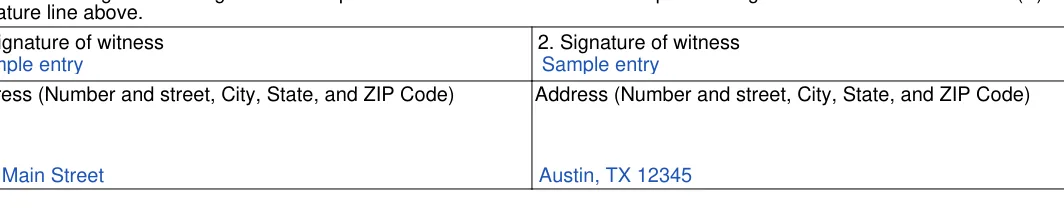
Witnesses. The last block on page 2 has two numbered lines. Each one has a place for a witness signature and the witness’s full address, with number and street, city, state and ZIP code.Step 9: sample entries, not a real document.
Privacy Act Statement. Page 3 opens with the Privacy Act Statement, which explains how Social Security collects and uses the information. There is nothing to fill in here.Step 10: sample entries, not a real document.
Paperwork Reduction Act Statement. The last block on page 3 gives a time estimate and an address for comments about that estimate. There is nothing to fill in here.Step 11: sample entries, not a real document.
Verify that the details you enter match your Social Security paperwork, review the content of each answer once more, then keep a copy of the signed form.
Frequently Asked Questions
What is the SSA consent form used for?
The SSA 3288 form lets you choose a person or organization, such as a doctor or an insurance company, and list the information you want shared with them. You pick the items from a list on page 2 of the form.
How many pages does the form have?
Form SSA-3288 has three pages. Page 1 holds the opening text, page 2 is the part you fill in and sign, and page 3 has the Privacy Act Statement and the Paperwork Reduction Act Statement.
Can I fill in the form on my computer?
Yes. The template is a fillable PDF, so you can type your answers into it before you print it for signing. Use the download button on this page to get the file.
What information can I ask the agency to release?
Page 2 lists nine options. You check each option you want and add date ranges where the form asks for them. The list covers:
Verification of a Social Security number
Monthly Social Security benefit and Supplemental Security Income payment amounts
Medicare entitlement dates
Medical records
Other Social Security records you list
Who can receive the information?
Page 2 has three rows for the individuals or organizations that will receive it, such as a doctor or an insurance company. Fill in as many rows as you need.
What if I make a mistake while filling in the form?
Correct the entry in the fillable PDF before you print it. If you already printed the page, print a fresh copy and complete it again, so the signed pages stay clean and easy to read.
Can I save the filled-in form?
Yes. After you type your answers in the FormsPal PDF editor, download the file and keep it with your other Social Security paperwork. Save one copy before you print and sign, and another after, so you have both versions.
What should I do with the finished form?
Make a copy for your files, then send or bring the original to the local servicing office. Page 1 of the form explains how to find that office by ZIP code.
General information, not legal or tax advice.
Jennifer M. Settles
Author & Attorney
With over 25 years of experience as a business and transactional attorney, Jennifer has mastered the craft of closing highly successful deals for her clients. Through her wide-ranging expertise in commercial contracts, real estate transactions, M&A and corporate law, Jennifer secures results that are second-to-none.

![Social Security Administration Consent for Release of Information: Form1[0].bodypage1[0].readonly fld[0], filled with sample entries](https://formspal.com/data/DHTMLImages/Image/630484.webp)
![Social Security Administration Consent for Release of Information: Form1[0].bodypage2[0].fullname fld[0], Form1[0].bodypage2[0].dob date[0] and more, filled with sample entries](https://formspal.com/data/DHTMLImages/Image/630485.webp)


![Social Security Administration Consent for Release of Information: Form1[0].bodypage2[0].pleaserelease cb1[0], Form1[0].bodypage2[0].pleaserelease cb2[0] and more, filled with sample entries](https://formspal.com/data/DHTMLImages/Image/630488.webp)



![Social Security Administration Consent for Release of Information: Form1[0].bodypage3[0].readonly fld1[0], filled with sample entries](https://formspal.com/data/DHTMLImages/Image/630493.webp)
![Social Security Administration Consent for Release of Information: Form1[0].bodypage3[0].readonly fld2[0], filled with sample entries](https://formspal.com/data/DHTMLImages/Image/630494.webp)

