Tattoo Release Form

The Tattoo Release Form is a record that is intended to hold a tattoo artist and their business innocent of illegalities as to the body artistry (tattoos and piercings) made upon the customer’s body, with their express signed consent. Download the free PDF below or build a personalized consent form online, then fill in the names, the initial lines and the signature.

Last Updated: October 2026. This guide is reviewed and updated regularly to reflect current law. If you notice an error or outdated information, please contact us.
Tattoo consent release form

Create a Personalized Tattoo Consent and Release Form online in under 5 minutes!

Build Your Document

Answer a few simple questions to make your document in minutes

Save and Print

Save progress and finish on any device, download and print anytime

Sign and Use

Your valid, lawyer-approved document is ready

... or download your Tattoo Release Form as a  PDF file

When to Use Tattoo Release

Tattooing is a creative craft. People trust their skin to you, and a good tattoo studio delivers strong body art and a comfortable experience from the first sketch to the final touch-up.

Sadly in our belligerent society, individuals are continually searching for approaches to make an additional buck. Should your customer feel in any capacity that you or your studio was answerable for individual or passionate injury, they may choose to sue you. To be safe and secure, one should fill out and complete the Tattoo Release form.

Other names for this document include Tattoo Parental Release and Tattoo Copyright Release, so search for any of the three titles when you compare consent templates.

Studios often hand the consent form to people at moments like these:

  • A first tattoo for a walk-in or a booked customer
  • A piercing appointment
  • A cover-up or rework session with a returning customer
  • A guest artist day or a convention booth where every customer signs before work starts

Tattoo Release Form Details

Document Name Tattoo Release Form
Other Names Tattoo Parental Release, Tattoo Copyright Release
Avg. Time to Fill Out 9 minutes
# of Fillable Fields 24
Available Formats Adobe PDF
Similar Forms Tattoo Consent Form
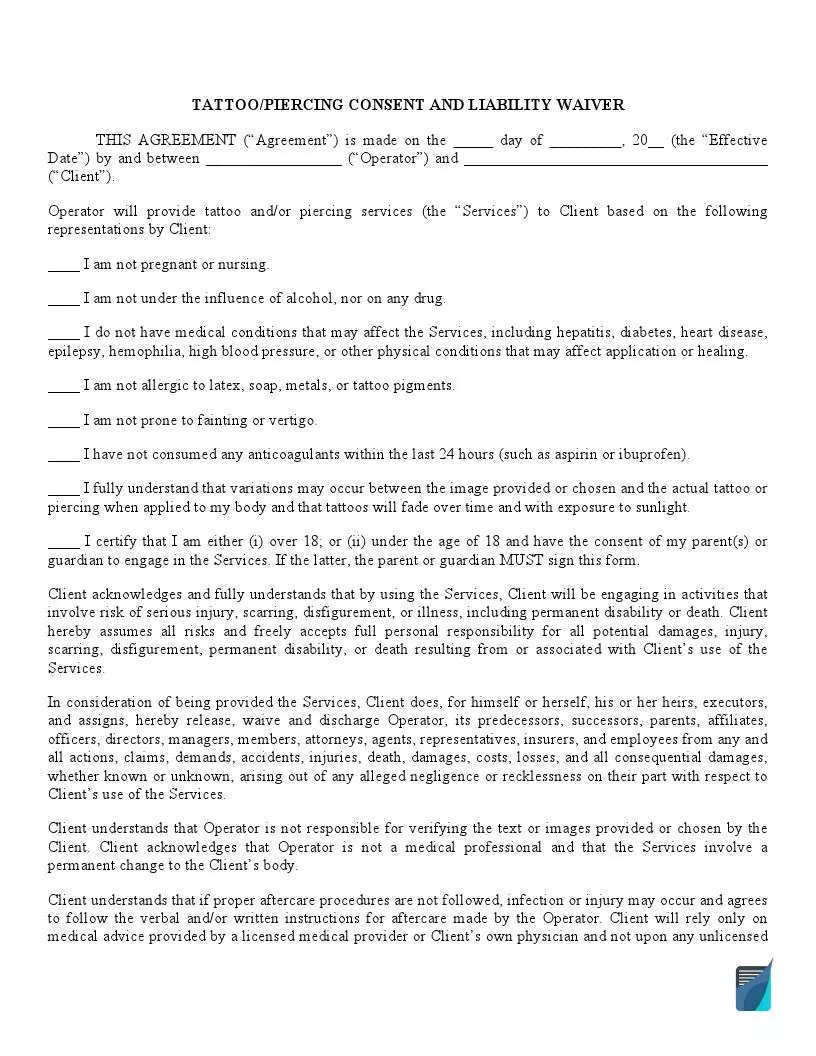
Template Preview
Create a Personalized Tattoo Consent and Release Form online in under 5 minutes!

What the Tattoo Release Form Includes

The template has 24 fillable fields spread over two pages, and each block matches a part of the printed form. Here is what you find, from the top of page one to the last signature line on page two:

  • Header block: The day, month and year, the Operator (the artist or studio) and the Client (the person getting the tattoo or piercing).
  • Eight statements: Each has an initial line and touches on pregnancy or nursing, alcohol or drugs, medical conditions, allergies, fainting, anticoagulants, image variation and age.
  • Risk and aftercare paragraphs: Printed text with no fields to complete.
  • Client signature and printed name: Both sit near the top of page two.
  • Consent of Parent or Guardian: Lines for the parent or guardian names, the minor child’s name and date of birth, and a description of the tattoo.
  • Two dated signature lines: Space for one or two parents or legal guardians.

The customer must answer a set of inquiries to guarantee the security of the artist and the business establishment, as expressed in the release of liability form. All questions must be replied to in a “yes” or “no” format by ticking the needed option.

Then, in the questionnaire part, the responses are private and will not prevent the customer from getting a piercing or tattoo; nonetheless, all inquiries must be replied to in a “yes” or “no” format.

Filling Out the Tattoo Release Form

First of all, download the template of the document from the website. Open the file in the PDF editor to type your answers, or print it and use a blue pen. Work from the top of page one to the signature lines on page two, one block at a time.

The screenshots under each step show the FormsPal Tattoo Release template filled with sample entries in blue, so you can see where each answer goes. The names, addresses, dates and amounts are examples only.

  1. Enter the date, Operator and Client. Under the heading TATTOO/PIERCING CONSENT AND LIABILITY WAIVER, fill in the day, month and year of the Effective Date. Then add the Operator name and the Client name, for example Harbor Ink Studio and Jordan Lee.
    Tattoo Release: TATTOO/PIERCING CONSENT AND LIABILITY WAIVER, filled with sample entries
    Step 1: sample entries, not a real document.
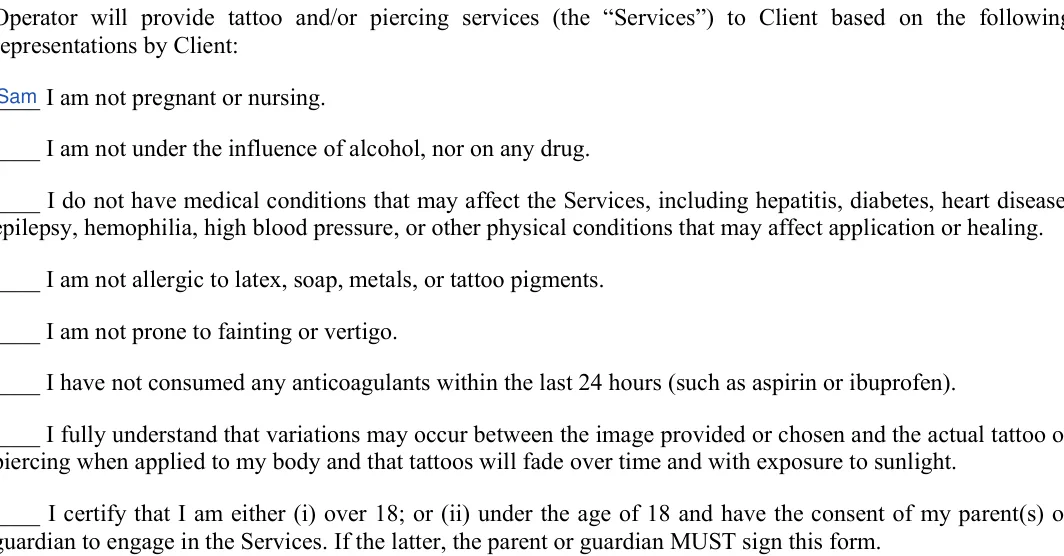
  2. Initial each representation by Client. Read the eight statements and write initials on the line before each one. Every line is its own statement, so initial them one by one.
    Tattoo Release: representations by Client, filled with sample entries
    Step 2: sample entries, not a real document.
  3. Sign and print the Client name. After the paragraphs on risk and aftercare, the person getting the tattoo signs on the Client Signature line and prints their name on the Printed Name line.
    Tattoo Release: Client signature, Printed name, filled with sample entries
    Step 3: sample entries, not a real document.
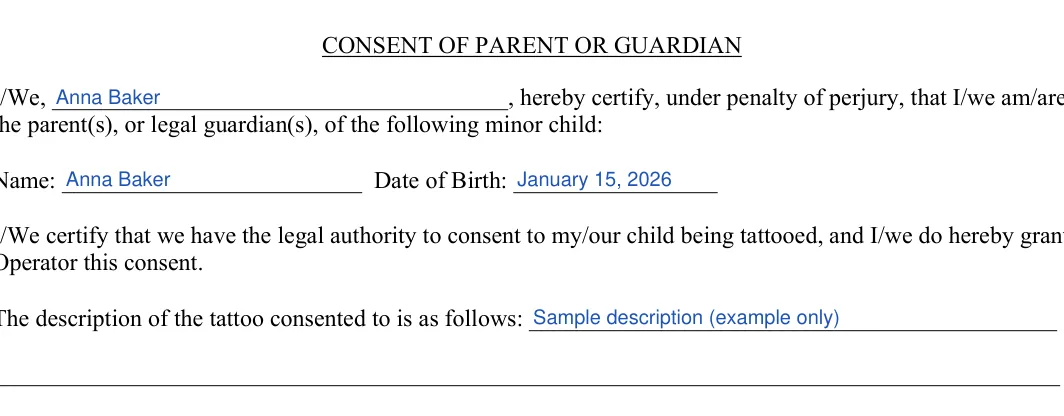
  4. Complete the Consent of Parent or Guardian. For a minor, this block holds the parent or guardian name or names, the minor child’s name and date of birth, and a description of the tattoo, such as a small floral design on the left forearm.
    Tattoo Release: CONSENT OF PARENT OR GUARDIAN, filled with sample entries
    Step 4: sample entries, not a real document.
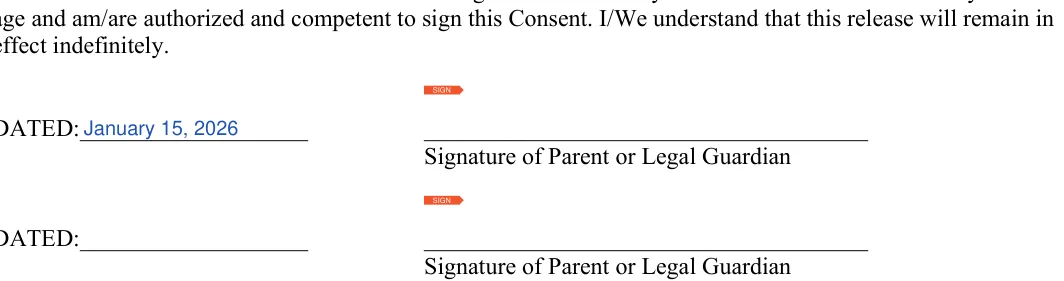
  5. Date and sign as parent or legal guardian. Each parent or legal guardian writes the date and signs on one of the two DATED lines at the bottom of page two. You can skip the second line when only one person signs.
    Tattoo Release: Dated, Signature of parent or legal guardian, filled with sample entries
    Step 5: sample entries, not a real document.

Step 2 to filling out a tattoo release form names Step 3 to filling out a tattoo consent and release sample questionnaire Step 4 to filling out a blank tattoo release form signature

How to Sign and Use the Tattoo Release

Signing day goes smoothly when the entries are already in place. Make sure that all fields in this record are filled. The record must be deliberately inspected before being signed.

No minor youngster, younger than 18 years, may obtain tattoos or piercings without the signed document from a parent or any other responsible person, like a guardian.

  1. Sit down with the customer and read the whole form together, including the paragraphs that have no fields.
  2. Have the customer initial each statement, then sign and print their name on page two.
  3. For a minor, add the parent or guardian entries and signatures from the last two steps above.
  4. Hand the customer a copy and file the original with the booking record.

Do not forget to include the city-state zip code and then, finally, sign the document.

Frequently Asked Questions

What is a tattoo release form?

It is a consent and waiver document a customer signs before a tattoo or piercing. The studio keeps the signed copy with the booking record, so the date, the names and the initials are on file if they return for another session.

How long does the form take to fill out?

Most people finish in about 9 minutes. The template has 24 fillable fields, and the customer’s share is mostly initials and a signature.

Who is the Operator and who is the Client?

The Operator is the artist or tattoo studio providing the service. The Client is the person getting the tattoo or piercing.

Does one template cover tattoos and piercings?

Yes. The title and the opening paragraph name both tattoo and piercing services, so the same PDF works for either appointment.

Is the template free to download?

Yes. The PDF is a free download, and you can also build a personalized consent form online with the Create My Document button.

Which part is for a parent or guardian?

The Consent of Parent or Guardian block on page two. It has lines for:

  • The names
  • The child’s date of birth
  • A description of the tattoo
  • Two dated signature lines

General information, not legal or tax advice.

Jennifer M. Settles
Jennifer M. Settles
Author & Attorney
With over 25 years of experience as a business and transactional attorney, Jennifer has mastered the craft of closing highly successful deals for her clients. Through her wide-ranging expertise in commercial contracts, real estate transactions, M&A and corporate law, Jennifer secures results that are second-to-none.
Published: Jun 15, 2022