
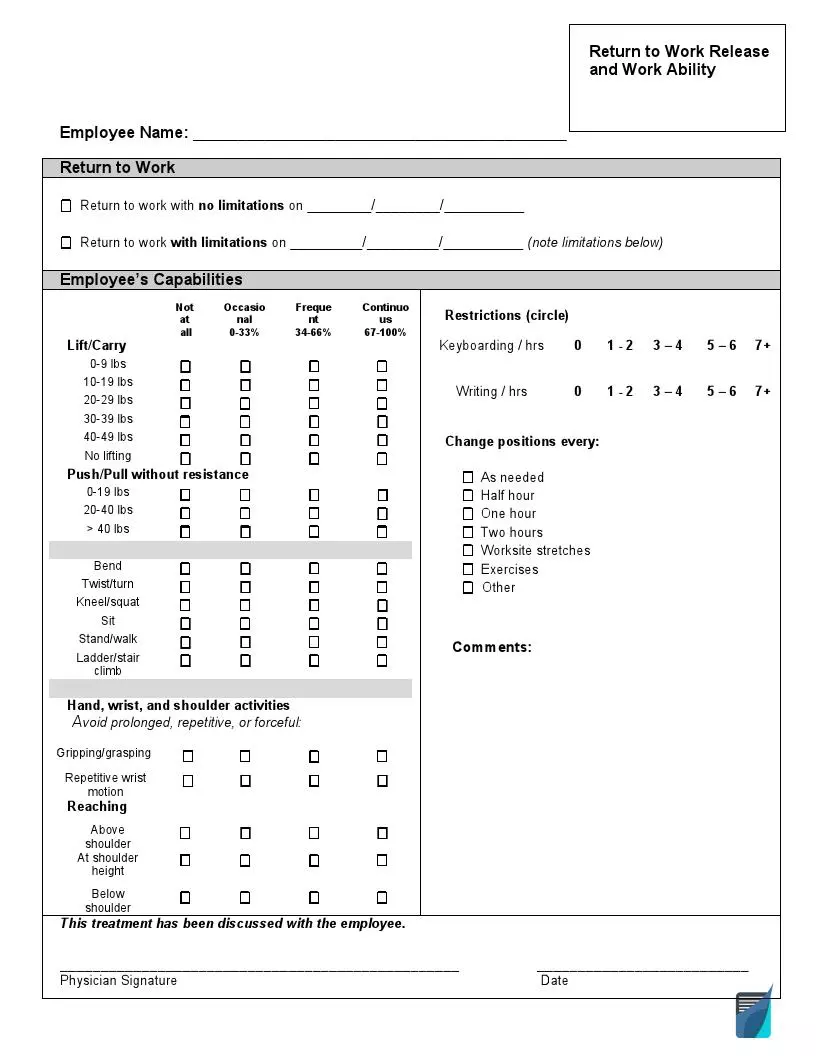
A work release form is the type of release of liability form that people in the United States may submit to skip work legally when they feel ill. It is a short document that a doctor or other medical care provider completes, not the patient. The form tells your employer on which day you can go back to work and which limits apply until then. Bring a blank copy to your appointment so the doctor can fill it in.
Last Updated: October 2026. This guide is reviewed and updated regularly to reflect current law. If you notice an error or outdated information, please contact us.
Typically, the document contains:
Use a work release form (also called a doctor release form) when an illness or injury keeps you away from work and you want your doctor to confirm the day you can return in writing. The same form works when you come back but can only do part of your usual tasks.
A common example is a job that involves carrying heavy items. If a worker has back pain and a confirmed diagnosis, the physician will probably prohibit lifting and carrying heavy items for a while, and the form lists that limit together with the day it ends.
| Document Name | Work Release Form |
| Other Names | Doctor Release, Medical Release to Return to Work |
| Avg. Time to Fill Out | 18 minutes |
| # of Fillable Fields | 99 |
| Available Formats | Adobe PDF |
You do not write this form yourself, because a doctor creates it after examining you. The process starts with a message to your employer and ends when you hand over the signed form, so follow these 3 steps in order.
The patient fills in the first lines of the template, and the doctor completes the remaining sections. Bring the blank form to your appointment so the doctor can enter the return date, any restrictions and a signature. The 5 steps below follow the order of the form.


A doctor completes most of this form, and the patient adds only the first details. These answers explain who fills in each part, what information the form includes and what to do with the signed copy.
The patient writes the name and the date on the first lines, while the doctor completes the remaining sections, including the return date and any restrictions. The doctor, not the patient, also signs the form.
It includes the day the patient may get back to work, restrictions on activities and duties, the period in which those restrictions are effective, and the signature of the doctor.
Ask your doctor to list the limits in the restrictions part of the form and to add the last day those limits apply. Typical examples are:
The template takes about 18 minutes on average and has 99 fillable fields, and most of the time goes to the restrictions part that the doctor completes.
Give the original to your employer and keep a copy for your own records. A photo or scan of the signed page also works as a backup if the paper copy gets lost.
Yes, people also call it a doctor release or a medical release to return to work, and all three names point to the same kind of document.
General information, not legal or tax advice.
