A photo booth contract is a rental agreement for an event photo booth. It names both sides and lists the booth, the event date, the hours, the fees and the props. Booth companies and event hosts can download the free template or fill it out online.
Create a free high-quality Photo Booth Contract online now!
Build Your Document
Answer a few simple questions to make your document in minutes
Save and Print
Save progress and finish on any device, download and print anytime
Sign and Use
Your valid, lawyer-approved document is ready
... or download your Photo Booth Contract Template as a PDF file
A photo booth rental agreement is a booking contract between the company that owns a photo booth and the client who rents it for one event. It sets out the equipment, the event, the price and what happens if plans change.
The same document goes by several names: photo booth contract, photo booth rental contract or photobooth contract. People also search for a lease agreement for renting a photo booth. It is the same paper: the client rents equipment and a service for a set block of time, not a room or a building. That is why it sits with our commercial lease templates while covering a very different deal.
The form works for any kind of booth, from a large walk-in design to an open backdrop, a 360 booth or a portable camera with a photo printer. Its twelve numbered sections fall into six groups:
The booth, the dates and the hours
Delivery and who stays with the booth
The rental fee, the deposit and extra time
Indemnity and props
Date changes, cancellations and the photo release
Refunds and added lines
What to Include in a Photo Booth Contract
A photo booth contract should include the money terms, the equipment and prints the company brings, and the event details, so both sides read the same booking. Start with the price, then the gear, then the event itself.
The money terms tell the client what to pay and when:
The base rental amount and its due dates
The first deposit and when the balance is due
Any security deposit or other fees
Late fees and the excess time fee
The refund if the booth stops working
The equipment terms say what arrives at the venue. List the booth, the type of photos printed (color, black and white or digital), the prop box and whether a company attendant stays. Props may come with an extra cost above the base rental, so the contract should say which.
The event terms tell the company what to expect:
What kind of event it is
The date, the start and end times and the venue address
The approximate set-up time
The power outlets the client makes available
How many days ahead the client can change or cancel the date
Before you start, make a short list of what the booth company brings, such as the booth, props, an attendant and prints. It makes each part of the template quicker to fill in.
Photo Booth Contract Form Details
Document Name
Photo Booth Contract Form
Other Name
Photo Booth Rental Agreement
Avg. Time to Fill Out
12 minutes
# of Fillable Fields
54
Available Formats
Adobe PDF
Create a free high-quality Photo Booth Contract online now!
How to Fill Out a Photo Booth Contract
To fill out the template, work through its fourteen parts in order, from the agreement date and both parties to the refund terms and the two signature blocks. Each step below matches one part of the free FormsPal form.
You can type into the downloaded PDF with the online PDF editor, or answer a few questions and let FormsPal build the document for you.
The screenshots under each step show the FormsPal Photo Booth Contract template filled with sample entries in blue, so you can see where each answer goes. The names, addresses, dates and amounts are examples only.
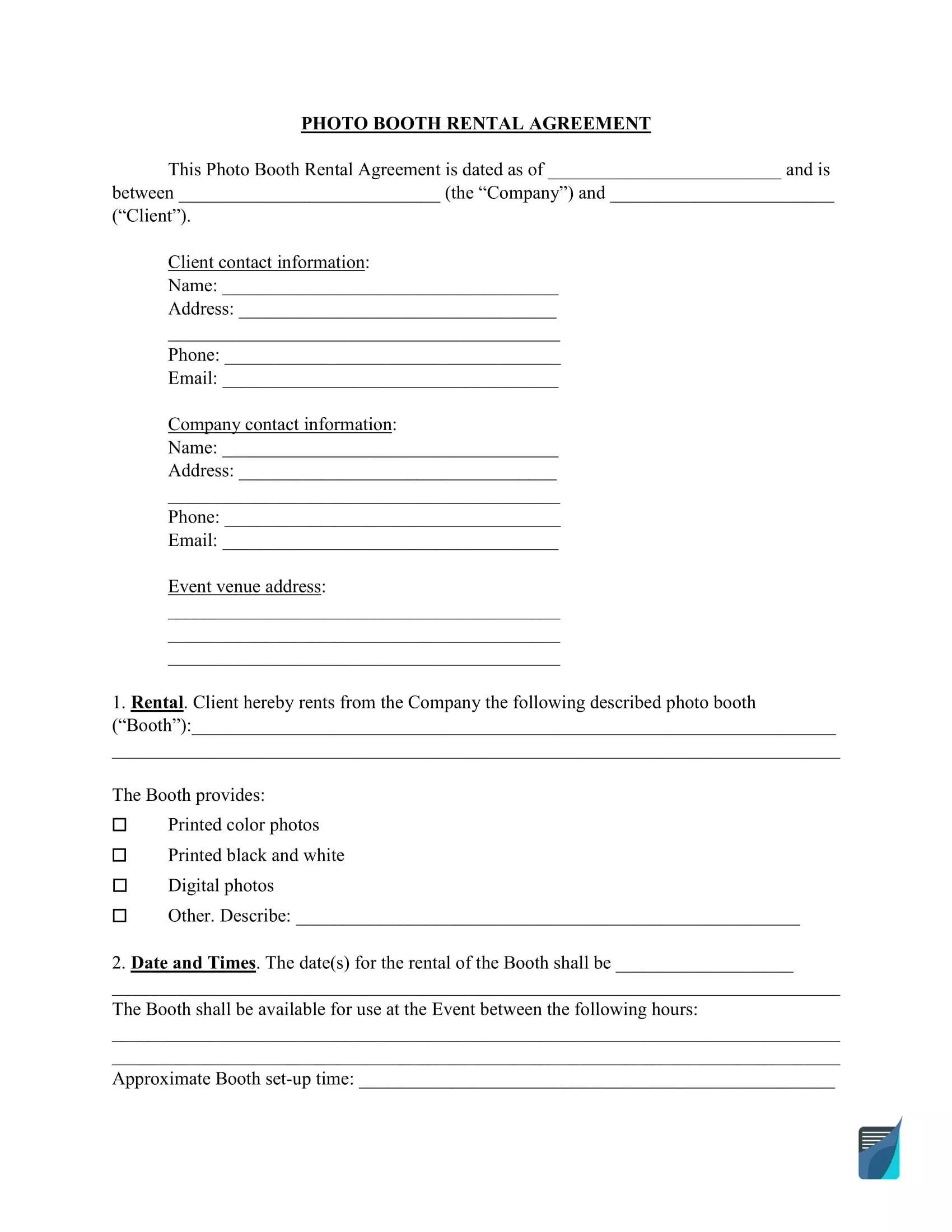
Agreement date, Company and Client: Type the date at the top of the agreement. Then enter the Company name and the Client name in the opening paragraph. Step 1: sample entries, not a real document.
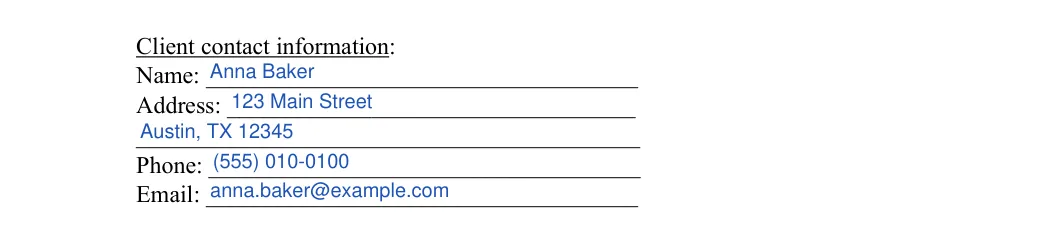
Client contact information: Enter the Client’s name, address, phone number and email. The address has two lines.Step 2: sample entries, not a real document.
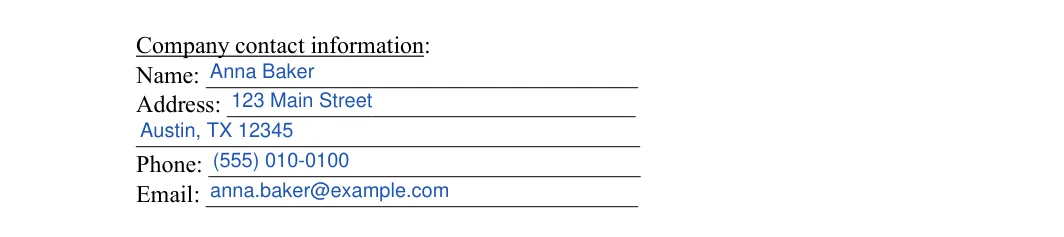
Company contact information: Enter the Company’s name, address, phone number and email. The address has two lines.Step 3: sample entries, not a real document.
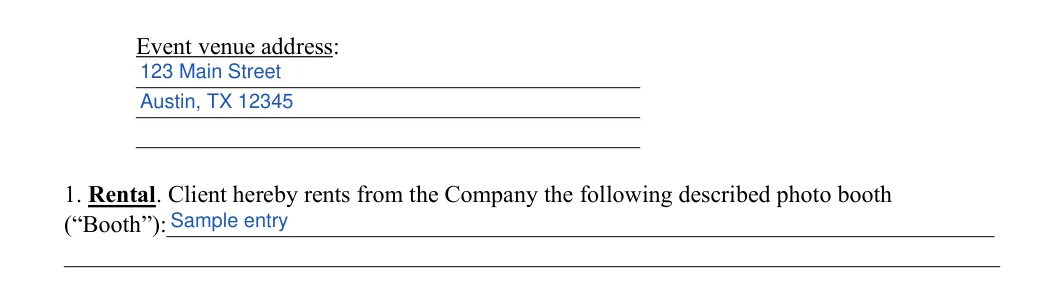
Event venue address and the rented Booth (Section 1): Write the venue address on the three lines. Then describe the photo booth being rented in the Section 1 line, such as its model, its backdrop or its 360 platform. Step 4: sample entries, not a real document.
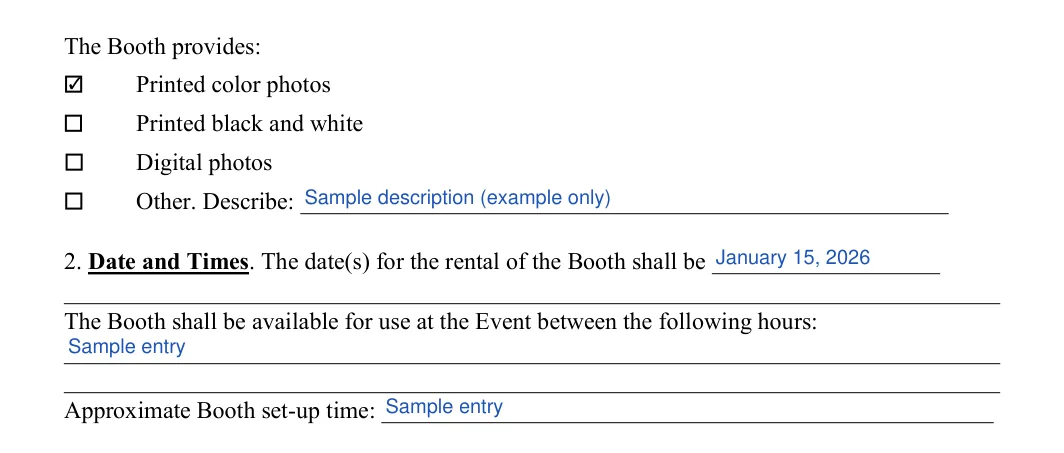
What the Booth provides, dates and hours (Sections 1 and 2): Check each option the booth provides: printed color photos, printed black and white, digital photos, or Other with a short description. Then enter the rental date or dates, the hours the booth is available and the approximate set-up time.Step 5: sample entries, not a real document.
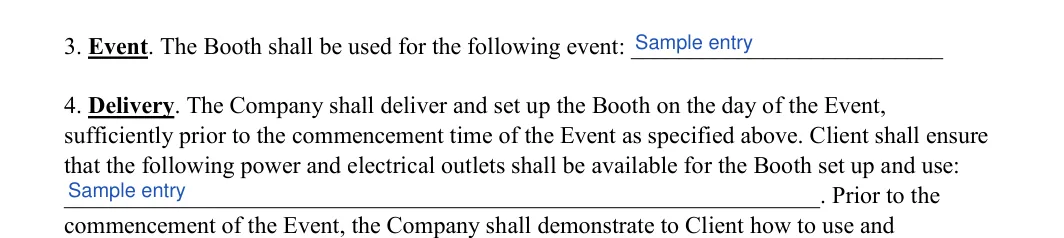
Event and power outlets (Sections 3 and 4): Name the event in Section 3. In Section 4, list the power and electrical outlets the Client will make available for the booth.Step 6: sample entries, not a real document.
Company presence at the Event (Section 4): In Section 4, choose one box. Either a Company representative stays for the whole event, or the booth is self-service and the representatives leave after set-up.Step 7: sample entries, not a real document.
Base rental fee and deposit (Section 5): Enter the base rental fee, the first deposit with its due date, and the date the balance is due in full. If the two sides agree on several payments, list the due date of each one here so the Client knows every deadline. Step 8: sample entries, not a real document.
Excess time fee (Section 6): Enter the extra fee and the time period it covers, for example per hour, for time past the end time. Section 7 (Indemnity) has no blanks, so read it before you move on.Step 9: sample entries, not a real document.
Props (Section 8): Initial the first Props box if the prop box comes with the base rental price. The Props text continues at the top of page 3. Step 10: sample entries, not a real document.
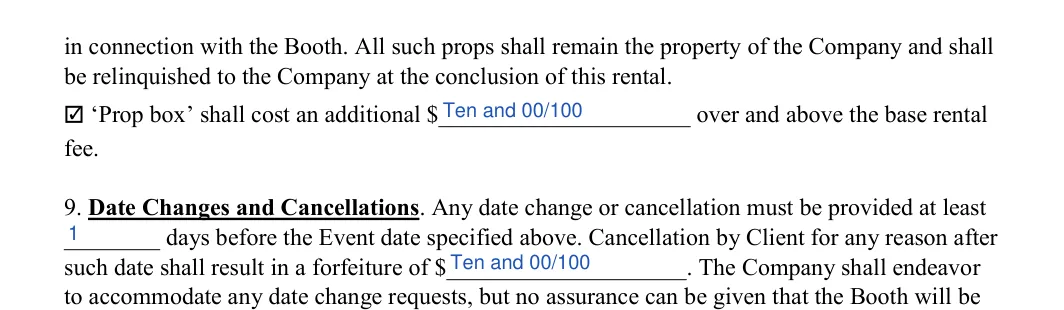
Prop box cost, date changes and cancellations (Sections 8 and 9): If the prop box costs extra, mark that box and enter the amount. In Section 9, enter the number of days before the event for a date change or cancellation, and the amount that applies after that date.Step 11: sample entries, not a real document.
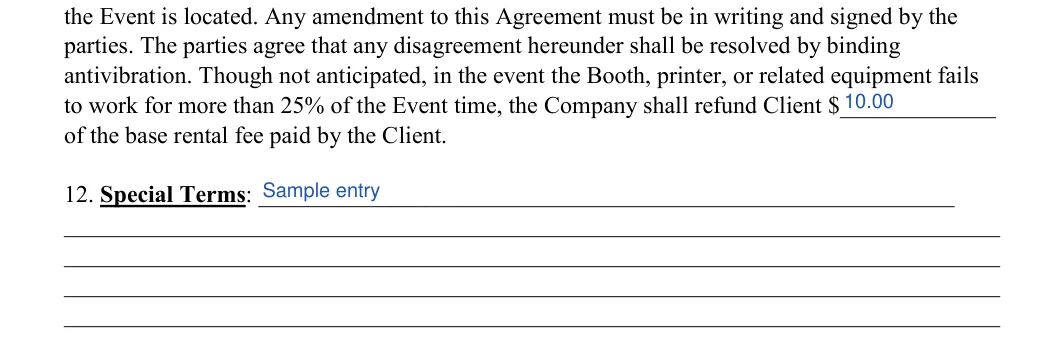
Photo release, refund amount and added lines (Sections 10 to 12): Section 10 (Photo Release) has no blanks. It gives the booth company the right to print and reproduce photos taken in its booth without paying royalties, so read it before you sign. In Section 11, enter the refund amount the Client gets back if the booth does not work for part of the event. Use the Section 12 lines for anything else the two sides add, or leave them blank. Step 12: sample entries, not a real document.
Company signature block: Under The Company, fill in By, Its (the signer’s title) and Print Name. Step 13: sample entries, not a real document.
Client signature block: Under The Client, fill in By and Print Name. The form has no separate date line here. It refers back to the date at the top of page 1.Step 14: sample entries, not a real document.
360 Photo Booth Contract
A 360 photo booth contract uses the same template as any other booth rental: you describe the 360 booth in Section 1 and add the terms that set it apart in the Section 12 lines. The form needs no separate version for a 360 booth.
A 360 booth records short video clips around a guest on a platform, so the deal turns on a few points a print booth does not raise. Cover them in these parts of the form:
Section 1: name the 360 booth and its platform, then check Other and describe the video clips or digital files the Client receives
Section 4: choose whether a Company attendant runs the platform for the whole event
Section 4: list the outlets near the spot where the platform will stand
Section 11: enter the refund if the camera arm or the software fails during the event
Section 12: add the floor space, the surface and any indoor or outdoor limits the Company sets
Ask the company how and when it sends the clips, then write that in Section 12 too. The Client then knows what arrives after the event and in what form.
Common Mistakes When Filling Out a Photo Booth Contract
The common mistakes on this form are small slips in the blanks, not gaps in the big items. Before you sign, check the agreement against your booking details and look for these:
Mixing up the Company and the Client in the opening paragraph
Entering a deposit without its due date
Giving an excess time fee without the time period it covers
Skipping the power outlet line, so the equipment has nowhere to plug in
Leaving both Props boxes blank, so no one knows if the prop box costs extra
Leaving a line empty when it does not apply, instead of writing N/A
Using one spelling of a name at the top and another in the signature block
Forgetting to match the rental dates with the booking date
How to Sign and Use the Photo Booth Contract
The template becomes a signed agreement once the Company and the Client each sign their own block after a last check of the names, dates and amounts. Go through these steps in order:
Read it through once more. Check that the names, dates and amounts match what you agreed on.
Sign the contract. The Company signer fills in By, Its and Print Name, and the Client fills in By and Print Name.
Settle any extra signing steps early. The template has signature blocks for the two sides and no notary block. If the booth company asks for a notary or a witness, arrange that before the event day.
Keep a signed copy. Each side keeps a copy where it is easy to find, and the Client brings it or has it on a phone on the event day.
Professional Photo Booth Rental vs. a DIY Photo Booth
A professional photo booth rental brings the booth, the camera, the prints and often an attendant, while a DIY photo booth uses your own phone or camera, a backdrop and props. Only the rental calls for a signed contract.
Point
Professional rental
DIY photo booth
Equipment
The Company brings the booth, camera and printer
Guests use phones or your own camera
Photos
Printed or digital photos, as checked in Section 1
Digital, unless you bring a printer
Staff
An attendant or self-service, as chosen in Section 4
You or a guest runs it
Paperwork
A contract signed by both sides
No rental contract
Phone cameras take good photos, so a DIY corner with a backdrop and props can cost less. A professional booth adds instant prints and a set-up guests come back to, which is what the rental fee pays for.
Frequently Asked Questions
Is there a photo booth contract PDF?
Yes, the FormsPal template comes as a free Adobe PDF. Download it and type into it with the PDF editor, or use the Create My Document button to answer a few questions. Save your progress and finish on any device.
Is there a sample photo booth contract?
Yes, the screenshots in the steps above show the template filled with sample entries in blue. The names, addresses, dates and amounts in them are examples only, so replace each one with your own booking details.
What’s Included in the Rent?
A photo booth rental usually includes the camera, film for printing at least one kind of photo and ink for that photo, though every company sets its own package. Read the terms of your rental agreement to see what yours covers.
You may also get a box of props, which may come with an extra charge; Section 8 of the template shows which. Depending on the booth, instruction on how to use it may come as a standard part of the rental, so add it to Section 12 if you want it in writing.
How long does it take to fill out?
About 12 minutes. The template has 54 fillable fields, and many of them are names, addresses and dates you can copy from your booking details.
What if the rental runs past the booked time?
Section 6 of the template has a line for the extra fee and the time period it covers. Enter both so the Company and the Client see the same numbers.
What if the date changes?
Section 9 of the template has blanks for the number of days before the event and the amount that applies after that date. Fill them in before you sign, then keep the signed copy where you can find it.
Is a photo booth contract the same as an invoice?
No, a photo booth contract sets the terms before the event, while an invoice bills the amount due under those terms. A company can send the signed contract first, then an invoice for the deposit and another for the balance.
General information, not legal or tax advice.
Jennifer M. Settles
Author & Attorney
With over 25 years of experience as a business and transactional attorney, Jennifer has mastered the craft of closing highly successful deals for her clients. Through her wide-ranging expertise in commercial contracts, real estate transactions, M&A and corporate law, Jennifer secures results that are second-to-none.