
Billions of PDFs get shared online every day. Still, myths cling to this format - how safe it is, whether you can actually edit it. So we'll break down the numbers, the facts, and a few myth-busting surprises that might change how you see this everyday file.
The PDF statistics below are based on the latest available data and current 2026 sources.
The History of PDF Files
Short Facts:
- 1991 - Dr. John Warnock proposed the Camelot Project.
- 1993 - Adobe introduced the PDF format to the public.
- 2004 - PDFs added support for 3D content.
- 2008 - PDF files gained embedded audio and video.
PDF (Portable Document Format) has been around longer than you might think. It started in 1991, when Adobe co-founder Dr. John Warnock proposed the Camelot Project. He wanted one format that kept pages looking identical across devices and operating systems, even when the software changed, or the screen size didn’t match.[30]
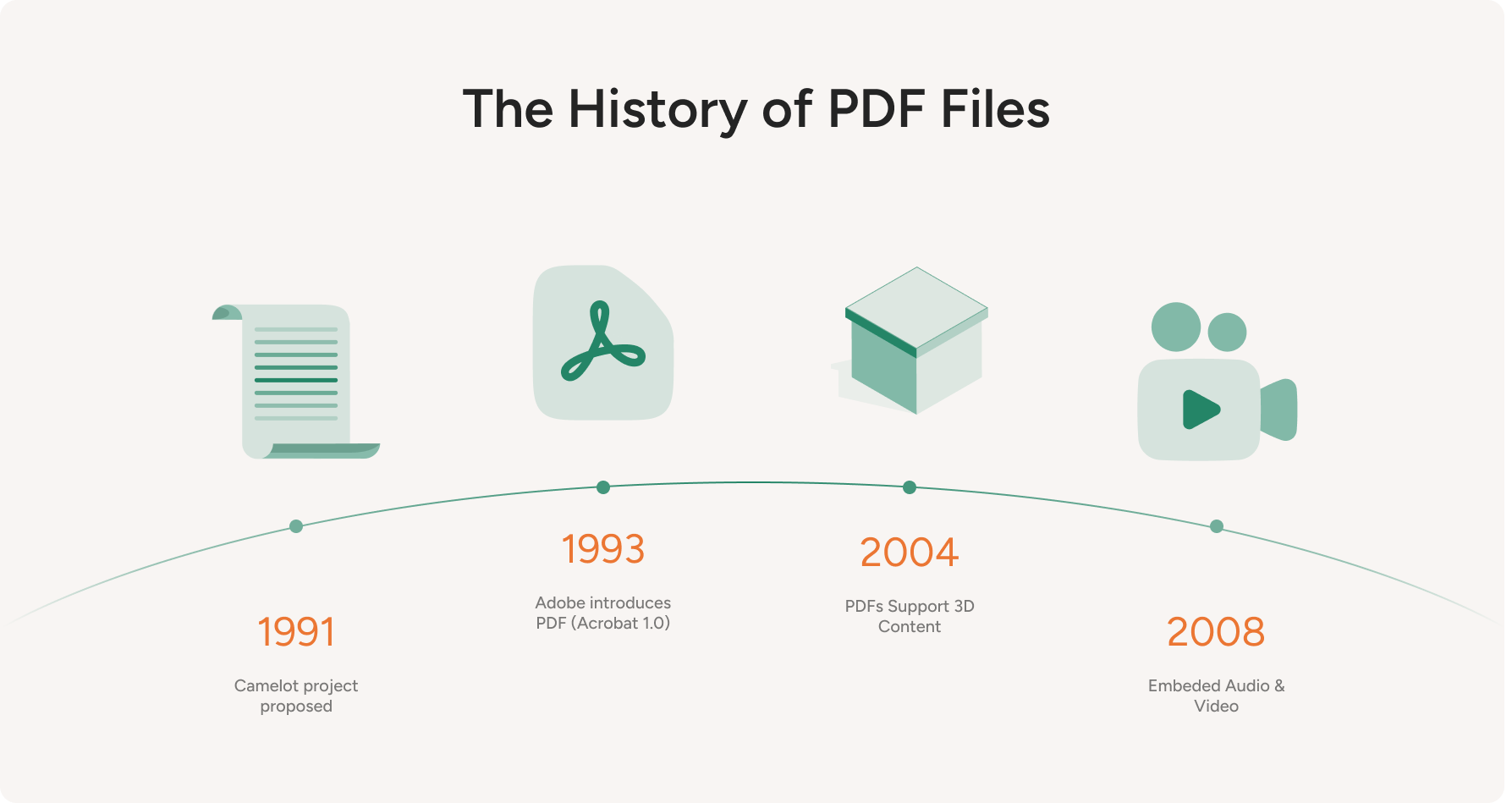
In 1993, Adobe shipped the first version of Adobe Acrobat and introduced PDF to the public. Acrobat originally cost about $50 per user, and that price tag slowed early adoption. But the core promise stayed simple: open it anywhere, and it still looks right.[2]
Things changed when the Internet took off, and Adobe made Acrobat Reader free. PDFs became the go-to format for sharing documents. No more worrying about messed-up layouts or fonts. You could open a PDF on your computer, tablet, or phone, and it would look exactly the same every time.
PDFs didn’t stop evolving, either. In 2004, the format began supporting 3D content, so readers can rotate and inspect models right inside the file.
Then, in 2008, PDF began supporting embedded audio and video, allowing creators to make more interactive documents. Add hyperlinks and fillable fields, and the format becomes useful for anything.[4]
PDFs can get weird in the best way. Recently, a high school student who goes by ading2210 managed to put the classic game Doom inside a PDF - you open the file, and the game plays right on the page. The graphics are built from letters and symbols, so it looks rough and runs slowly. But it works.[12]
Then, the same developer squeezed a working Linux setup into a PDF. It takes about a minute to start up, and everything on screen is drawn with plain text characters. For a file format built to display documents, that's absurd - in a good way.[13]
PDF Growth and Reach
Short Facts:
- Over 3 trillion PDFs exist worldwide, with 400 billion opened yearly in Adobe products.
- PDF 2.0 stands as an official ISO standard, ISO 32000-2:2020.
- The IRS adopted PDFs in 1995, long before most people emailed attachments.
- Google searches for "pdf" have climbed to their highest level yet.
According to Adobe, there are more than 3 trillion PDFs in circulation, and about 400 billion are opened each year in its products alone.[3]
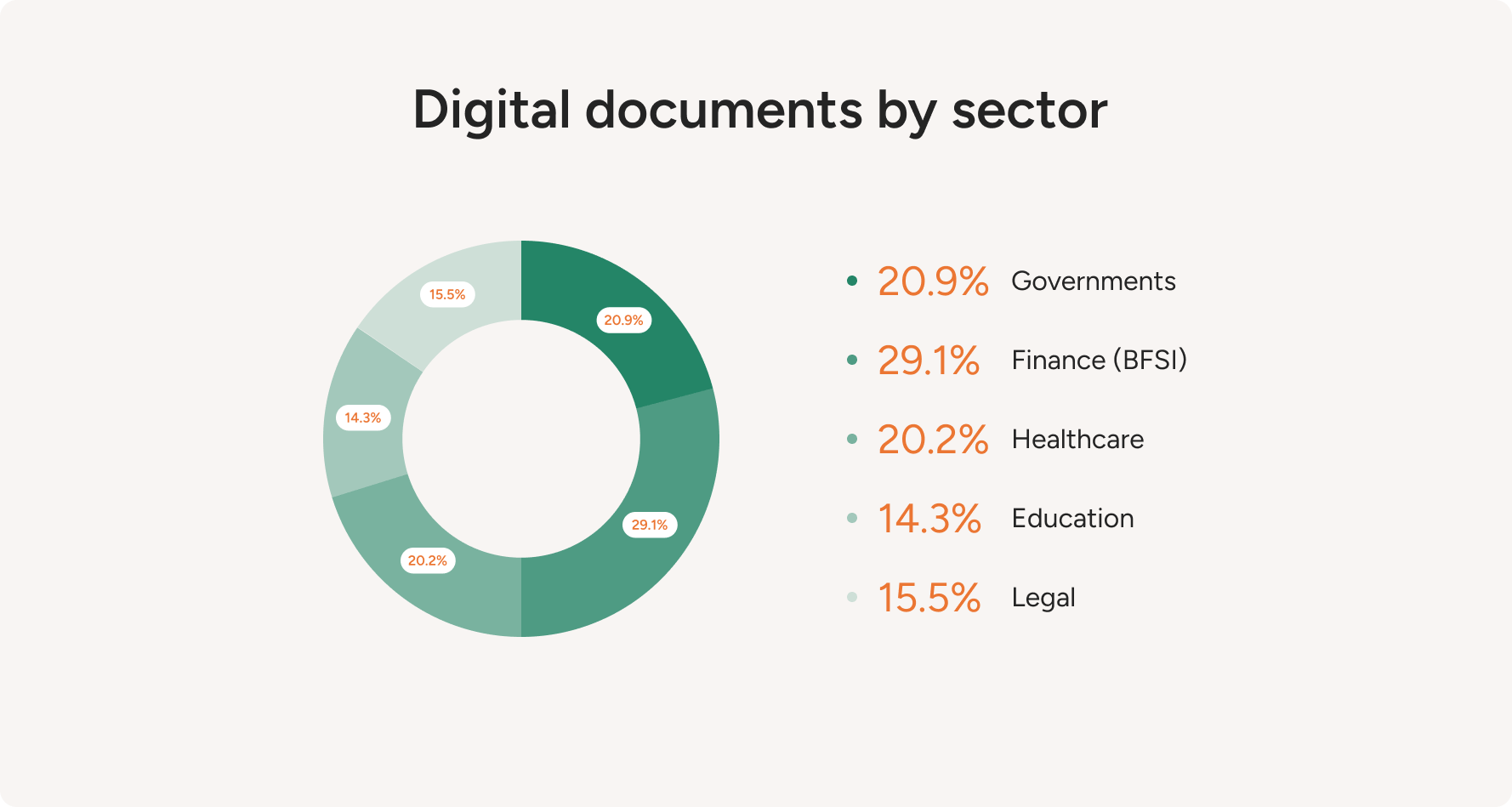
PDFs are widely used in the legal industry for their ability to maintain document integrity and support digital signatures. But they’re not just for lawyers! You'll find PDF files pretty much everywhere:
- Finance - statements, contracts, and reports.
- Healthcare - patient records, consent forms, and reports.
- Education - learning materials, assignments, and even e-books.
- Government - official publications, regulations, and archives.
Now, PDF 2.0 is a de jure standard as ISO 32000-2:2020 (yes, the spec itself is massive: 986 pages).[18]
Even top colleges and universities use PDFs for study materials, so students see uniform layouts regardless of device. MIT OpenCourseWare, for example, posts course lecture notes explicitly as downloadable PDFs. Oxford also distributes official student handbooks in PDF form.
Government agencies also prefer this file format. For example, the U.S. Government Publishing Office uses PDFs for federal publications, and the National Archives and Records Administration accepts this format for electronic record transfers.[22]
Did you know the IRS was one of the first major organizations to use PDFs? They started distributing tax forms in PDF format in 1995.[17]
One way to gauge the popularity of PDFs is to look at Google Trends data. This chart shows how often people searched for the PDF file format over the past 5 years as a proportion of all Google searches.
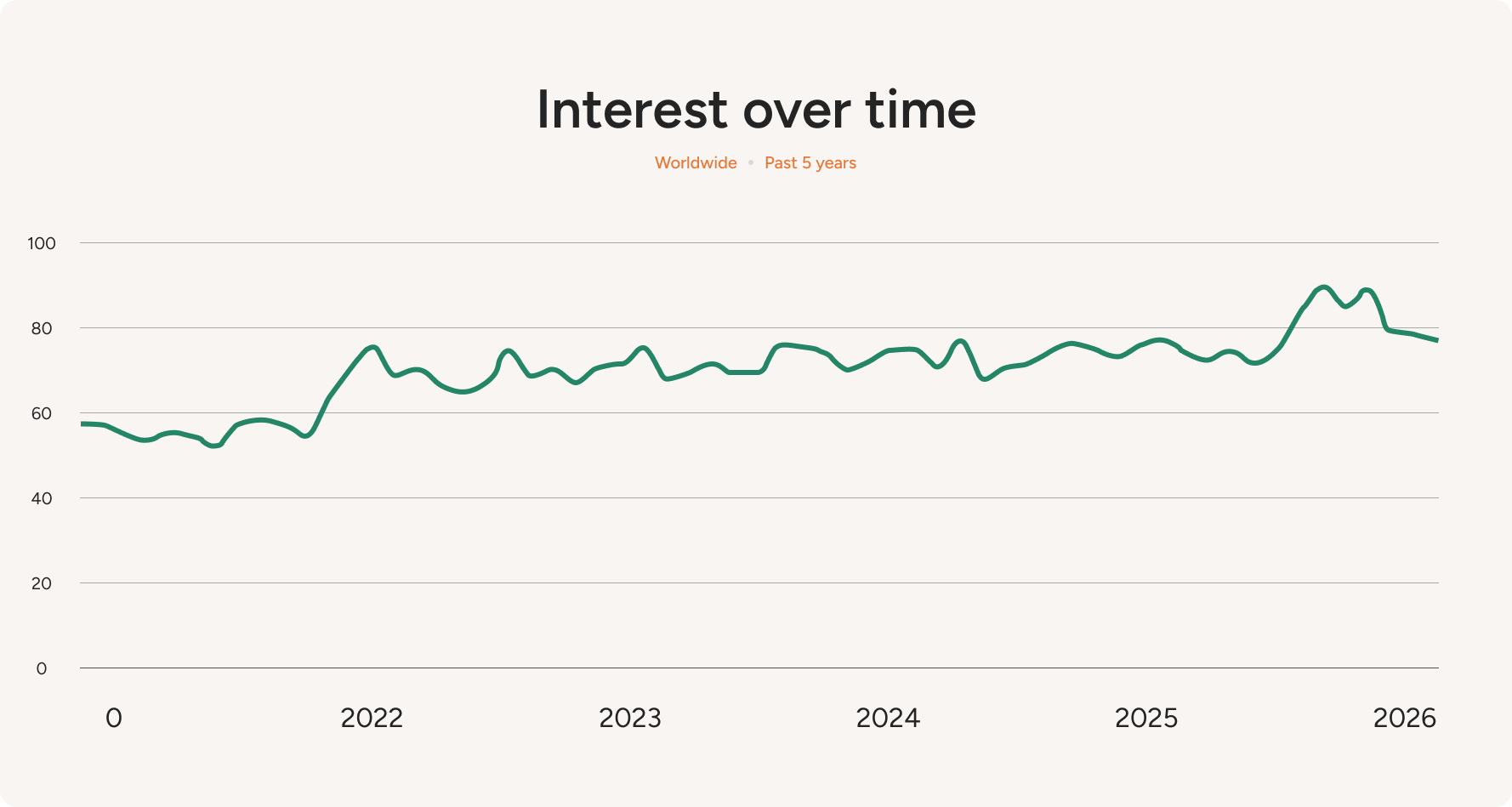
The term "pdf" has climbed to its highest popularity yet relative to all worldwide Google searches. It’s also pretty impressive that this format has been around for decades and is only getting more popular.
But how does "pdf" stack up against other trending keywords?
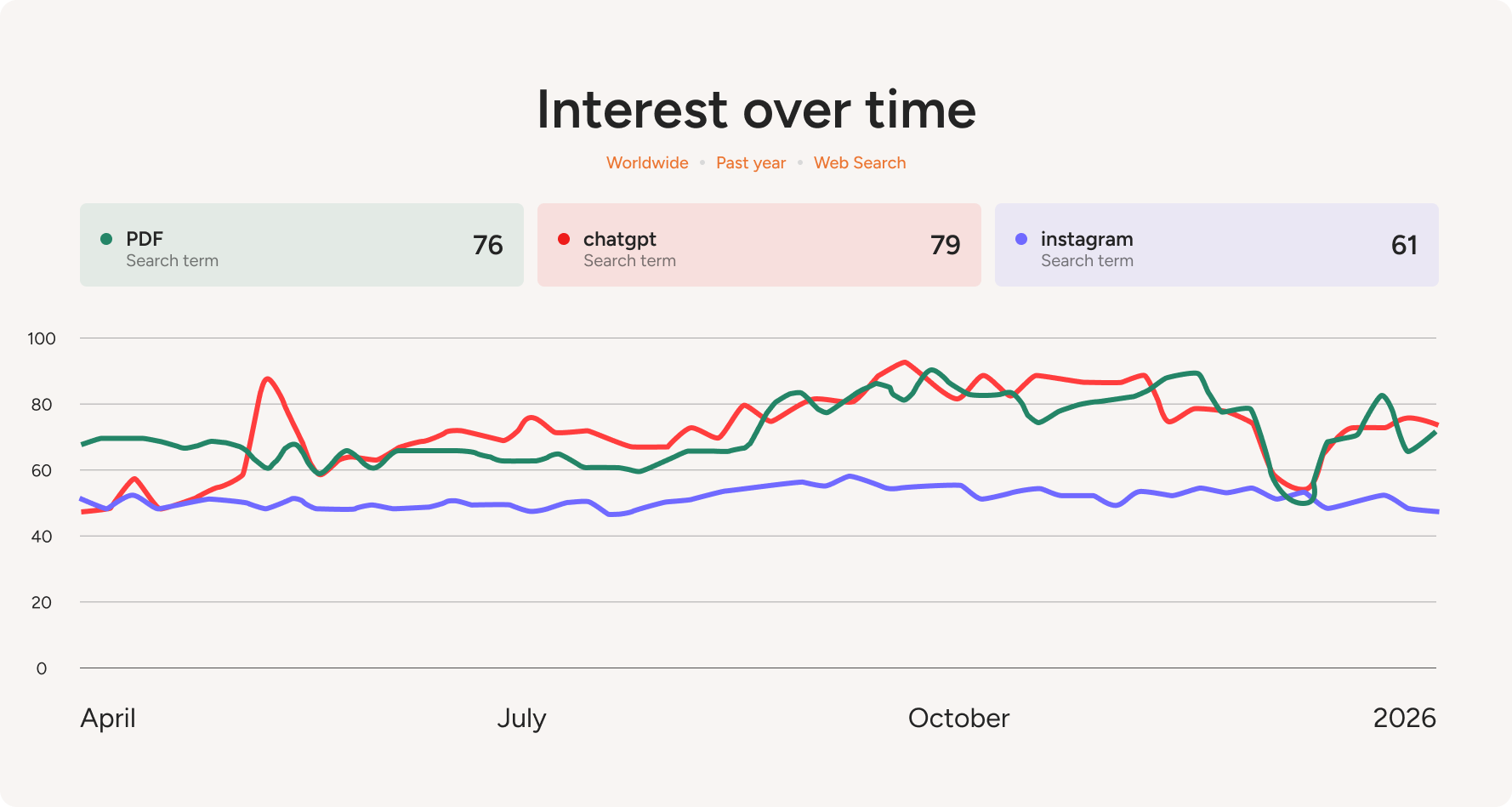
So, PDF stays popular because it fits how we actually share and open files every day. Browsers open PDFs instantly, email treats them as a safe default, and the layout stays the same everywhere.
PDF Usage by Device & Platform
Short Facts:
- Federal websites drove about 4 billion PDF downloads over the past decade.
- Windows dominates at 46%, with iOS (22%), Android (13%), and macOS (13%) behind it.
- Chrome handles 53% of PDF viewing, followed by Safari (24%) and Edge (14%).
- Adobe reports 1+ billion mobile PDF reads via Acrobat Liquid Mode.
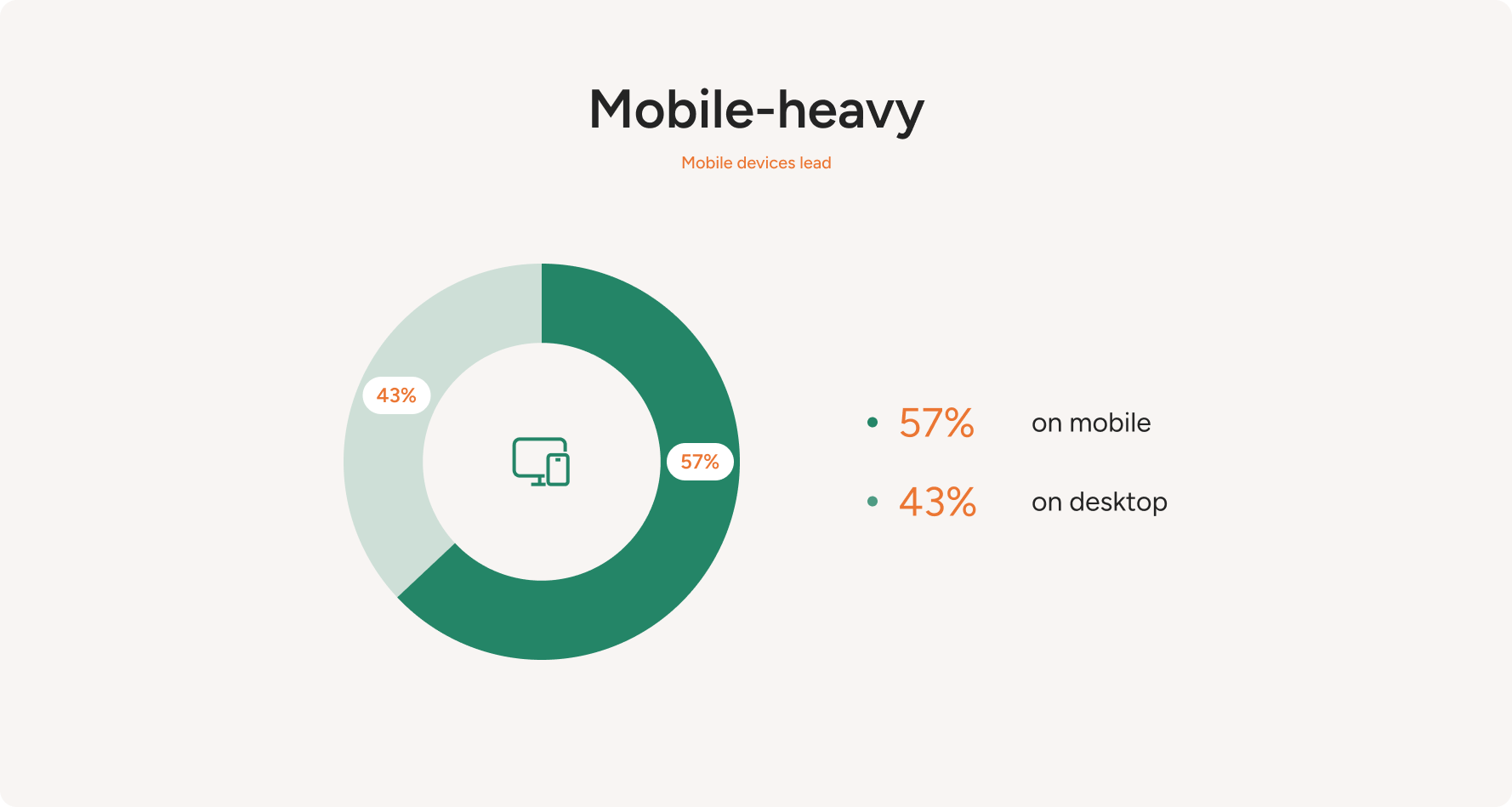
Across U.S. federal websites tracked by the Digital Analytics Program (DAP), mobile accounts for 56.8% of users, while desktop sits at 43.1% (tablet is basically a rounding error). That’s a pretty loud signal. And since these sites push PDFs nonstop (about 4 billion downloads over the last 10 years), this split is a useful stand-in. People reach PDF content phone-first, then desktop, with tablets barely showing up.[11][29]
Looking at platforms, Windows still leads (about 46%), followed by iOS (22%), Android (13%), and macOS (13%). That mix explains why PDFs must work well across both desktop systems and mobile operating systems.
For those same government sites, most PDF viewing happens through Chrome (53%), with Safari (24%) and Edge (14%) following behind. Firefox represents only a small share (2.9%). FYI, Safari and Edge include a built-in PDF reader that displays PDFs right in the browser window.[29]
So, backed by DAP breakdowns, PDF usage skews mobile-first, with Windows still accounting for a large share and Chrome and Safari driving most viewing.
At the same time, Adobe says Acrobat customers have read more than 1 billion PDFs on mobile devices via Liquid Mode. So mobile reading isn’t a niche.[3]
Global PDF Adoption Statistics
Short Facts:
- PDFs dominate e-signatures because they preserve layout while supporting secure signing.
- The digital signature market has hit $6.9B and is growing fast.
- The PDF editor market has reached $4.77B.
- Tens of millions of new PDFs appear online every month.
PDFs are everywhere these days, especially as digital transactions keep growing, and one big reason for this is the rise of e-signatures. PDFs are perfect for adding signature fields while keeping the document's original format intact.
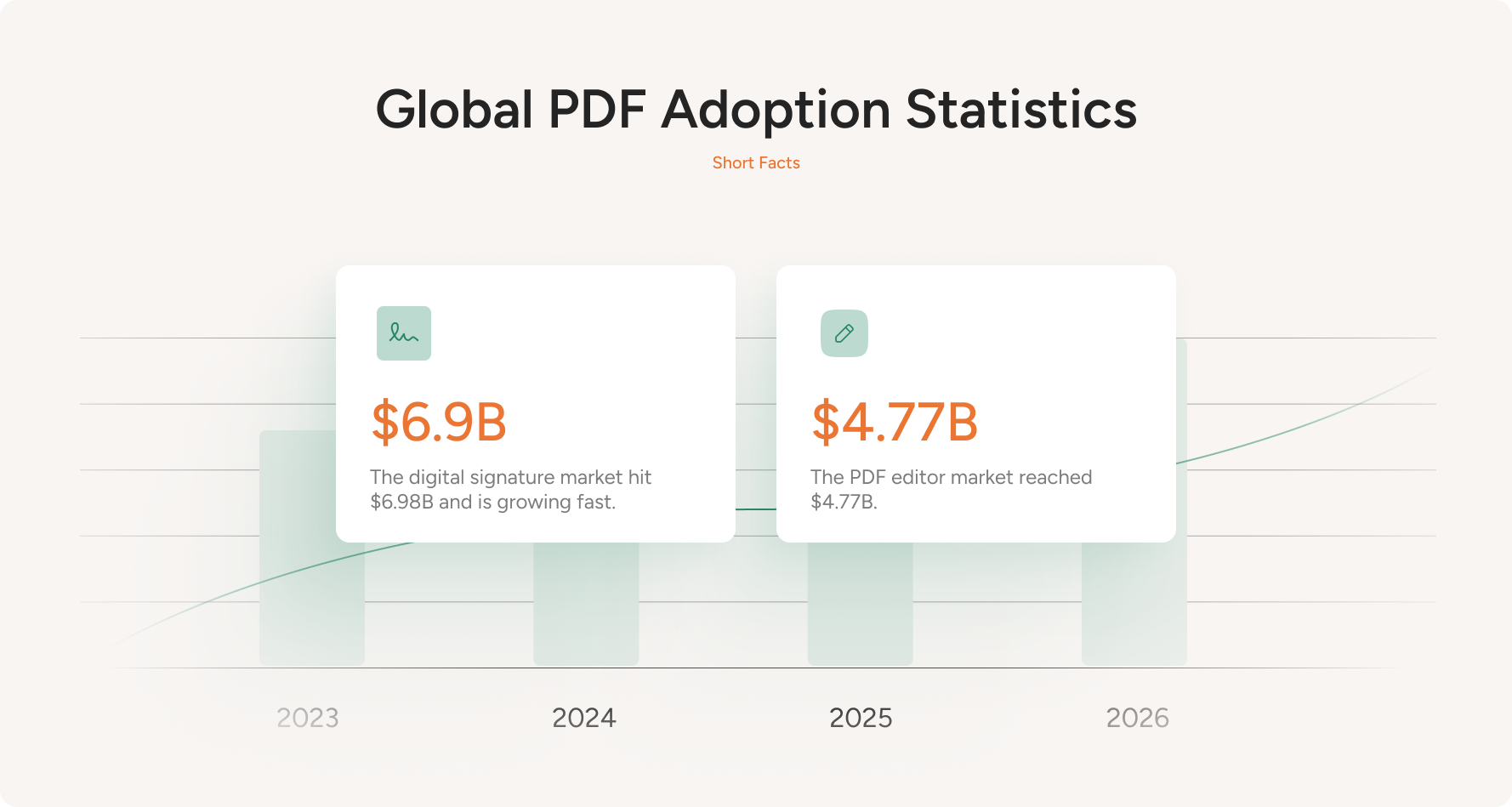
According to Grand View Research, the digital signature market was valued at $6.9 billion in 2025 and is expected to reach $9.4 billion in 2026, on its way to $121.0 billion by 2033 at a 43.9% annual growth rate. North America held a 32.3% share of global revenue.[14]
Demand for PDF editors is booming, too. 360iResearch put the global PDF editor software market at about $4.77 billion, with forecasts of roughly $5.29 billion in 2026 and $10.01 billion by 2032. That works out to about 11% annual growth as more teams edit, convert, sign, and redact PDFs in day-to-day work.[15]
Here's something cool: PDFs aren't just popular on Earth. They're used on the International Space Station for astronaut manuals and checklists. Even NASA's Curiosity Rover sent PDF reports to Earth with its findings!
In fact, the latest Common Crawl archive shows about 0.98% of collected content labeled as PDF - which still works out to tens of millions of PDF files in a single monthly crawl.[10]
PDF Security Statistics and Risks
Short Facts:
- PDFs rank as the most used file type in malicious email campaigns.
- PDFs appeared in 45.2% of malicious attachment detections.
- Recent phishing data shows 47% of email attachments were PDFs, far ahead of ZIP and DOCX files.
- Bitcoin sextortion scams made up 12% of malicious PDFs in recent email attacks.
According to Statista's most recent data, PDFs rank as the most common file type attackers use in malicious attachment campaigns.[26]
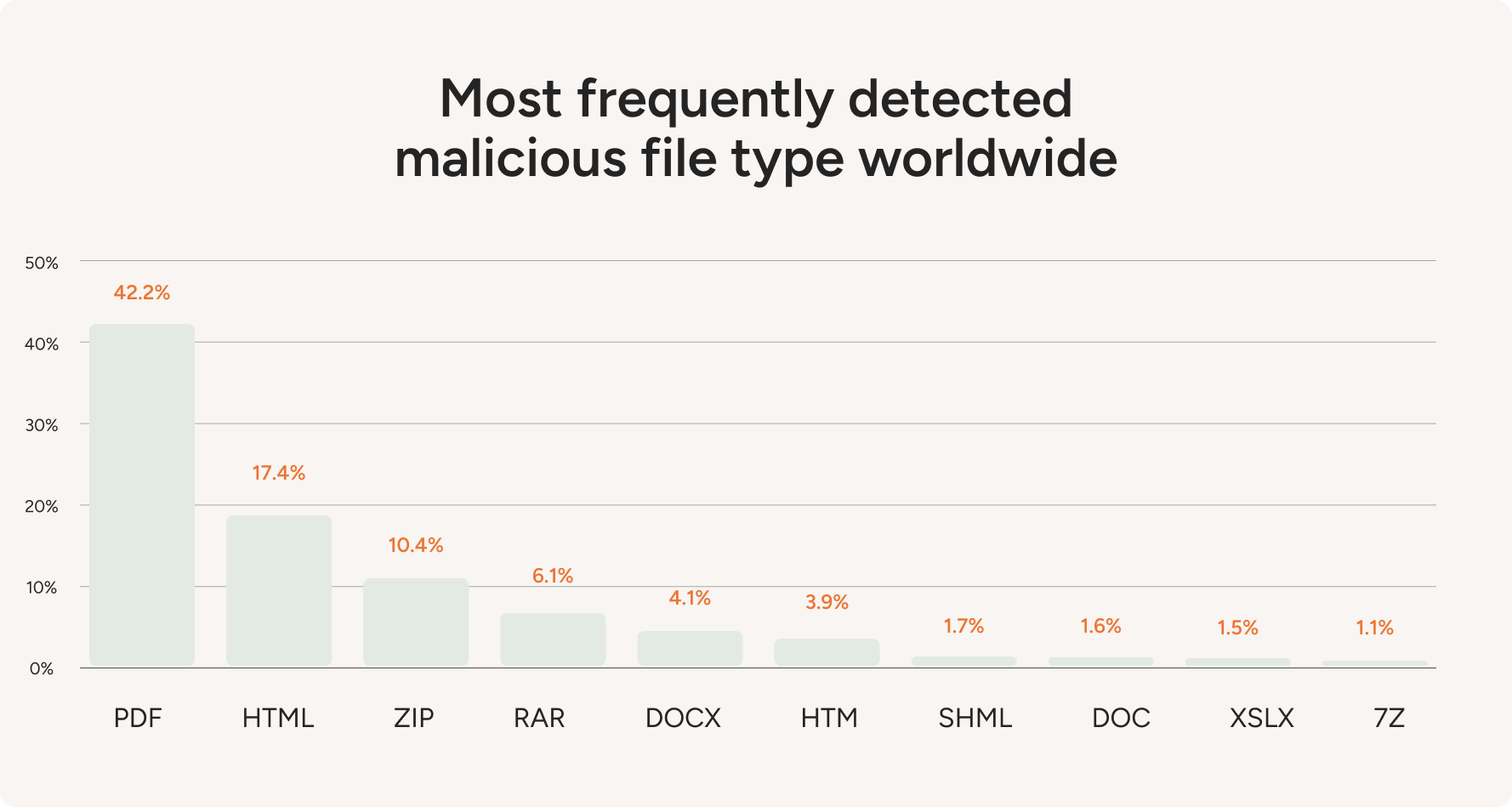
Also, IBM X-Force reports that PDFs appeared in 45.2% of detections among the top malicious attachment file types, making them the top pick for hiding or delivering harmful content.[16]
Email is where this shows up most often. For example, KnowBe4 found that in its latest dataset, 47% of phishing email attachments were PDFs, with ZIP and DOCX far behind.[19]
Next, Check Point Research also reports that PDF-based attacks account for 22% of malicious email attachments, which lines up with the idea that attackers choose formats people open without hesitation.[8]
Some campaigns even “dress up” PDFs with themes that push fast clicks. Barracuda’s Email Threats Report says bitcoin sextortion scams make up 12% of malicious PDF attachments in its observations.[7]
This all happens because PDFs can hide links, scripts, or fake login screens while still looking routine. Layered habits will help reduce risks. Use email filters that scan PDFs and browser viewers that block risky actions. In addition, treat unexpected PDFs with caution, especially those urging fast action or asking you to click a link.
Adoption of Advanced PDF Features
Short Facts:
- Law firms report buying PDF tools with OCR (46%), redaction (37.8%), and annotation (24.3%) built in.[6]
- A survey of U.S. cancer centers found 80% had e-consent capabilities, yet 95% still used a mix of paper and electronic consenting.[9]
- The NAR technology survey reported 79% of realtors used e-signature tools.[23]
- Nearly 15% of the mortgage notes Fannie Mae accepted were fully digital, not paper.
- Electronic filing (CM/ECF) covers 65 million cases with 1.7 billion docket entries across 200+ courts.
Advanced PDF use has become mainstream. Teams don't just open and read PDFs. They add features like capture, comments, OCR, redaction, and signing, turning a static file into a working tool.
Reviews have moved into the browser. This change is clear in surveys where many respondents expect web-based review and collaboration. PDF's advanced features allow teams to quickly share feedback across different time zones and locations.[24]
In legal workflows, attorneys and court staff often choose OCR, redaction, and annotation features. For example, CM-ECF runs the federal courts’ e-filing system, and because it processes huge volumes of case documents daily, courts rely on PDF for consistent, standardized filings.[5]
Signing is also becoming more widespread. Real estate leans on e-signatures every single day, while mortgages move slowly toward digital notes - the electronic version of the paper you sign when you borrow. Healthcare tends to mix both, keeping paper consent forms around even where e-consent already works.[21]
By the way, AIIM’s IDP survey reported 78% of companies were operational with AI in document processing, while 61% of IDP processes still included paper, and 48% expected paper use to keep rising.[1]
Cutting Paper Use and Costs With PDFs
Short Facts:
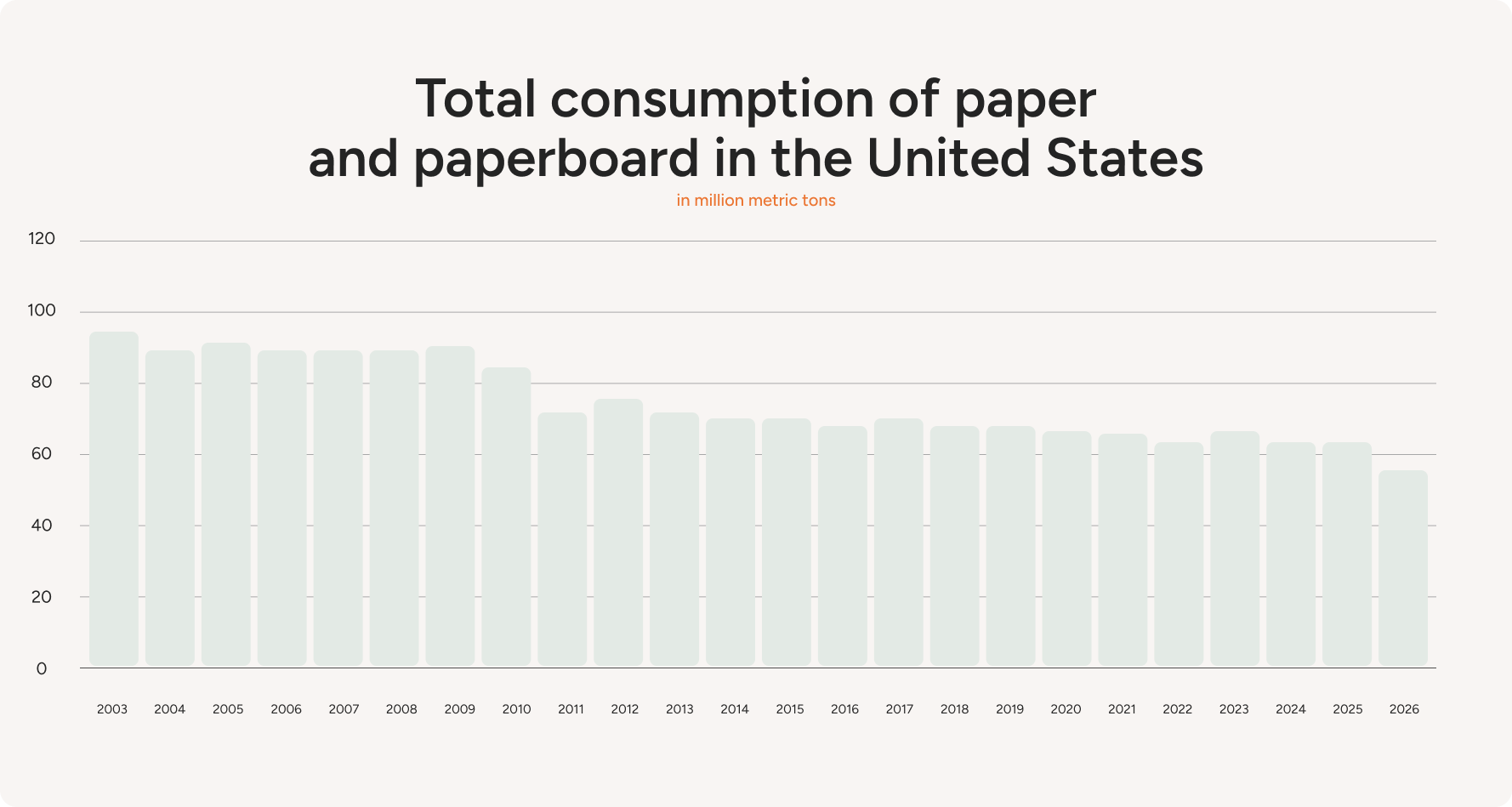
- U.S. paper use dropped 38% since 2000, yet still hits 58.3M metric tons.
- An office worker uses ~10,000 sheets of paper per year.
- Paper storage costs about 58× more than digital storage.
- Paper production uses 13-15% of global wood.
According to Statista, the U.S. consumed 58.3 million metric tons of paper and paperboard, down from the prior year and 38% below 2000 levels. Despite the drop, the U.S. stays the world's second-largest paper consumer, behind China.[27]
Printing, storing, and managing paper documents is expensive. The average office worker uses about 10,000 sheets of paper annually. Roughly 20 reams per person! Transitioning to digital documents in PDF format can cut these costs sharply.
PDFs can eliminate the need for physical storage space. Filing cabinets, document storage rooms, and off-site archives all come with costs. Digital files, however, are stored securely in the cloud or on servers, saving both space and money. For example, according to MCCi research:
- Although storing a paper document away might not seem costly, the cost adds up to about $0.0159 per year when you factor in office space and filing cabinets.
- On the other hand, storing the same document digitally only costs around $0.000276 per year. That makes paper storage nearly 58 times more expensive than digital storage.[20]
Using less paper also benefits the environment. According to the World Wildlife Fund, roughly 405 million tons of paper and paperboard are produced globally annually, accounting for 13-15% of total wood consumption.[31]
When documents move to PDF, fewer pages get printed, which eases pressure on forests. Sharing, signing, and storing files digitally may seem minor. However, at scale, it lowers waste, saves trees, and trims the environmental footprint of everyday document handling.
A minimal, valid PDF can be as small as 294 bytes. At that size, the file still contains the core structure a PDF reader needs, so standard viewers open and display it without issue.[25]
With all these benefits, it's no surprise that PDFs are driving sustainable document management. Many companies are already seeing the benefits of going paperless. Statista reports that digital transformation spending has hit $2.58 trillion and is expected to reach $3.88 trillion by 2028.[28]
5 Common Myths About PDF Files
Holding onto these misconceptions about PDF files might seriously hinder your progress. You lose out on features that may speed up and simplify your work when you don't realize what PDFs can actually accomplish.
1. PDF Is Only for Printouts
PDF files can carry links, form fields, comments, and signatures, so they work as living documents.
When you add tags for headings and reading order, plus real text instead of scans, screen readers can parse the file smoothly. This searchable content lets you find what you need in seconds.
2. PDFs Aren’t Secure
PDFs give you multiple security options. You can encrypt the file, set a password, add permission limits (like blocking edits or copying), apply watermarks, and use digital signatures to prove who signed and whether anything changed after signing. Your PDF may be as secure as you require with these settings.
3. PDFs Are Bad for SEO
PDFs can rank well in search results, which might surprise you. Increase your online exposure by giving your PDF a proper filename, optimizing images, using relevant keywords in the text, and adding metadata (titles, descriptions, and tags).
PDFs are a great way to distribute information and get noticed online, since Google treats them like conventional web pages.
4. PDFs Are Always Huge and Slow
Size depends on what’s inside, and a photo-heavy scan can balloon while a text-first file stays small.
You can shrink many PDFs by compressing images, removing unused objects, and saving with fast web view, so the file goes on a sensible diet without turning pages into pixel soup.
5. PDF Always Looks Identical Everywhere
Most PDF files do. However, fonts, embedded graphics, and the viewer's rendering engine can change spacing, especially with scanned pages or complex tables.
If the creator didn't embed fonts, or if you're using a browser reader with different smoothing rules, you may see layout issues. Also, the reflow mode on phones can rearrange text for reading comfort.
Sources & References
- AIIM. Market Momentum Index: Intelligent Document Processing (IDP) Survey.
- Adobe. Celebrating 30 Years of Digital Transformation with Adobe Acrobat.
- Adobe. Adobe Brings Conversational AI to Trillions of PDFs with the New AI Assistant in Reader and Acrobat. Press release.
- Adobe. History of the PDF Timeline.
- Administrative Office of the U.S. Courts. Letter to Senator Ron Wyden regarding CM/ECF and PACER.
- American Bar Association. ABA Legal Technology Survey Report: Vol. 5 - Litigation Technology & E-Discovery.
- Barracuda. Email Threats Report.
- Check Point Research. The Weaponization of PDFs.
- Chimonas, S., et al. Electronic Consent at US Cancer Centers: A Survey of Practices, Challenges, and Opportunities. JCO Clinical Cancer Informatics.
- Common Crawl Statistics. MIME Types: Monthly Crawl Statistics.
- Digital.gov. From Pageviews to Progress.
- GitHub. DoomPDF: Doom Running Inside a PDF.
- GitHub. LinuxPDF: Linux Running Inside a PDF.
- Grand View Research. Digital Signature Market Size, Share & Trends Report.
- 360iResearch. PDF Editor Software Market - Global Forecast 2026-2032.
- IBM Security. IBM X-Force Threat Intelligence Index.
- Internal Revenue Service. Publication 554 - PDF Example.
- ISO. ISO 32000-2 - Document Management - Portable Document Format - Part 2: PDF 2.0.
- KnowBe4. Phishing Threat Trends Report.
- MCCi. The Cost of Paper vs. Digital Operations.
- MISMO. eMortgage Statistics: Fannie Mae eNote Volume.
- National Archives and Records Administration. Transfer Instructions for Permanent Electronic Records - PDF Records.
- National Association of REALTORS®. REALTOR® Technology Survey.
- Nextpoint. How Does Your Firm Stack Up When It Comes To Legal Tech? A Look Through the ABA Legal Technology Survey Report.
- PDF Association. The Smallest Possible Valid PDF: 294 Bytes.
- Statista. Most Frequently Detected Malicious File Type Worldwide.
- Statista. Total U.S. Consumption of Paper and Paperboard.
- Statista. Worldwide Digital Transformation Spending.
- U.S. Digital Analytics Program. Data Portal.
- Warnock, J. The Camelot Project. PDF Association.
- WWF. Pulp and Paper.