
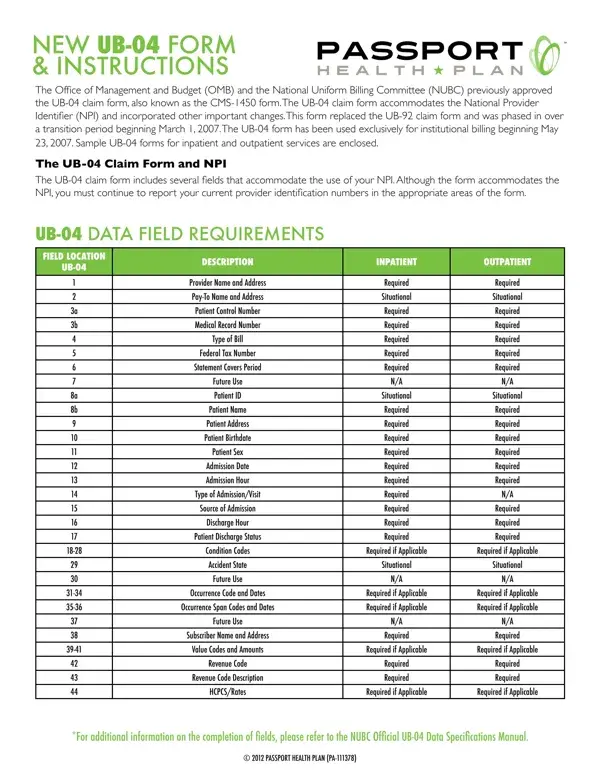
In the landscape of healthcare billing in the United States, the transition to the UB-04 claim form, also recognized as the CMS-1450, marks a pivotal evolution in institutional billing practices. Mandated by the Office of Management and Budget (OMB) and the National Uniform Billing Committee (NUBC), the adoption of this form, from March 1, 2007, reflects significant steps towards streamlining the process and accommodating the integration of the National Provider Identifier (NPI). The comprehensive UB-04 form caters to both inpatient and outpatient services, encapsulating a wide array of data requirements such as patient information, provider details, admissions data, and various codes essential for processing claims accurately. Rigorous in its design, the form includes fields for provider names, patient demographics, the type of bill, admission details, and an extensive list of condition and value codes, among others, to support the nuanced requirements of medical billing. The insistence on the usage of NPI alongside provider identification numbers underscores the form's role in the transition towards a more centralized and efficient electronic billing system. This change, exclusive since May 23, 2007, points towards a broader shift in healthcare administration, aiming to reduce complexities and improve the precision of claims processing. Moreover, the supplement of sample UB-04 forms and specific instructions for completion underlines the effort to guide healthcare providers through this detailed and critical documentation process, ensuring compliance and facilitation of timely reimbursements.
| Question | Answer |
|---|---|
| Form Name | 04 Form Printable |
| Form Length | 5 pages |
| Fillable? | No |
| Fillable fields | 0 |
| Avg. time to fill out | 1 min 15 sec |
| Other names | aia product substitution request form, 04 form, ub 04 insurance form, printable ub 04 claim form |