
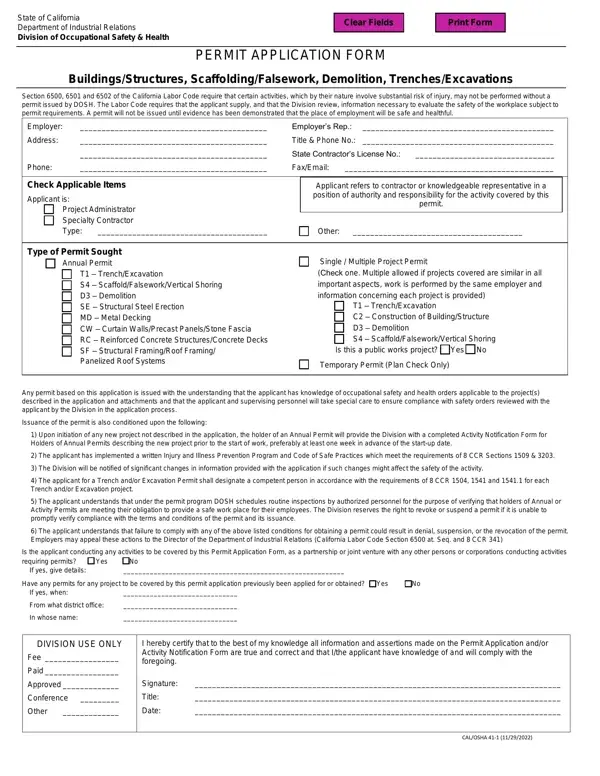
In the sphere of industrial endeavors within California, ensuring the safety and healthfulness of work environments, particularly in fields that inherently carry substantial risk, is not just beneficial but mandated by law. The State of California Department of Industrial Relations, through its Division of Occupational Safety & Health (DOSH), administers the enforcement of such regulations via tools like the Permit Application Form (41-1). This form is essential for activities involving buildings/structures, scaffolding/falsework, demolition, trenches/excavations, and more, as outlined in sections 6500, 6501, and 6502 of the California Labor Code. It necessitates that employers or their representatives, seeking to undertake such activities, furnish detailed information for DOSH's review. This rigorous process aims to evaluate and ascertain the prospective safety of the workplace concerned. Moreover, the issuance of a permit is contingent upon the demonstration of a workplace that is to be, or already is, safe and healthful for its employees. The form spans various permit types, including but not limited to, annual permits, single or multiple project permits across a range of specific activities from trench/excavation work to scaffolding and structural steel erection. Furthermore, conditions such as the implementation of a written Injury and Illness Prevention Program, designation of competent persons for certain tasks, and adherence to safety orders are stipulated to enhance workplace safety. Failure to comply with the terms may lead to denial or the revocation of the permit, against which employers have the right to appeal. This comprehensive approach underscores California's stringent measures towards ensuring the welfare of those in the industrial sector.
| Question | Answer |
|---|---|
| Form Name | 41-1 Form |
| Form Length | 1 pages |
| Fillable? | Yes |
| Fillable fields | 47 |
| Avg. time to fill out | 9 min 43 sec |
| Other names | california department trenches, cal osha 41 1r, department permit trenches online, ca dir permit application form |
41-1 Form isn’t the one you’re looking for?