
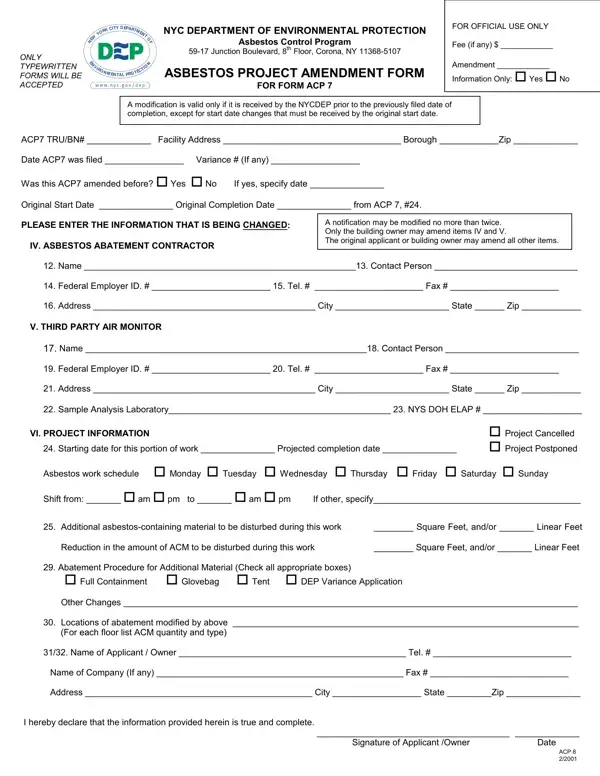
The ACP 8 Form is filed with the NYC Department of Environmental Protection (DEP) to amend an active asbestos abatement project that was originally registered on Form ACP 7. Any modification to a registered project must be submitted using this form before the amended work begins.
Common amendments covered by the ACP 8 Form include changes to the asbestos abatement contractor, updates to the third-party air monitoring firm, adjustments to the project start or end date, and modifications to the quantity of asbestos-containing materials (ACM) being removed. Each type of change has its own section on the two-page form.
All entries must be typewritten. The NYC DEP does not accept handwritten submissions of the ACP 8 Form. The property owner or authorized contractor must sign the completed form before submitting it to the department. Contractors handling NYC asbestos projects often need additional forms, including the Asbestos Worker Application, the Asbestos Disposal Manifest, and the Asbestos Project Addendum.
The ACP 8 Form is two pages long and covers the full scope of allowable amendments to ACP 7 project records. After the DEP reviews and approves the amendment, the project may proceed under the updated terms. For other NYC DEP regulatory forms, see the NYC DEP Noise Mitigation Plan.
| Question | Answer |
|---|---|
| Form Name | ACP 8 Form |
| Form Length | 2 pages |
| Fillable? | No |
| Fillable fields | 0 |
| Avg. time to fill out | 30 sec |
| Other names | acp 8, acp8 form, nyc dep acp 8, asbestos abatement amendment, acp8 asbestos |
Acp 8 Form isn’t the one you’re looking for?