
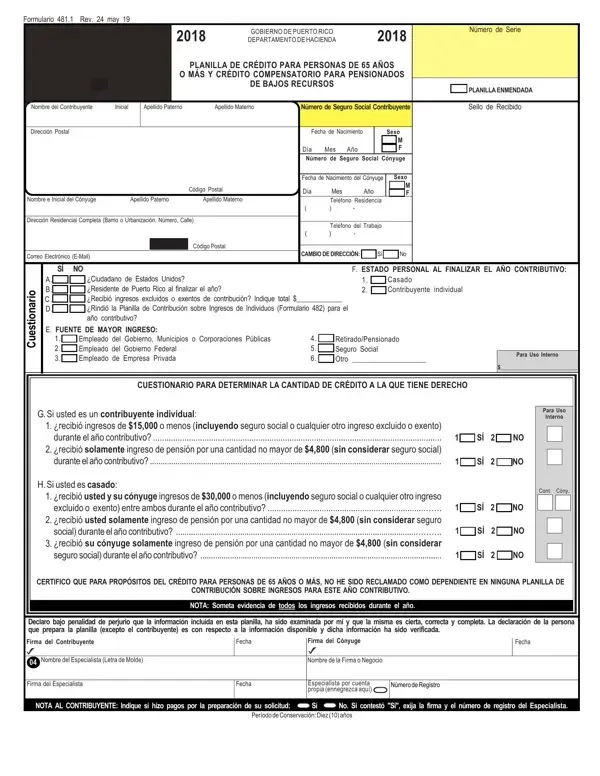
Formulario 481.1 – Form Details

The Formulario 481.1, issued by Puerto Rico's Departamento de Hacienda, supports two distinct tax credits for island residents. The first credit applies to individuals aged 65 and over. The second is a compensatory credit for pensioners with low income. Both credits aim to provide financial relief to seniors and retired workers living in Puerto Rico.

Eligibility is based on total annual income, including Social Security benefits. Income thresholds vary depending on marital status. If an individual has been claimed as a dependent on another person's tax return, eligibility may be affected. All applicants must attach supporting documentation for every source of income received during the tax year. The form must be completed truthfully and accurately, as it is submitted under penalty of perjury.

Prior-year submissions can be amended within a four-year window. The amended document must clearly indicate that it is a correction. The form includes detailed instructions covering individual identification, marital status declaration, income documentation, and updates for address changes. Eligible seniors and pensioners should gather all required income statements before starting the form.

For other Puerto Rico tax forms, visit our Puerto Rico 480.2 form page. Those who need documentation for disability-related tax credits may also find our T2201 tax credit form guide helpful.

QuestionAnswer
Form Name481 1 Form
Form Length8 pages
Fillable?No
Fillable fields0
Avg. time to fill out2 min
Other namesformulario 481 1 para llenar 2021 suri, formulario 481 1 para llenar 2021, suri formulario 481 1, formulario 481 1 pdf

How to Edit 481 1 Form Online for Free

With FormsPal's online PDF editor, completing Form 481.1 (Formulario 481.1) is quick and straightforward. Our team continually improves the tool to make it more accessible. Follow these steps to get started:

Step 1: Click the "Get Form" button at the top of this page to open the PDF editor. All the tools you need are available directly in the browser.

Step 2: Customize your PDF form as needed. You can add text, make corrections to existing fields, and add a signature, all without leaving the page.

Here is a step-by-step walkthrough for Form 481.1:

1. Begin by completing the main identification fields at the top of the form. Collect all required documentation beforehand, including proof of income and age verification.

Form 481.1 completion process detailed (stage 1)

2. Next, fill in the income-related sections: Cuestionario, Fuente de Mayor Ingreso, Empleado del Gobierno, Retirado/Pensionado Seguro Social, and Para Uso Interno. Complete all SÍ/NO checkboxes carefully. The Cont/Cóny fields and the SÍ/NO selections are among the most important entries on this page.

Filling out part 2 of Form 481.1

Review each SÍ/NO answer and the Cont/Cóny entries with care. Errors in these fields can delay the processing of your credit claim.

3. Complete the declaration section: Declaro bajo penalidad de perjurio, Firma del Cónyuge, Firma del Especialista, Fecha, Número de Registro, and the NOTA AL CONTRIBUYENTE. Fill in every required field before moving forward.

Part number 3 for filling in Form 481.1

Step 3: When you are satisfied with your entries, click "Done" to complete the process. Download your finished Form 481.1 and save a copy for your records. FormsPal saves your progress automatically, so you can return at any time. Your data is protected with secure encryption. For other income-related tax forms, see our annual income tax return form page.