
T2201 Tax Credit Form PDF Details

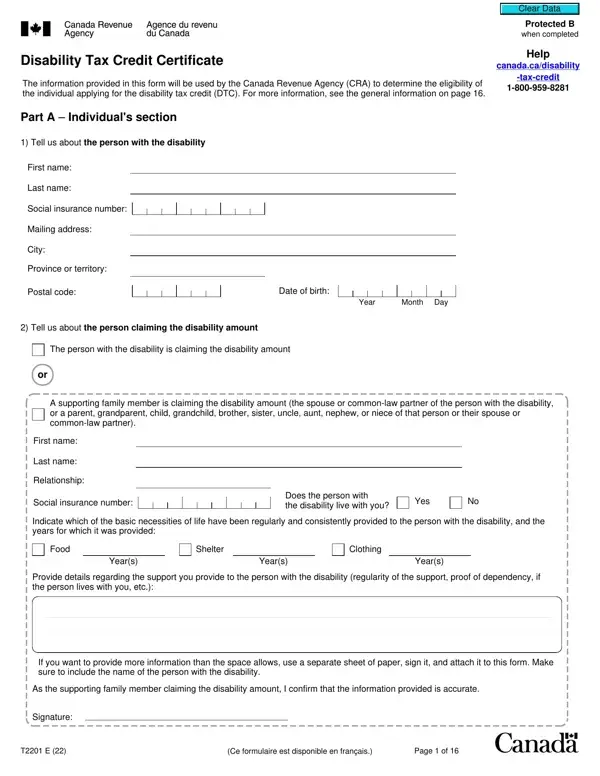
The T2201 Tax Credit form, also known as the Disability Tax Credit Certificate, serves a critical role in assisting individuals with disabilities in Canada. This form is an application tool used to determine eligibility for the Disability Tax Credit (DTC), a non-refundable tax credit that reduces the amount of income tax that individuals with disabilities or their supporting persons need to pay. To apply, the form requires detailed information from both the person applying for the credit and the medical practitioner who certifies the disability. In Part A, personal and disability-related information is provided by the applicant, including the nature of the relationship to the person with the disability, if applicable. Medical professionals complete Part B, which involves a thorough assessment of the patient's condition, focusing on the effects of the impairment rather than the diagnosis itself. This process aims to identify the significant and prolonged effects of the impairment on daily living activities. Additionally, the form explores eligibility for adjustments to the applicant's tax returns in previous years, potentially leading to substantial financial relief. The Canada Revenue Agency (CRA) takes privacy and information security seriously, ensuring that personal data collected is under strict regulations for its intended use, highlighting the importance of accuracy and honesty in completing this documentation.

QuestionAnswer
Form NameT2201 Tax Credit Form
Form Length16 pages
Fillable?No
Fillable fields0
Avg. time to fill out4 min
Other namescanadian disability tax credit forms form, t2201 tax credit, t2201 printable form, t2201 tax form

How to Edit T2201 Tax Credit Form Online for Free

Any time you wish to fill out t2201 form, it's not necessary to download any sort of applications - just try our PDF tool. In order to make our editor better and more convenient to utilize, we constantly work on new features, with our users' suggestions in mind. With some simple steps, you can start your PDF journey:

Step 1: Click on the orange "Get Form" button above. It's going to open up our pdf editor so you can begin completing your form.

Step 2: Using our handy PDF editor, you'll be able to accomplish more than just complete blank fields. Edit away and make your forms seem faultless with customized textual content added in, or adjust the original input to perfection - all comes along with the capability to add just about any images and sign the file off.

Pay attention when completing this pdf. Ensure that every field is filled in accurately.

1. The t2201 form necessitates specific details to be entered. Make certain the next blanks are complete:

Find out how to complete t2201 disability tax credit form portion 1

2. When the last segment is completed, you're ready to put in the required specifics in First name, Last name, Relationship, Social insurance number, Does the person with the, Yes, Indicate which of the basic, Food, Shelter, Clothing, Years, Years, Years, Provide details regarding the, and If you want to provide more so you can move on further.

Writing section 2 of t2201 disability tax credit form

3. This next segment will be focused on Yes, If eligibility for the disability, Yes adjust my previous tax returns, No do not adjust my previous tax, Individuals authorization, As the person with the disability, I certify that the above, I give permission for my medical, determine my eligibility, I authorize the CRA to adjust my, Signature, Telephone number, and Date - fill in all these fields.

Step number 3 for filling out t2201 disability tax credit form

4. You're ready to fill in the next portion! Here you will get all of these Patients name, Vision, Clear Data, Protected B when completed, Initial your designation if this, medical doctor, nurse practitioner, optometrist, Indicate the aspect of vision, Left eye after correction, Visual acuity, Right eye after correction, Visual acuity, Measurable on the Snellen chart, and Measurable on the Snellen chart fields to fill in.

The best ways to fill out t2201 disability tax credit form stage 4

Always be extremely mindful while filling out Vision and Clear Data, because this is where most users make errors.

5. The document has to be finished with this particular area. Below you'll find a full listing of form fields that need to be filled in with appropriate information in order for your document submission to be complete: Field of vision provide greatest, Field of vision provide greatest, degrees, degrees, Is the patient considered blind, The visual acuity is or less on, The greatest diameter of the, Yes provide the year they became, Year, No provide the year the vision, Year, Medical doctors and nurse, and Provide examples of how their.

Yes provide the year they became, The greatest diameter of the, and Provide examples of how their of t2201 disability tax credit form

Step 3: As soon as you have reread the details in the document, press "Done" to conclude your document creation. Get your t2201 form as soon as you register here for a 7-day free trial. Immediately access the pdf form from your personal cabinet, together with any modifications and changes conveniently saved! We do not share or sell any details that you provide whenever dealing with documents at our website.