
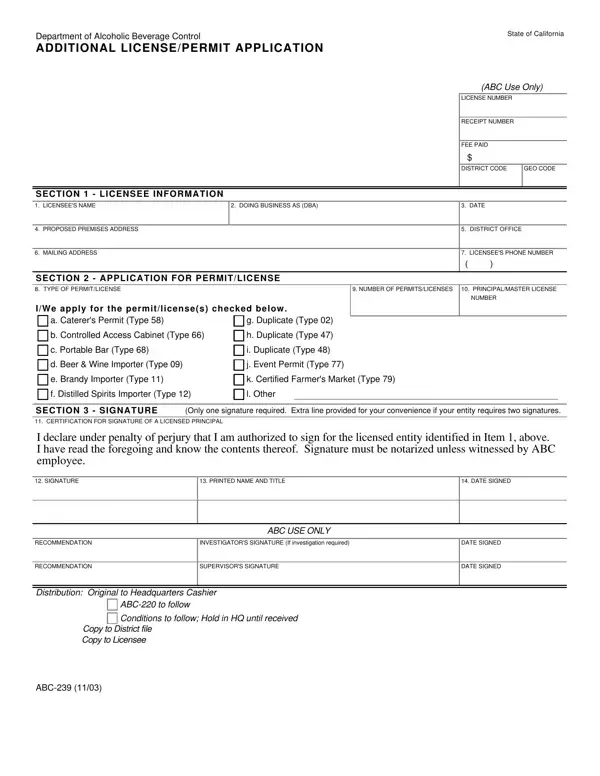
The ABC 239 form is the official Additional License/Permit Application issued by the California Department of Alcoholic Beverage Control (ABC). Existing ABC licensees file this form when they want to add a new permit type to their current license or to change an existing authorization.
Any business that holds a valid California ABC license may need to file the ABC 239 form. This includes restaurants, bars, nightclubs, hotels, retail liquor stores, importers, and wineries. You must have an active license in good standing before you can apply for additional permits.
New applicants who are starting the licensing process from scratch use a different application. The ABC 239 form is only for current licensees who are expanding or changing their existing authorization.
The ABC 239 covers a wide range of permit types, including:
The available permit types depend on your current license class. Contact your local ABC district office to confirm which permits you are eligible for before submitting the form.
The form asks for the following information:
The ABC USE ONLY and RECOMMENDATION fields are reserved for agency staff. The applicant should leave those blank. Some permit types require notarization or witnessing by ABC staff before the form is accepted.
Mail or deliver the completed form to your local California ABC district office. Include all required supporting documents and the applicable filing fee. Fees vary by permit type and are listed in the current ABC fee schedule.
Some applications also require a personal qualification statement. The ABC 231 form serves this purpose and is often filed together with the ABC 239 when a business has multiple principals listed on the license.
If you are planning a special event, you may also need the ABC Banquet License application. For an overview of California license types and categories, refer to the ABC license chart.
| Question | Answer |
|---|---|
| Form Name | ABC 239 Form |
| Official Name | Additional License/Permit Application |
| Issuing Agency | California Department of Alcoholic Beverage Control |
| Form Length | 1 page |
| Fillable? | No |
| Fillable fields | 0 |
| Avg. time to fill out | 15 sec |
| Other names | ABC-239, abc239 form, CA License/Permit Application, LICENSEE |