Please rate Address Nycers

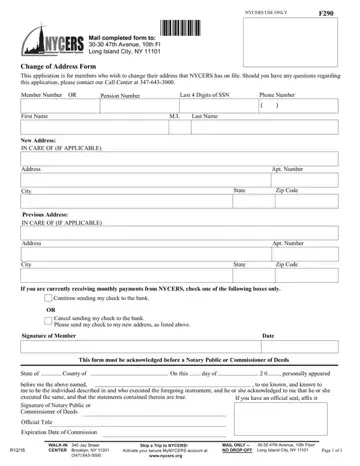
The New York City Employees' Retirement System (NYCERS) administers pension benefits for over 375,000 active and retired city employees. The Change of Address Form lets any member update the mailing address NYCERS holds on file. Keeping your address current ensures you receive pension checks, tax documents, and annual benefit statements without disruption.
File this form if you are a current or retired NYCERS member and your mailing address has changed. This applies if you receive any of the following:
Members who receive payments by direct deposit must still update their mailing address. NYCERS continues to send tax documents and benefit notices by mail regardless of payment method.
Have the following details ready before you begin filling out the form:
NYCERS requires this form to be notarized before submission. A Notary Public or Commissioner of Deeds must verify your identity and witness your signature. This requirement protects your account from unauthorized changes that could redirect pension payments or misdirect important documents.
The notarization section at the bottom of the form includes fields for the state and county, the notary's official title and seal, and the commission expiration date. Notary services are available at most NYC banks, public libraries, and government offices, often at no charge.
How long does an address change take to take effect?
NYCERS typically processes address updates within 5 to 10 business days after receiving your completed, notarized form. Changes submitted near the end of a month may not apply until the next payment cycle.
Can I update my address online instead?
Yes. NYCERS offers an online option through the MyNYCERS member portal. The paper form is the preferred option for members who want to submit changes by mail or in person at a NYCERS service center.
What happens if my address is outdated?
Pension checks, tax forms, and benefit notices sent to an incorrect address may be returned or lost. Uncashed checks are held by NYCERS but delays in re-processing can affect your payment schedule. Submit this form as soon as your address changes.
Does this form also update my direct deposit account?
No. This form updates your mailing address only. To change your direct deposit banking details, contact NYCERS directly or use the MyNYCERS online portal.
Where do I submit the completed form?
Mail your notarized form to NYCERS at 340 Jay Street, Brooklyn, NY 11201, or deliver it in person. NYCERS requires original notarized documents and does not accept submissions by fax or email.
| Question | Answer |
|---|---|
| Form Name | Address Nycers |
| Form Length | 1 pages |
| Fillable? | No |
| Fillable fields | 0 |
| Avg. time to fill out | 15 sec |
| Other names | nycers change address, ny dmv online services change of address, change your address in new york form, nys change of address form |
Address Nycers isn’t the one you’re looking for?
Please rate Address Nycers
