
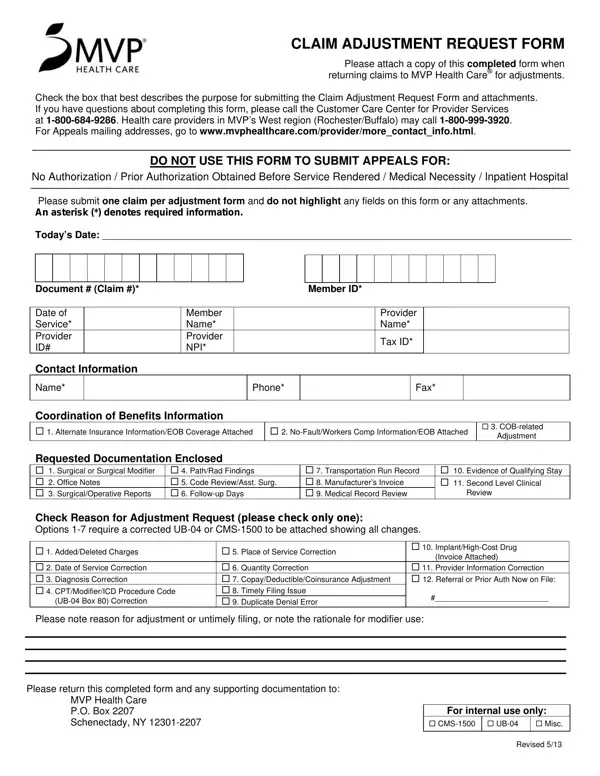
What Is the Adjustment Request Form?

The Adjustment Request Form helps healthcare providers correct claims filed with MVP Health Care. Common reasons include changes to dates of service, procedure codes, diagnosis codes, or billing amounts.

Submit one claim per adjustment form and do not highlight any fields. Sections marked with an asterisk are required. Select the reason for your adjustment from the options listed before completing the remaining fields.

Attach a corrected UB-04 or CMS-1500 form when submitting billing corrections. For coordination of benefits adjustments, include the other carrier's explanation of benefits. Use the Health Insurance Appeal Form for authorization denials rather than this adjustment form.

Mail the completed form with all supporting documents to the MVP Health Care address listed on the form. Do not submit appeals related to medical necessity using this adjustment form.

QuestionAnswer
Form NameAdjustment Request Form
Form Length1 pages
Fillable?Yes
Fillable fields49
Avg. time to fill out10 min 7 sec
Used byHealthcare providers and billing staff
PurposeSubmit claim adjustments to MVP Health Care
Do not use forAuthorization denials or medical necessity appeals
Other namescardinal innovations claim adjustment form, cair adjustment claim forms, mvp claim adjustment form, dc6 187 good adjustment transfer request form

Form Preview Example

CLAIM ADJUSTMENT REQUEST FORM

Please attach a copy of this completed form when returning claims to MVP Health Care® for adjustments.

Check the box that best describes the purpose for submitting the Claim Adjustment Request Form and attachments. If you have questions about completing this form, please call the Customer Care Center for Provider Services

at 1-800-684-9286. Health care providers in MVP’s West region (Rochester/Buffalo) may call 1-800-999-3920. For Appeals mailing addresses, go to www.mvphealthcare.com/provider/more_contact_info.html.

DO NOT USE THIS FORM TO SUBMIT APPEALS FOR:

No Authorization / Prior Authorization Obtained Before Service Rendered / Medical Necessity / Inpatient Hospital

Please submit one claim per adjustment form and do not highlight any fields on this form or any attachments.

An asterisk (*) denotes required information.

Today’s Date: ______________________________________________________________________________________

Document # (Claim #)*


Member ID*


Date of


Member


Provider


Service*


Name*


Name*


Provider


Provider


Tax ID*


ID#


NPI*


Contact Information


Name*


Phone*


Fax*


Coordination of Benefits Information


1. Alternate Insurance Information/EOB Coverage Attached

2. No-Fault/Workers Comp Information/EOB Attached

3. COB-related


Adjustment

Requested Documentation Enclosed


1. Surgical or Surgical Modifier

4. Path/Rad Findings

7. Transportation Run Record


10. Evidence of Qualifying Stay

2. Office Notes

5. Code Review/Asst. Surg.

8. Manufacturer’s Invoice


11. Second Level Clinical

3. Surgical/Operative Reports

6. Follow-up Days

9. Medical Record Review


Review

Check Reason for Adjustment Request (please check only one):

Options 1-7 require a corrected UB-04 or CMS-1500 to be attached showing all changes.

1.

Added/Deleted Charges

5. Place of Service Correction

10.

Implant/High-Cost Drug


(Invoice Attached)


2.

Date of Service Correction

6.

Quantity Correction

11.

Provider Information Correction

3.

Diagnosis Correction

7.

Copay/Deductible/Coinsurance Adjustment

12. Referral or Prior Auth Now on File:

4.

CPT/Modifier/ICD Procedure Code

8.

Timely Filing Issue

#__________________________


(UB-04 Box 80) Correction

9.

Duplicate Denial Error


Please note reason for adjustment or untimely filing, or note the rationale for modifier use:

Please return this completed form and any supporting documentation to: MVP Health Care

P.O. Box 2207

Schenectady, NY 12301-2207

For internal use only:

CMS-1500 UB-04 Misc.

Revised 5/13

How to Edit Adjustment Request Form Online for Free

Follow these steps to complete your adjustment request for MVP Health Care.

  1. Identify the reason. Select the correct reason code on the form, such as date of service correction, procedure code change, diagnosis correction, or coordination of benefits.
  2. Complete required fields. Fill in all fields marked with an asterisk, including the provider NPI, patient name, claim number, and service date.
  3. Attach supporting documents. Include a corrected UB-04 or CMS-1500 for billing corrections, or the other carrier's explanation of benefits for coordination of benefits issues.
  4. Submit one claim per form. Each adjustment must be on a separate form. Do not combine multiple claims on one submission.
  5. Mail to MVP Health Care. Send the completed form and attachments to the appropriate address shown on the form.

View related forms: CMS-1450 Claim Form, Medical Claim Form, and Aetna Appeal Form.