
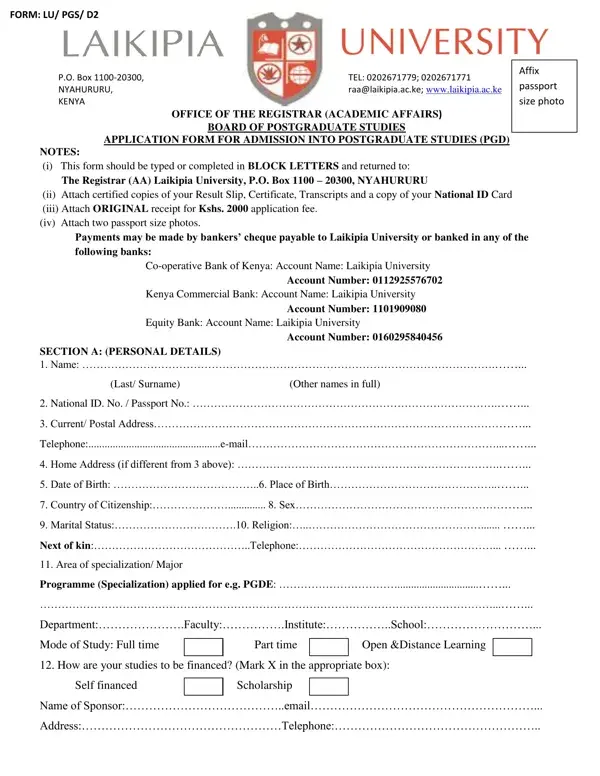
Laikipia University is a public university in Nyahururu, Kenya, offering a range of postgraduate programs. The Admission Form Laikipia University (FORM: LU/PGS/D2) is required for all prospective postgraduate students. Completing and submitting this form is the first step toward enrollment in any master's or doctoral program at the university.
Applicants must hold a recognized undergraduate degree or an equivalent qualification. Specific requirements vary by faculty. Candidates should review current intake requirements on the university's official website and confirm their qualifications meet the minimum academic standards before applying.
The form requires full legal name (surname first), contact details, physical address, date of birth, and nationality. You must also provide your complete academic history, employment record, proposed area of postgraduate specialization, and preferred campus location. Attach two recent passport-size photographs and certified copies of all academic certificates and transcripts.
A non-refundable application fee of Kshs. 2,000 is required. Payment options include Mpesa, bank transfer, or the university cashier. Retain your payment receipt as confirmation of submission.
After the university reviews your application, successful applicants receive an admission letter from Laikipia University. This letter confirms your program, campus, tuition fees, and reporting date. Students who receive an offer must follow the instructions to register and secure their place. If you are also researching other Kenyan universities, see the Kenyatta University application form also available at FormsPal.
| Question | Answer |
|---|---|
| Form Name | Admission Form Laikipia University |
| Form Length | 6 pages |
| Fillable? | No |
| Fillable fields | 0 |
| Avg. time to fill out | 1 min 30 sec |
| Other names | laikipia university ac ke, laikipia university admission letter, laikipia university admission letters, laikipia university main campus photos |
Admission Form Laikipia University isn’t the one you’re looking for?