
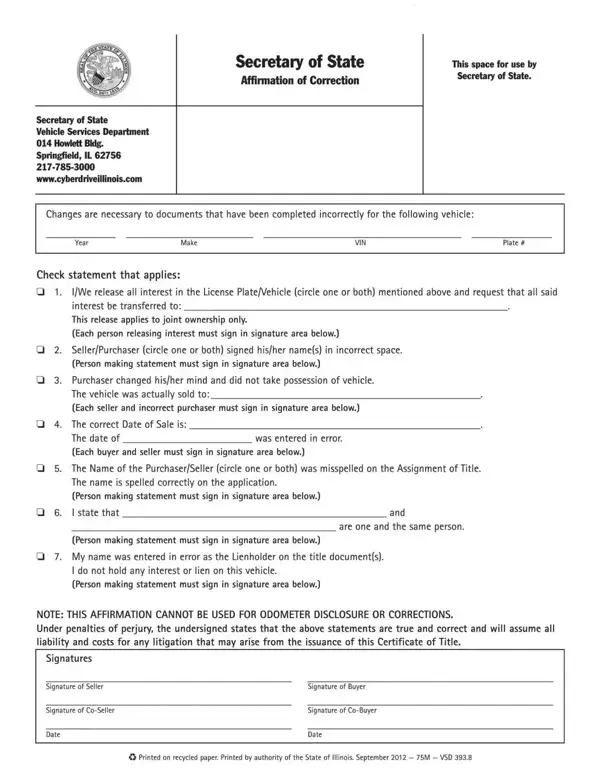
Affirmation Correction Form PDF Details

When to Use an Affirmation Correction Form

Use an Affirmation Correction Form any time inaccurate or incomplete information was submitted in a prior affirmation. This includes clerical errors made during the original filing, changes in personal information such as a new address, or cases where required fields were accidentally left blank. Courts, state agencies, and administrative offices use the correction form to update their records without requiring a full re-submission of the original affirmation.

What Information the Form Requires

Most versions of this form ask for the case number or file reference of the original affirmation, the specific field being corrected, the incorrect information as originally submitted, and the accurate replacement information. The signer must affirm under penalty of perjury that the correction is accurate. Many jurisdictions also require a notary seal or an authorized witness signature to validate the amendment.

Legal Importance of Filing a Correction

Errors in sworn affirmations can have serious legal consequences. An uncorrected mistake may delay court proceedings, affect eligibility determinations, or create discrepancies in official records that complicate future filings. Filing a timely correction demonstrates good faith and preserves the integrity of the documented record. Failing to correct a known error in a sworn statement may itself carry legal risk in some jurisdictions.

Related Forms You May Need

Depending on the nature of the correction, other documents may accompany or replace the Affirmation Correction Form. The T11 Affidavit of Correction is used specifically for vehicle title corrections in many states. For work authorization affirmations, the Affirmation of Legal Work Status provides the correct framework. General affidavit requirements may be addressed using an Affidavit of Affixture. City-specific versions, such as the City of New York Affirmation Form, are required when filing in certain jurisdictions.

QuestionAnswer
Form NameAffirmation Correction Form
Form Length1 pages
Fillable?No
Fillable fields0
Avg. time to fill out15 sec
Other nameshow to fill out affirmation of correction illinois, affidavit of correction, illinois affirmation correction, illinois affidavit of correction

How to Edit Affirmation Correction Form Online for Free

FormsPal's online PDF editor makes it simple to complete your Affirmation Correction Form on any device. Follow these steps to fill out and download your completed form.

Step 1: Open the Form Editor

Click the "Get Form" button at the top of this page to launch the online PDF editor with the Affirmation Correction Form preloaded. No software installation is required and no account is needed to begin.

Step 2: Enter the Correction Details

Locate the fields related to the error being corrected. Enter the case number or reference number from the original affirmation in the designated space. In the correction section, write the accurate replacement information. Double-check all spelling, dates, and numeric values before proceeding to the next step.

Affirmation correction form fields shown in the online editor (step 2)

Step 3: Identify Common Mistakes to Avoid

When completing a correction form, users frequently make secondary errors by entering the wrong case reference number, omitting the original incorrect information (which must be stated to identify what is being replaced), or failing to complete all required signature fields. Review each section carefully. If the form includes an attestation clause, read it fully before signing.

Step 4: Sign and Notarize if Required

Review all entries for accuracy. If the form or receiving jurisdiction requires notarization, arrange for a licensed notary to witness your signature before submission. Some agencies accept an unsworn declaration under penalty of perjury in place of notarization. Sign where indicated and date the form on the day of signing.

Step 4 signing section of the affirmation correction form

Step 5: Save and Submit

Click "Done" to finalize your form. Download the completed PDF to your device or print it directly. Submit the form to the relevant court clerk, government agency, or administrative office using their preferred method. Keep a signed copy of the submitted correction for your records.

Frequently Asked Questions

What is an Affirmation Correction Form used for?

It is used to formally correct errors or omissions in a previously submitted affirmation or sworn statement. It allows individuals to update the official record without filing an entirely new affirmation.

Does the form need to be notarized?

Notarization requirements vary by jurisdiction. Many courts and agencies require a notary seal or witness signature to validate the correction. Check with the receiving office before submitting the completed form.

Can I use this form for any type of affirmation?

This form applies to a broad range of affirmations, including court filings, administrative declarations, and regulatory submissions. For vehicle title corrections, use the T11 Affidavit of Correction instead. For work status affirmations, see the Affirmation of Legal Work Status form.

How long does the correction take to process?

Processing time depends on the receiving office and jurisdiction. Some corrections are processed within a few business days, while others may take several weeks. Contacting the relevant office directly provides the most accurate timeline for your specific filing.