Please rate Ai 1 Form

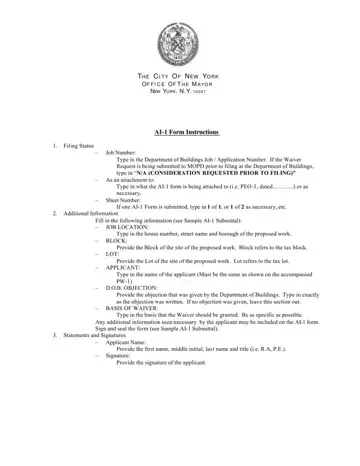
The AI 1 Additional Information document is used in New York City construction projects to provide supplemental information for the NYC Department of Buildings (DOB). Understanding its requirements helps ensure smooth permit processing and regulatory compliance.
The ai1 form is filed by licensed contractors, registered architects, professional engineers, and property owners involved in NYC construction or renovation projects. It is typically needed when the DOB issues objections to a building permit application and the applicant must submit additional documentation to resolve those concerns. Project owners, filing representatives, and special inspectors may all complete sections of this document depending on the nature of the waiver request.
This dob ai1 form is needed when a project applicant seeks a waiver from specific NYC building code requirements, when the DOB has raised objections that need clarification, or when supplemental documentation is necessary to complete a permit review. The document must reference the specific job number assigned by the NYC DOB to your construction project. Projects needing plan examination typically use this form to move forward in the approval process.
Submitting an incomplete or inaccurate application can result in permit processing delays, application denial, or stop-work orders. The form includes a mandatory applicant certification, affirming that all provided information is accurate and legally binding under New York City regulations. Non-compliance with NYC DOB rules may result in substantial fines and project delays. Contractors found to have submitted false information may face license suspension or revocation by the NYC DOB.
The dob ai1 form includes these main sections: filing status identification, job location with borough, block, and lot numbers, description of specific DOB objections, waiver request narrative, attachment details, and the applicant's signed certification. Each section must be completed accurately to avoid delays in permit issuance at the NYC Department of Buildings. The filing status section identifies whether the submission is an original application, an amendment, or a supplemental filing.
Before filling out this form, gather the DOB job number, property address with block and lot numbers, the specific DOB objection notice, and documentation supporting your waiver request. Use clear, concise language in the waiver narrative section. Attach all relevant supporting documents referenced in the form. Keep a copy of the completed application and any confirmation numbers for your project records.
| Question | Answer |
|---|---|
| Form Name | AI-1 Form |
| Form Length | 1 pages |
| Fillable? | No |
| Fillable fields | 0 |
| Avg. time to fill out | 15 sec |
| Other names | nyc dob ai1 form, nyc dob ai 1, ai1 nyc dob, ai1 form nyc |
Ai 1 Form isn’t the one you’re looking for?
Please rate Ai 1 Form
