
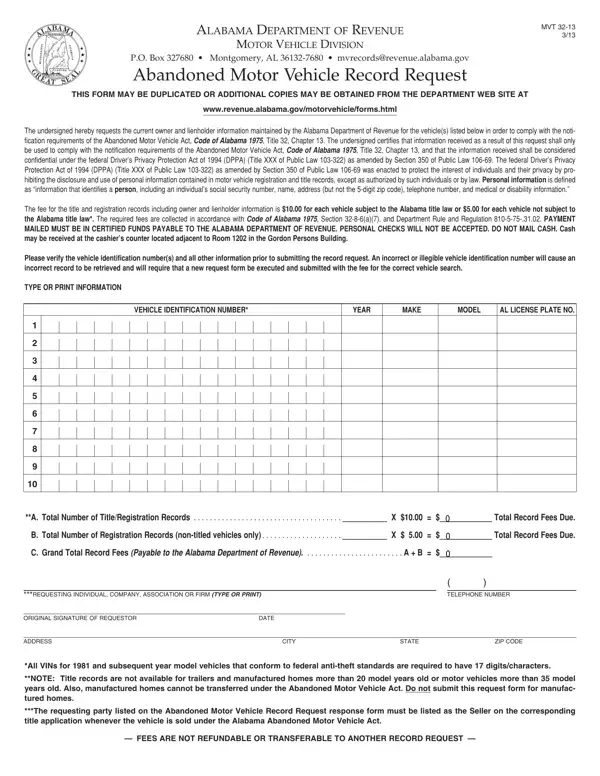
The Alabama Department of Revenue manages the Abandoned Motor Vehicle Record Request process through Form MVT 32-13. This form allows individuals, businesses, and towing operators to obtain the current registered owner and lienholder information for vehicles that appear abandoned. Obtaining this information is required under the Abandoned Motor Vehicle Act before you can legally notify the vehicle's owner or proceed with any title action.
Several parties in Alabama may need Form MVT 32-13. Property owners who discover a vehicle left on their land can use it to identify the registered owner. Towing companies and impound lots holding unclaimed vehicles must obtain owner contact information before the vehicle can be processed under the Abandoned Motor Vehicle Act. Private individuals who find an abandoned vehicle may also file this form to determine its ownership status.
The form is also used when someone wants to determine whether a vehicle qualifies for a title transfer. Before Alabama will issue a new title for an abandoned vehicle, the original owner must be notified. Form MVT 32-13 initiates that notification process by identifying who must be contacted.
To complete Form MVT 32-13, you will need the vehicle identification number (VIN) for each vehicle in your inquiry. The form accommodates multiple VINs on a single submission, making it practical for towing companies handling multiple abandoned vehicles at once. You must also provide your full legal name, complete mailing address, city, state, and ZIP code. The Alabama Department of Revenue will mail the results of the title search to this address.
The form also requires the requesting party's original signature and date. Both fields are required. Unsigned forms will not be processed by the Motor Vehicle Division.
The Alabama Department of Revenue charges a processing fee for each VIN search conducted through this form. The fee amount depends on whether the vehicle falls under Alabama title law requirements. Vehicles old enough to be exempt from Alabama's titling system may be subject to a different fee. Review the fee schedule included with the form to calculate the correct amount for your submission.
Payment must be made by check or money order payable to the Alabama Department of Revenue. The Department does not accept cash or credit card payments for this form. All fees are non-refundable, even if no title record is found for the VIN submitted. Include the exact payment with your completed form before mailing it.
The Driver's Privacy Protection Act of 1994 restricts the disclosure of personal information contained in state motor vehicle records. The Alabama Department of Revenue follows these federal requirements when processing Form MVT 32-13 requests. The owner and lienholder information you receive may only be used for the purpose of complying with the Abandoned Motor Vehicle Act. This means contacting the parties who must be notified before any further action is taken on the vehicle.
Using the information received for any other purpose may violate federal law. If you are unsure about your legal obligations under the Abandoned Motor Vehicle Act, consult an attorney before proceeding with any vehicle action.
After receiving owner information from Form MVT 32-13, you may need additional documents to complete the abandoned vehicle process. If the vehicle is ultimately sold, a vehicle purchase agreement can document the transaction. For watercraft left on private property in Alabama, the Alabama boat bill of sale covers a similar ownership transfer process. Other states have equivalent procedures, including the Oregon abandoned vehicles form. Once ownership is resolved, you may need a vehicle registration form to register the vehicle in your name.
| Question | Answer |
|---|---|
| Form Name | Alabama Abandoned Vehicle Form |
| Form Length | 1 pages |
| Fillable? | No |
| Fillable fields | 0 |
| Avg. time to fill out | 15 sec |
| Other names | alabama title abandoned, abandoned title, abandoned vehicle title alabama, how to file for a title on a abandoned vehicle, MVT 32-13, abandoned motor vehicle record request |
Alabama Abandoned Vehicle Form isn’t the one you’re looking for?