
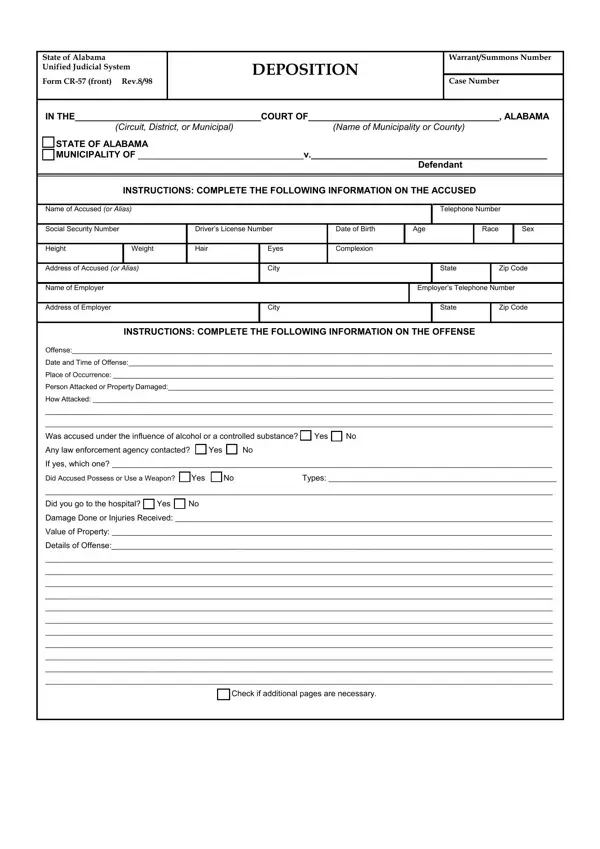
The Alabama Form CR-57 is a deposition form used by Alabama's Unified Judicial System for criminal proceedings. Courts use it to issue warrants and summon individuals to appear before a judge.
The form has two main sections. The complainant section collects details about the accused, including full name, address, Social Security number, and driver's license number. It also documents the offense type, date, location, property damage or personal injuries, alcohol or drug involvement, and any weapon used.
The judicial section is completed by court officials. Judges or magistrates record their notes, confirm whether a warrant or summons was issued, and enter the warrant number.
The form includes space for witness statements, providing courts with a consolidated record of testimony. Filing the CR-57 formally starts criminal proceedings. Once submitted, the complainant cannot withdraw the case without court approval.
Browse other Alabama legal forms on FormsPal: Alabama 8453 form, criminal record supplemental, and Alabama annual permit.
| Question | Answer |
|---|---|
| Form Name | Alabama Form Cr 57 |
| Form Length | 2 pages |
| Fillable? | No |
| Fillable fields | 0 |
| Avg. time to fill out | 30 sec |
| Other names | alabama employee withholding form 2018, alabama department of forensic evidence forms, alabama board of funeral service forms, alabama childcare forms |
Alabama Form Cr 57 isn’t the one you’re looking for?