Anthem Form 151 PDF Details

Anthem Form 151 is a standardized document used by healthcare providers and billing offices to report claim discrepancies directly to Anthem Blue Cross and Blue Shield. The form collects the provider's name, address, and National Provider Identifier (NPI), along with the insured member's Anthem identification number and the original claim number. Providers specify whether the claim involves professional services, facility charges, or dental work, and whether the original submission was on paper or electronic.

Three types of claim situations call for this form. Providers use it to report overpayments they need to return to Anthem, to dispute underpayments where reimbursement was lower than contracted rates, or to correct general billing errors that emerged after initial processing. Because each category routes to a different mailing address within Anthem's network, providers must confirm the correct destination before submitting. For Federal Employee Program (FEP) claims, Anthem routes adjustments through a dedicated channel with its own address listed on the form.

To support accurate processing, the form prompts for the original claim number, the date of service, the amount billed, and the amount Anthem paid. Including all of this in the correct fields helps Anthem's team resolve the adjustment without requesting additional documentation. Providers in Virginia and other states where Anthem operates under regional trade names should confirm which office handles their specific plan. If you need related insurance documents, see the Anthem Blue Cross Application Form, the Adjustment Request Form, or the United Healthcare Claim Form for other carriers. For other Anthem-specific forms, see the Anthem W-9 and the Empire Blue Cross Claim Form.

QuestionAnswer
Form NameAnthem Form 151
Form Length1 pages
Fillable?No
Fillable fields0
Avg. time to fill out15 sec
Other namesanthem 151, 151 bcbs, anthem 151 fillable, anthem form 151 adjustment request

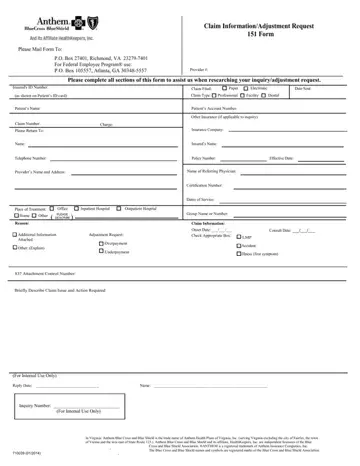
Form Preview Example

Please Mail Form To:

P.O. Box 27401, Richmond, VA 23279-7401

For Federal Employee Program® use:

P.O. Box 105557, Atlanta, GA 30348-5557

Claim Information/Adjustment Request

151 Form

Provider #:

Please complete all sections of this form to assist us when researching your inquiry/adjustment request.

Insured's ID Number:


Claim Filed:


Paper


Electronic


Date Sent:


(as shown on Patient’s ID card)


Claim Type:


Professional


Facility


Dental


Patient’s Name:


Patient’s Account Number:


Other Insurance (if applicable to inquiry)


Claim Number:


Charge:


Please Return To:


Insurance Company:


Name:


Insured’s Name:


Telephone Number:


Policy Number:


Effective Date:


Provider’s Name and Address:


Name of Referring Physician:


Certification Number:


Dates of Service:


Place of Treatment:

Office

Inpatient Hospital

Outpatient Hospital


Home

Other

PLEASE


Group Name or Number:


( DESCRIBE )


Reason:


Additional Information

Adjustment Request:

Attached


Overpayment

Other: (Explain)


Underpayment

Claim Information:

Onset Date: ___/___/___

Check Appropriate Box:

Consult Date: ___/___/___

LMP

Accident:

Illness (first symptom)

837 Attachment Control Number:

Briefly Describe Claim Issue and Action Required

(For Internal Use Only)

Reply Date: _______________________________Name: ________________________________________________________

Inquiry Number: ____________________________

(For Internal Use Only)


In Virginia: Anthem Blue Cross and Blue Shield is the trade name of Anthem Health Plans of Virginia, Inc. (serving Virginia excluding the city of Fairfax, the town


of Vienna and the area east of State Route 123.). Anthem Blue Cross and Blue Shield and its affiliate, HealthKeepers, Inc. are independent licensees of the Blue


.

Cross and Blue Shield Association. ®ANTHEM is a registered trademark of Anthem Insurance Companies, Inc.


The Blue Cross and Blue Shield names and symbols are registered marks of the Blue Cross and Blue Shield Association.


710039 (01/2014)


.

How to Edit Anthem Form 151 Online for Free

Our PDF editor makes it simple to complete Anthem Form 151 online without printing or mailing a paper copy. Follow the steps below to fill out the form and save your completed document.

Step 1: Open the Form

Click the "Get Form Here" button at the top of this page. The form will load in the online PDF editor, ready for you to begin entering information.

Step 2: Enter Provider and Member Information

Fill in the provider's name, address, and National Provider Identifier (NPI). Then enter the insured member's name and Anthem identification number. These fields appear at the top of the form and must be completed before moving on to the claim details section.

Step 1 to completing Anthem Form 151

Step 3: Complete the Claim Detail Fields

In the claim details section, enter the original claim number, the date of service, the amount billed, and the amount that Anthem paid. Select the type of claim (professional services, facility, or dental) and whether the original submission was paper or electronic. In the section labeled "For Internal Use Only," fill in the Reply Date, Name, and Inquiry Number as prompted.

Anthem Form 151 For Internal Use Only fields

Step 4: Describe the Issue and Action Required

Use the description field to explain the nature of the adjustment. State whether you are reporting an overpayment, an underpayment, or another billing discrepancy. Include the dollar amount in question and the reason for the adjustment request. A clear, specific description reduces the chance that Anthem will need to follow up for additional documentation.

Step 5: Save and Submit

Click the "Done" button to save your completed form. You can download the PDF to your device or print it directly. Mail the completed form to the appropriate Anthem address for your plan type. For Federal Employee Program (FEP) claims, use the FEP-specific mailing address printed on the form.

Step 6: Keep a Copy

Save a copy of the completed form and record the date you mailed it. Anthem typically acknowledges adjustment requests within 30 days. Your information is never shared or tracked by this platform.

Watch Anthem Form 151 Video Instruction

Please rate Anthem Form 151

1 Votes
If you believe this page is infringing on your copyright, please familiarize yourself with and follow our DMCA notice and takedown process - click here to proceed .
