
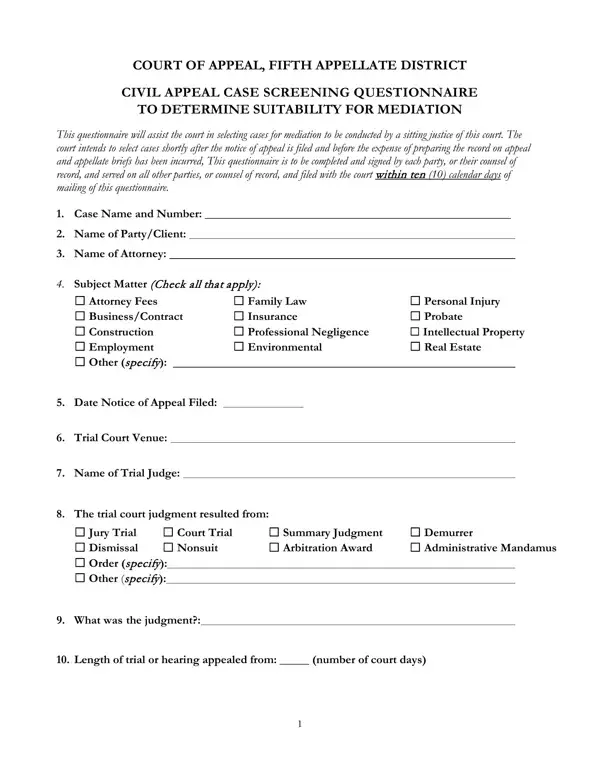
This screening questionnaire is a key procedural document in California's appellate system. The Fifth Appellate District uses it to evaluate whether a civil appeal is a good fit for its mediation program. Below is a breakdown of what the form covers and what you need to know before completing it.
Every party involved in a civil appeal before the Fifth Appellate District must complete this questionnaire. That includes both appellants and respondents. If you are represented by an attorney, your lawyer submits the form on your behalf. Unrepresented parties file it directly with the clerk.
The court typically sends a notice after the appeal is docketed. You must respond within the deadline stated in the notice. Failing to file on time may affect your case's eligibility for the mediation program.
The questionnaire gathers factual details about your case so a justice can assess its suitability for mediation. You will be asked to provide:
Answer each question completely. A sitting justice reviews your responses alongside those of the opposing party to decide whether to recommend the case for mediation.
If the court selects your case, a trained mediator works with both sides before significant resources are spent on appeal records and briefs. Mediation under this program is conducted by a sitting justice or a qualified neutral. Settlements reached at this stage are binding.
Not every case qualifies. Factors that typically weigh against selection include cases with no realistic settlement value, highly adversarial relationships, or legal questions that require a court ruling to resolve. The form's detailed questions help the court sort cases quickly.
For related legal documents, you may also need an appeal form to initiate the appellate process, or a mediation statement form if your case proceeds to a structured mediation session. Parties in California civil actions may also need to file a California civil form for related case management purposes.
| Question | Answer |
|---|---|
| Form Name | Appellate Screening Form |
| Form Length | 3 pages |
| Fillable? | No |
| Fillable fields | 0 |
| Avg. time to fill out | 45 sec |
| Other names | appellate district determine make, ca court of appeal 5th district, fifth appellate district california court of appeal, fifth appellate district |