
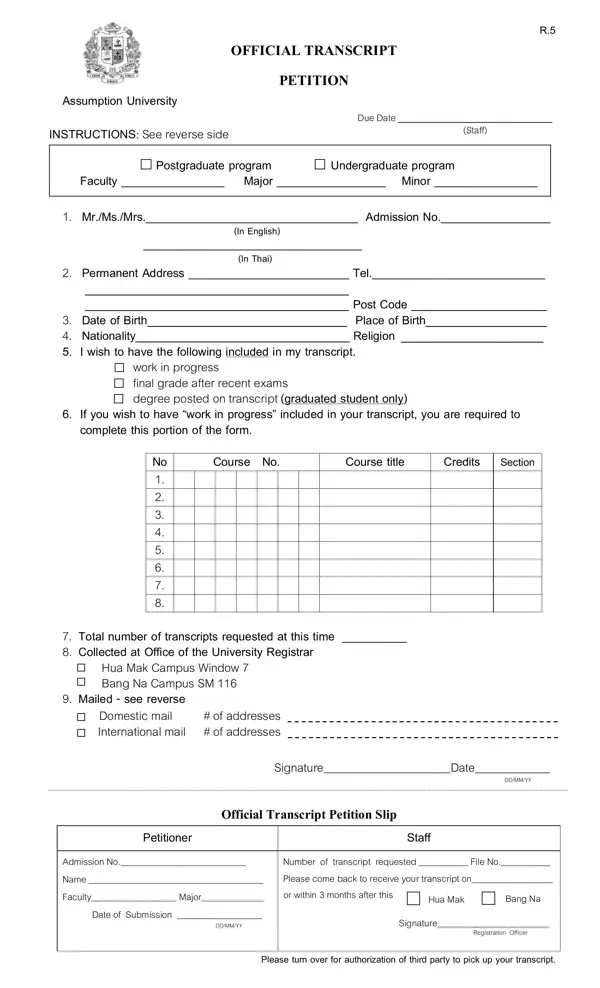
Form Details and How to Request Your Transcript

Form R.5 is the standard petition for requesting certified academic transcripts from Assumption University in Thailand. Current students, graduates, and alumni across all undergraduate and postgraduate programs use this petition when they need formal documentation of their academic record.

Who Should Use This Form

This petition is intended for anyone who needs an official transcript for purposes such as:

Information You Need to Complete the Petition

Before completing this petition, gather the following details:

Transcript Types Available

The petition lets you select specific transcript content to suit your needs:

Delivery Options and Fees

Form R.5 supports two delivery methods. Choose the option that works best for you:

Third-Party Collection Authorization

If you cannot appear in person to collect your transcript, the form includes a dedicated third-party authorization section. To use this option, provide your authorized representative's full name and attach a copy of your identification document to the form. Your representative must bring valid identification when collecting the transcript from the registrar.

Processing Timeline

Transcript processing times vary throughout the academic year. Allow additional time during examination periods and semester transitions. Contact the registrar's office for current processing estimates before submitting your request.

Frequently Asked Questions

Can I submit the form with outstanding university fees?
Outstanding financial balances may delay or prevent transcript release. Clear any pending obligations before submitting the petition.

How many transcript copies can I request at once?
You may request multiple copies on a single submission. Indicate the number of copies needed and the destination for each copy in the appropriate section.

Is this petition the same as a transcript verification letter?
No. Form R.5 is a formal petition for a certified academic transcript. A verification letter confirming degree status is a separate document issued by your department.

For additional university transcript forms, visit the Argosy University Transcript Request, the Dominican University Transcript Request, and the Academic Records Request Form on FormsPal.

QuestionAnswer
Form NameAssumption University Logo Form
Form Length3 pages
Fillable?No
Fillable fields0
Avg. time to fill out45 sec
Other namesAssumption University transcript request, Official Transcript Petition, Form R.5, AU transcript form

How to Edit Assumption University Logo Form Online for Free

You can complete and download the Assumption University Logo form using the FormsPal online editor. No additional software is needed. Use any device with a web browser to fill out Form R.5 and save a digital copy for submission to the registrar.

Before You Begin

Have the following information on hand to complete the form in a single session:

  • Your Assumption University admission number or student ID
  • Current contact information, including your phone number and mailing address
  • The mailing address of each transcript recipient
  • Your payment method and the applicable fee amount from the registrar's office

Step-by-Step Guide

Step 1: Open the form. Click the orange button at the top of this page to load the Assumption University Logo form in the PDF editor.

Step 2: Enter personal and academic details. Fill in your full name, admission number, faculty, department, and program of study in the designated fields on the first page.

Step 3: Choose your transcript options. Check the boxes for the type of transcript content you need: standard grades, grades in progress, final exam results, or degree posting.

Step 4: Select your delivery method. Mark whether you will collect the transcript in person or need it mailed. For postal delivery, enter the complete recipient address, including the country code for international destinations.

Step 5: Fill in third-party authorization if needed. If someone else will collect your transcript on your behalf, complete the authorization section with their full name and your identification details.

Step 6: Add payment information. Follow the payment instructions in the form. Attach proof of payment if the university requires it with your submission.

Step 7: Review and download. Read through all fields to verify accuracy. Click Download to save the completed form as a PDF file. Submit the document to the Assumption University registrar according to their current submission procedure.

Helpful Tips

  • Double-check your admission number before saving. Errors on this field can delay processing.
  • Submit your request well in advance of your deadline to allow for normal processing time.
  • Keep a copy of the completed form and payment confirmation for your records.

Looking for similar academic forms? Browse the Ashford University Transcript and East-West University Transcript Request forms on FormsPal.