
Axa Distribution Form PDF Details

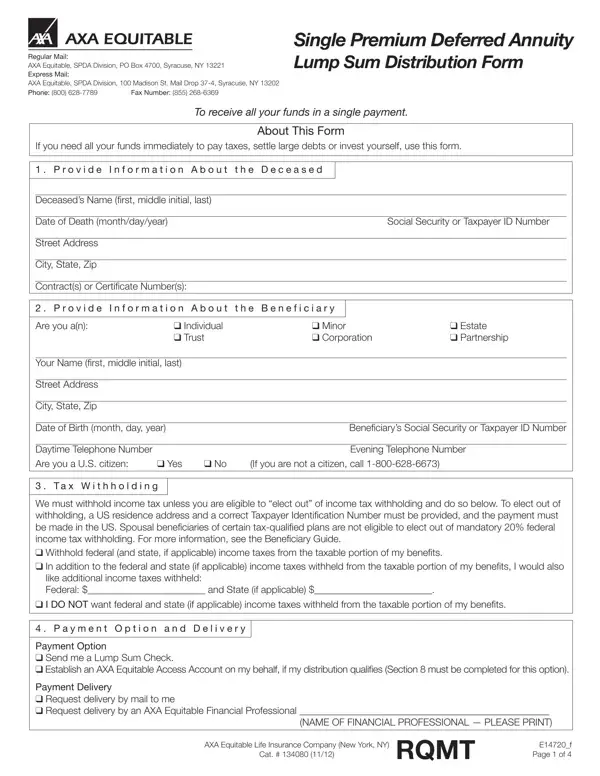
The AXA Distribution Form is the required document for requesting a lump sum payout from a Single Premium Deferred Annuity (SPDA) issued by AXA Equitable Life Insurance. Eligible recipients include individuals, estates, trusts, corporations, and partnerships. Each beneficiary type has different documentation requirements, so review the instructions for your category before filling out the form.

To complete the AXA Distribution form, you will need to provide the following information:

Payment can be received as a lump sum check mailed to your address, or transferred directly to a personal bank account via wire transfer. AXA also offers the AXA Equitable Access Account, an interest-bearing account option that holds distribution proceeds and provides access over time. This option suits beneficiaries who do not need all funds at once.

Tax withholding applies to most distributions unless you elect out under eligible conditions. Both federal and state taxes may be withheld from your lump sum payment. A tax advisor can help you determine the right withholding election for your financial situation before you submit the AXA distribution request.

For expedited delivery of your distribution check, select that option on the payment delivery section of the form. Additional fees may apply for expedited processing. Standard delivery typically takes 7 to 10 business days after AXA receives and processes the completed form.

For related financial and annuity forms, see the AXA 1035 Exchange form for tax-free transfers between annuities, the AXA 403(b) hardship loan form, or our general funds distribution request form. If you need to update who receives annuity proceeds, a beneficiary change form is available as well.

QuestionAnswer
Form NameAxa Distribution Form
Form Length4 pages
Fillable?No
Fillable fields0
Avg. time to fill out1 min
Other namesaxa automatic distribution rmd form, axa equitable distribution form, notice of proposed judgment and equitable distribution forms, axa equitable lump sum distribution form

How to Edit Axa Distribution Form Online for Free

You can fill out the AXA Distribution Form online using our PDF editor. The tool supports field entry, text editing, and electronic signing. Follow the steps below to complete the form and download your finished document:

Step 1: Click the "Get Form" button at the top of this page to open the PDF editor.

Step 2: Complete all required fields in the editor. You can add text, edit existing content, add images, and sign the form electronically.

The AXA Distribution Form requires specific details in each section. Fill in each field carefully using the guidance below:

1. Begin with the beneficiary identification section. Enter your full name, mailing address, Social Security or taxpayer identification number, daytime telephone number, and the contract number for the annuity policy:

AXA Distribution Form beneficiary information fields

2. Complete the tax withholding and payment option fields. Select whether to withhold federal and state income taxes from your distribution. Then choose your payment option: a lump sum check or a wire transfer to your bank account:

AXA Distribution Form tax withholding and payment option section

3. Fill in the delivery options and bank account information. Choose standard or expedited delivery. For wire transfers, enter your bank name, ABA routing number, account number, and account type. Confirm all bank details carefully to avoid processing delays:

AXA Distribution Form delivery options and bank account details

4. Review the AXA Equitable Access Account section. If you prefer to hold annuity proceeds in an interest-bearing account rather than receiving a single lump sum, complete this section with the agent code, agency name, and deposit amount:

AXA Equitable Access Account section

5. Complete the final signature page. Print your name, enter your contract number, mailing address, Social Security or taxpayer number, and daytime telephone number. Sign and date the form where indicated:

AXA Distribution Form signature and final fields

Step 3: After reviewing all completed fields, click "Done." Download the AXA Distribution form as a PDF, email it directly to a recipient, or print a hard copy. FormsPal uses a secure system to protect your personal data and never shares information with third parties. For other related forms, see the Charles Schwab 401(k) distribution form, the Lincoln Financial distribution request, or the MetLife withdrawal form.