
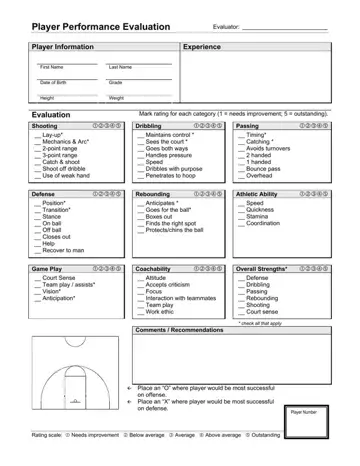
A basketball evaluation form is a no-nonsense tool for keeping track of a player's progress - rather than just being a bunch of random notes, it's a comprehensive record and a key part of how an organization runs its coaching. Depending on how it's being used, it can be a great tool for coaches or a straightforward admin document.
At the end of the day, it's something that coaches at the high school or college level, or club and travel team coaches - even academy trainers, camp evaluators and staff on development programmes are all able to use.
This form combines all the hard data of a score with a healthy dose of professional judgement. You've got rating scales and open comment sections all mixed in. This way, reviewers can compare apples with apples, using the same standards to judge each player, while still factoring in the situation, the conditions on the court, and, of course, each player's role in the team. It's a whole lot more complicated than just scoring.
Most teams use the form during tryouts, practices, training camps, or review sessions - and coaches will usually fill it out right after they've watched a game or practice, when it's all still fresh in their minds. Some programmes might use it once a season - others might do it more regularly to keep track of how players are getting on, whether they're improving or slumping, or whether their role in the team is changing. Either way, timing is everything - fill it out too late, and it's just guesswork.
The basketball evaluation form is made up of several sections :
• Basic player details for identification.
• Skill-based ratings tied to clear performance areas.
• Checkboxes for specific actions or habits.
• Space for written comments and recommendations.
The rating system uses a simple scale to measure a player's skills and performance in specific areas of the game. Each of the categories is focused on a particular action that the coaches keep an eye on. Then, as the game is being played, coaches look at the way the player is performing in specific areas like shooting, dribbling, defense, and teamwork, and then pick the level that best matches what they're seeing.
| Question | Answer |
|---|---|
| Form Name | Basketball Evaluation Form |
| Form Length | 1 page |
| Fillable? | Yes |
| Fillable fields | 65 |
| Avg. time to fill out | 15 min |
| Other names | basketball player evaluation form word, basketball performance evaluation, basketball evaluation form, basketball evaluation form template |
