Baseball Tryout Evaluation Form PDF Details

With the baseball evaluation form, coaches can review several players at once and compare scores on the fly.

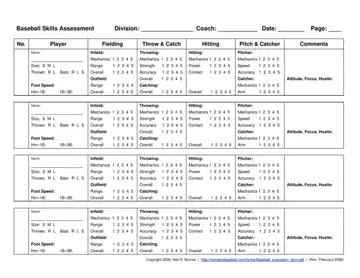
You can add basic session details, such as division, coach name, and date, at the top of the page. It's all pretty straightforward. Each player has their own row with space for their name, size, throwing hand, and batting preference. A five-point scale is used for skill ratings, which remains easy to read even after a long day in the field.

This simple form also includes a comments column. Use it for quick notes, sharp observations, or reminders that don't fit neatly into numeric scores.

The middle of the form groups skills in a way that feels familiar to anyone who’s run a tryout:

✔️ Fielding ability for infield and outfield positions.

✔️ Throwing and catching mechanics, strength, and accuracy.

✔️ Hitting mechanics, power, and contact quality.

✔️ Pitching and catching performance, if the player tries those roles.

✔️ Foot speed, attitude, focus, and hustle.

With a player evaluation form like this, setup helps coaches stay fair. One great play won’t outweigh the steady performance of athletes, and one mistake won’t sink a solid tryout. Simple evaluation forms work really well for recreational leagues and large tryout groups.

What's good is that the same layout repeats several times on a single page, reducing paper use. At the same time, evaluations remain consistent for the team, from first player to last.

QuestionAnswer
Form Name Baseball Evaluation Form
Form Length 2 pages
Fillable? Yes
Fillable fields 32
Avg. time to fill out 20 min
Other names baseball evaluation form template, baseball tryouts evaluation form, baseball skills assessment form, baseball player evaluation form

How to Edit Baseball Player Assessment Form Online for Free

Begin by clicking the Get Form Now button on the page. That’s it. The document loads instantly in the FormsPal PDF editor, keeping the original layout intact and ready for input.

Also, you can download this baseball tryout evaluation form for free and edit it on your device.

Step 1. Complete the Header Information

At the top of the page, enter:

  • Division,
  • Coach name,
  • Date of the evaluation,
  • Page number if using multiple pages.

Note that the baseball evaluation form uses a fixed layout and a five-point rating scale. Fill it out row by row, player by player, following the sections exactly as they appear on the form.

Step 2. Enter Player Identification Data

Move to the left side of the row and record the player’s basic information.

Write the player’s name, mark size (S, M, or L), and indicate throwing and batting preference. Do this before scoring anything else.

Step 3. Rate Fielding Skills

In the Fielding section, rate the infield and outfield skills on a scale of 1 to 5, as shown on the form. Evaluate the skills and abilities of the player, taking into account the specific aspects of the game that are relevant to the player's performance. Each line should contain only one number.

Here's a quick reminder! A score of 1 indicates very weak performance, while 5 indicates strong ability compared to other peers' performance during the same session.

baseball evaluation form spaces to fill out

Step 4. Score Throwing and Catching

In the Throw & Catch section:

  • Rate throwing mechanics, strength, accuracy, and overall ability,
  • If applicable, rate catching mechanics and overall catching skill.

Only score catcher-related fields if the player actually performs that role.

Step 5. Hitting Ability

Under the Hitting section, score mechanics, power, contact, and overall hitting performance. Use what you actually see during drills or live swings.

Numbers should reflect outcomes and form, not reputation or past seasons (tempting, but misleading).

Step 6. Pitching and Catcher Skills

In the Pitch & Catcher column, just fill in the roles the player attempted. Pitchers get rated on their mechanics, speed, and accuracy. Catchers can get points for their mechanics and arm strength.

Don't rate both unless the player really tries both positions.

Finishing baseball evaluation form part 2

Step 7. Record Foot Speed

Next, enter the base running performance in the foot speed fields. Record the times or relative results for home to first base and first base to third base.

Step 8. Add Comments

In the Comments column, you can write attitude, focus, hustle, and any standout strengths or concerns

Step 9. Repeat for Each Player

The same structure repeats multiple times on one page, so fill out each row independently.

Watch Baseball Player Assessment Form Video Instruction

Please rate Baseball Assessment

1 Votes
If you believe this page is infringing on your copyright, please familiarize yourself with and follow our DMCA notice and takedown process - click here to proceed .
