
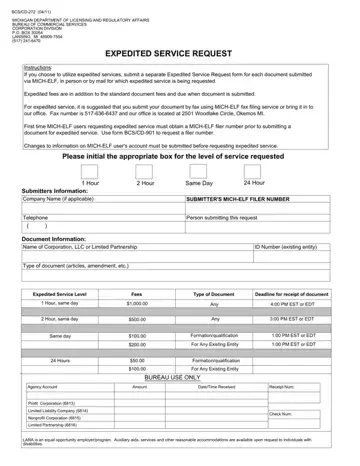
The BCS/CD-272 form is used by businesses incorporated or organized under Michigan law to pay additional fees for priority document handling. Rather than waiting several days or weeks under standard processing timelines, entities can use this form to have articles of incorporation, articles of organization, certificates of amendment, certificates of dissolution, annual reports, and other statutory filings reviewed on an accelerated schedule by the Bureau of Commercial Services Corporation Division.
Michigan LARA offers three expedited service tiers through this form. One-hour service is the fastest option and is available only for documents submitted in person at a LARA office. Two-hour service also requires in-person submission and applies to filings that do not qualify for the one-hour tier. The 24-hour service accommodates businesses submitting documents by mail or through the MICH-ELF fax filing system. Fees for each tier are charged in addition to any standard state filing fees and vary by document type. Because the fee schedule is set by statute and subject to periodic updates, filers should confirm the current amounts with LARA before submitting.
First-time users of the MICH-ELF electronic filing system must register to obtain a filer identification number before submitting documents through that channel. The registration process involves providing basic contact and entity information to establish a secure fax transmission account. Once a filer number is established, it must be included on every BCS/CD-272 expedited service request submitted through the MICH-ELF system. In-person and mail submissions follow a different process and do not require a MICH-ELF filer number.
Businesses most likely to use the BCS/CD-272 form include newly formed corporations and LLCs that need their formation documents quickly before a financing transaction closes, companies undergoing merger or acquisition that must file amendments on a tight deadline, and entities that need to correct a statutory filing error as soon as possible. The form is not required for routine filings that do not need priority handling from the Bureau of Commercial Services.
For Michigan businesses that need other related filings, the CSCL/CD-715 form and the CSCL/CD-518 form cover additional aspects of business entity administration in Michigan. Reviewing the full set of Bureau of Commercial Services forms ensures your entity stays current with all state requirements.
| Question | Answer |
|---|---|
| Form Name | Bcs Cd 272 Form |
| Form Length | 1 pages |
| Fillable? | No |
| Fillable fields | 0 |
| Avg. time to fill out | 15 sec |
| Other names | CD-272, EDT, Submitters, SUBMITTER |