
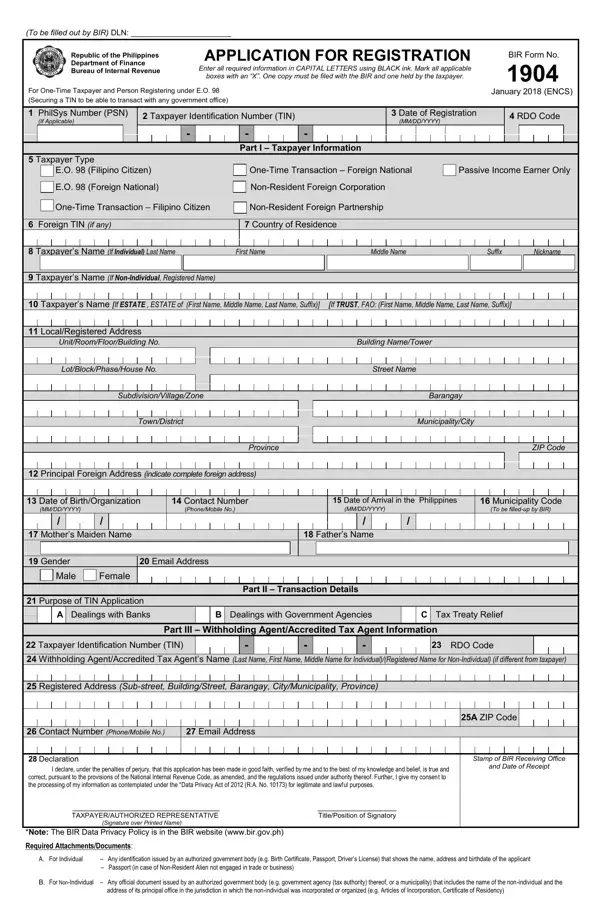
This form can be filled in online without difficulty. Just use FormsPal's PDF editing tool to complete the job fast. To keep our editor at the forefront of convenience, we work to integrate user-driven features and improvements regularly. We are always looking for feedback - assist us with revolutionizing PDF editing. In case you are seeking to begin, this is what it will require:
Step 1: Just press the "Get Form Button" above on this site to get into our pdf editing tool. There you will find all that is necessary to fill out your document.
Step 2: The tool allows you to customize your PDF file in many different ways. Enhance it with your own text, correct what is already in the file, and place in a signature - all at your fingertips!
This document requires specific details. To ensure consistency, be sure to pay attention to the subsequent steps:
1. Begin completing your form with a number of major fields. Consider all the information you need and ensure nothing is omitted!
2. Soon after filling in the last step, head on to the next step and enter the necessary particulars in these blank fields - ZIP Code, MunicipalityCity, Date of Arrival in the Philippines, Father's Name, Municipality Code, SubdivisionVillageZone, TownDistrict, Province, Principal Foreign Address, Contact Number, Mother's Maiden Name, Gender, Email Address, and Purpose of TIN Application.
For the Purpose of TIN Application and Father's Name fields, make certain you do not make any errors in this section. These two are the most important fields in the form.
3. Completing Email Address, Registered Address, TAXPAYER/AUTHORIZED REPRESENTATIVE, Signature over Printed Name, ZIP Code, Stamp of BIR Receiving Office, and Date of Receipt, Required Attachments/Documents is essential for the next step. Make sure to fill them out in their entirety. Do not miss any information!
Step 3: Before submitting your file, ensure that all form fields have been filled in properly. Once you think it is all correct, click on "Done." Join FormsPal right now and easily get your completed application, ready for downloading. Every change made is automatically saved, enabling you to edit the file at a later time when necessary. FormsPal ensures your data confidentiality via a secure method that does not record or distribute any personal information involved in the process. Your paperwork is kept confidential each time you work with our service.
Frequently Asked Questions About BIR Form 1904
What is BIR Form 1904 used for?
It is used to apply for a Taxpayer Identification Number in the Philippines for one-time transactions with government offices, including real estate transfers, estate settlement, and treaty relief applications.
Who can file BIR Form 1904?
One-time taxpayers, individuals registering under Executive Order 98, foreign nationals needing treaty relief, and estate representatives can file this form. Regular employees and business owners use different BIR registration forms.
Where do I submit the completed form?
Submit the completed form to the Revenue District Office (RDO) that has jurisdiction over your address or the location of the transaction. Bring your original government-issued ID along with your supporting documents.
Is BIR Form 1904 the same as Form 1901 or Form 1902?
No. BIR Form 1901 is for self-employed individuals and professionals. BIR Form 1902 is for employees. Form 1904 is exclusively for one-time taxpayers who need a TIN for a specific government transaction.
Can I fill out BIR Form 1904 online?
Yes. You can use FormsPal's free online PDF editor to fill out the form digitally, download it, and print it for submission at your Revenue District Office. You can also find related forms such as the BIR 1701Q and BIR Form 2306 on FormsPal.
