

DHCS 6207 at a glance
What it is: The Medi-Cal Disclosure Statement (DHCS 6207) is completed and submitted by every applicant or provider as part of a complete application package for enrollment, continued enrollment, or certification as a Medi-Cal provider.
Who signs: The signature must be an individual who is the sole proprietor, partner, corporate officer, or an official representative of a governmental entity or nonprofit organization who has the authority to legally bind the applicant or provider.
Notary: The Disclosure Statement must be notarized by a Notary Public except for those applicants and providers licensed pursuant to Business and Professions Code, Division 2, beginning with Section 500.
What to bring and attach to DHCS 6207
If the applicant leases the location where services are being rendered or provided, attach a copy of a current signed lease agreement.
A filled-in DHCS 6207 example: a sole proprietor who owns the office
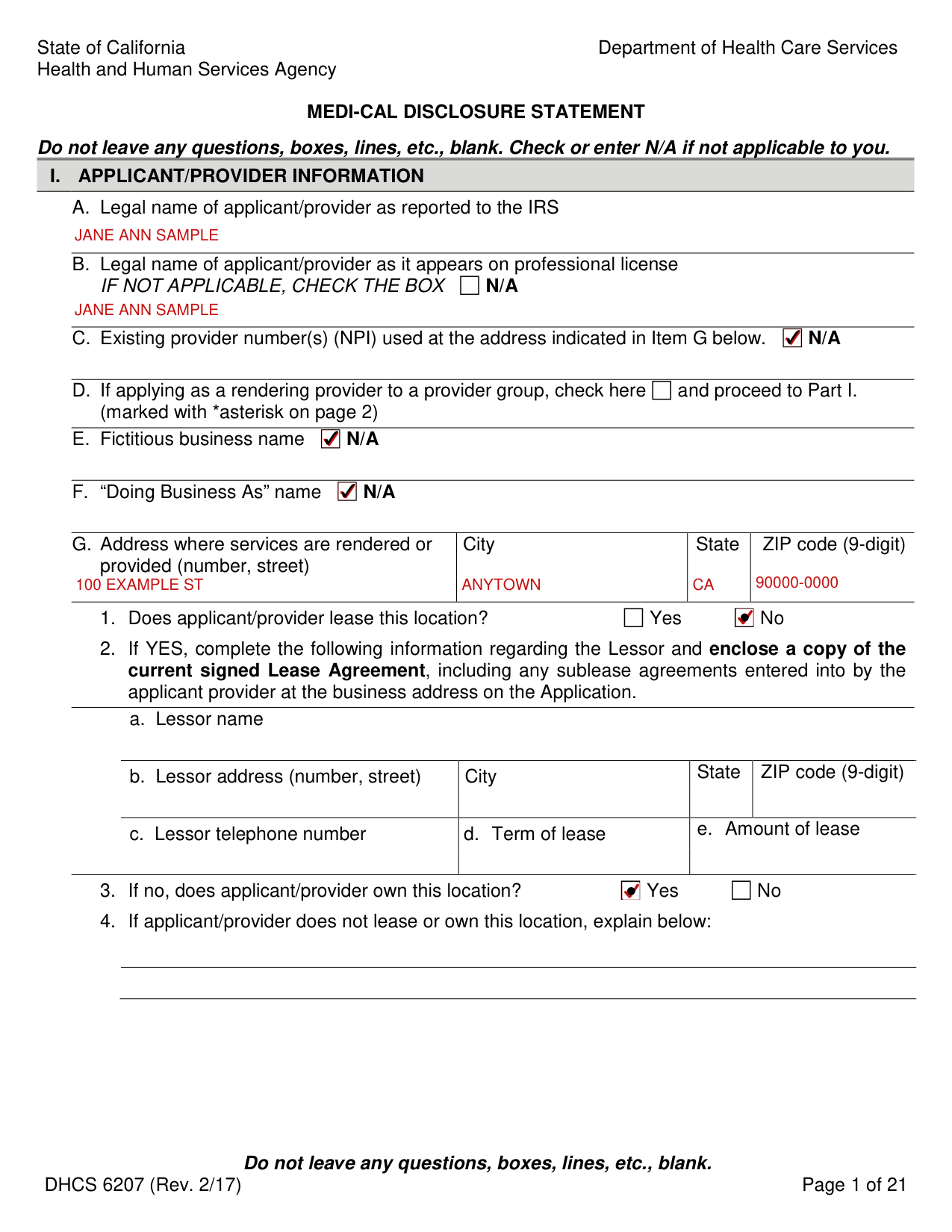
How to fill out DHCS 6207, box by box
Names, provider number and group (Section I, Parts A to F)
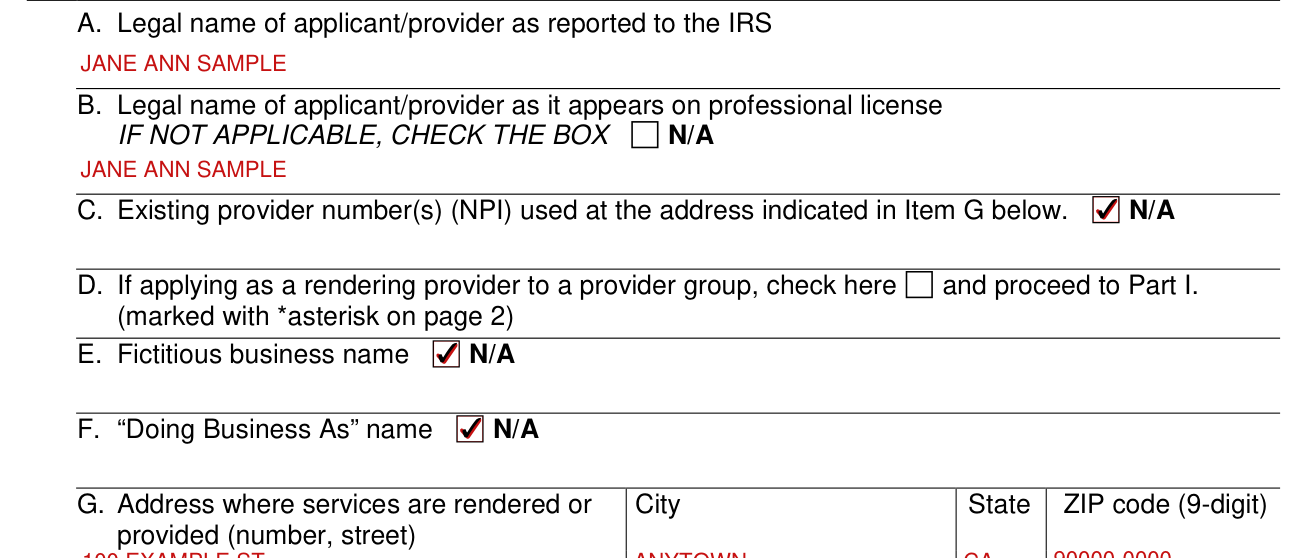
Enter A. Legal name of applicant/provider as reported to the IRS and B. Legal name of applicant/provider as it appears on professional license. If not applicable, check the box N/A.
Enter C. Existing provider number(s) (NPI) used at the address indicated in Item G, or check N/A.
D. If applying as a rendering provider to a provider group, check here and proceed to Part I (marked with asterisk on page 2). Enter E. Fictitious business name and F. Doing Business As name, or check N/A.
Location and lease (Section I, Part G)
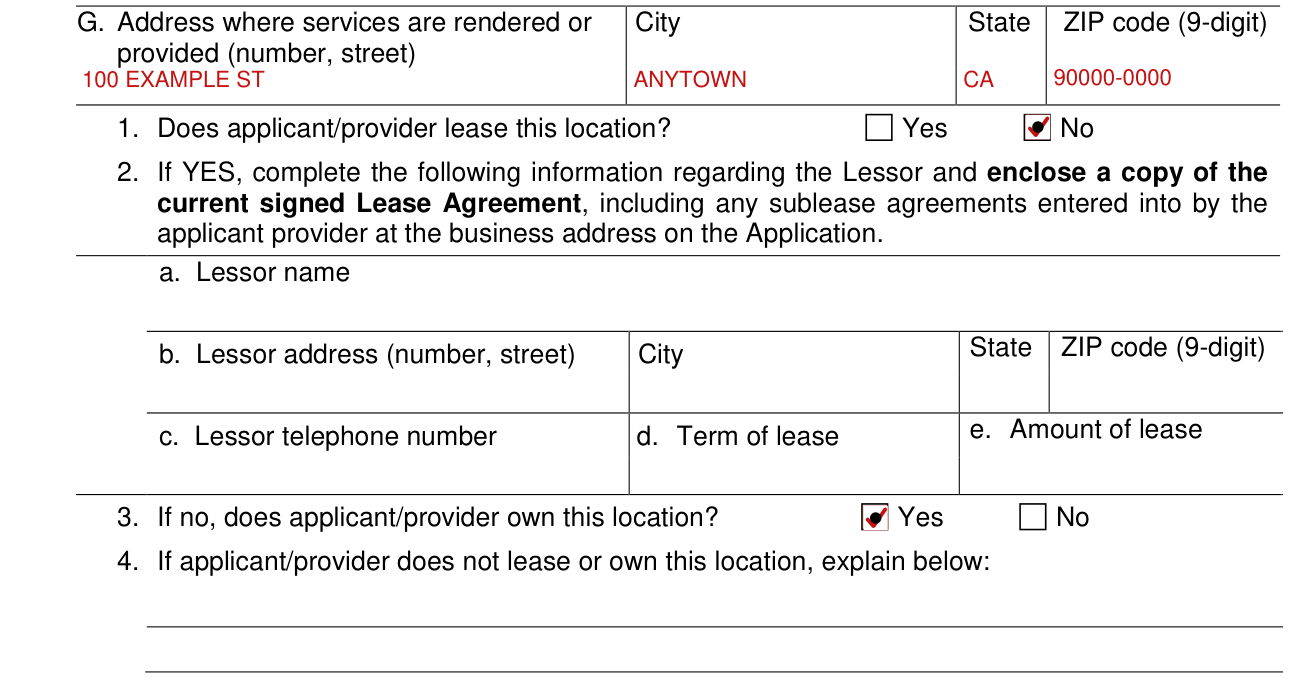
Enter G. Address where services are rendered or provided (number, street), City State ZIP code (9-digit).
1. Does applicant/provider lease this location? Check Yes or No.
If YES, complete the following information regarding the Lessor and enclose a copy of the current signed Lease Agreement, including any sublease agreements entered into by the applicant provider at the business address on the Application.
Under the lease, enter the Lessor name, Lessor address (number, street), City, State and ZIP code (9-digit), Lessor telephone number, Term of lease and Amount of lease.
3. If no, does applicant/provider own this location? Check Yes or No. 4. If applicant/provider does not lease or own this location, explain.
Type of entity (Section I, Part H)
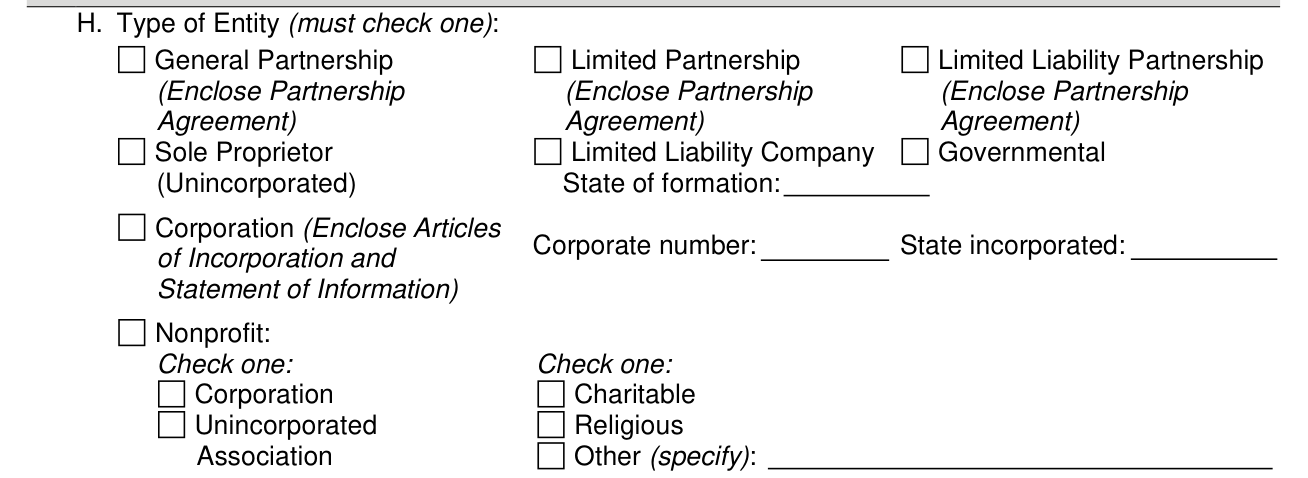
H. Type of Entity (must check one).
Limited Partnership: enclose the Partnership Agreement.
Corporation: enclose Articles of Incorporation and Statement of Information.
Fines, debts and other providers (Section I, Parts I and J)
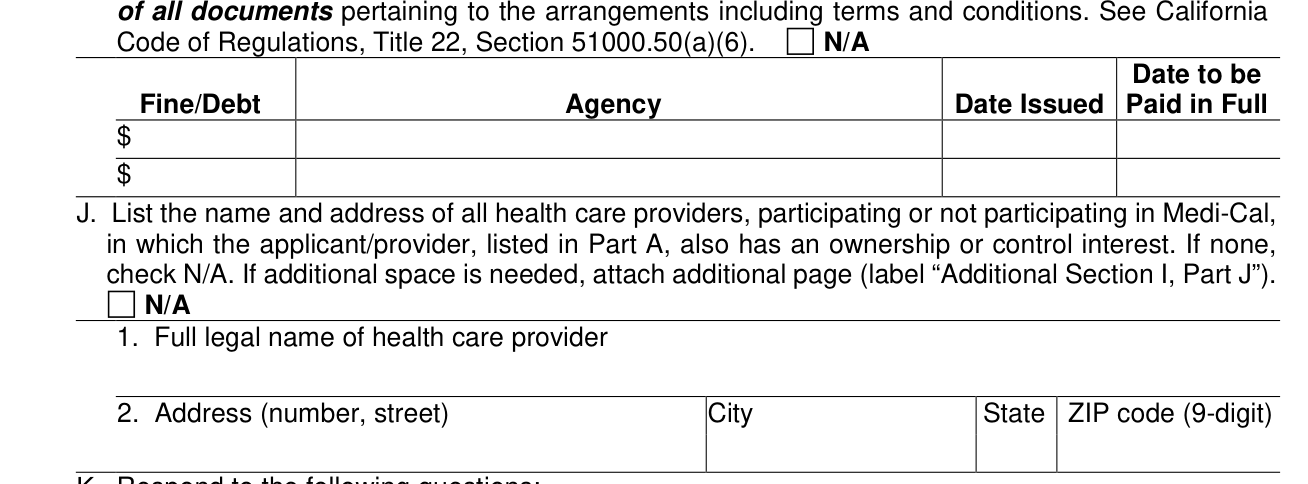
I. List fines/debts due and owing by applicant/provider to any federal, state, or local government that relate to Medicare, Medicaid and all other federal and state health care programs that have not been paid and what arrangements have been made to fulfill the obligation(s). Submit copies of all documents pertaining to the arrangements including terms and conditions. See California Code of Regulations, Title 22, Section 51000.50(a)(6). In each row: Fine/Debt, Agency, Date Issued, Date to be Paid in Full.
J. List the name and address of all health care providers, participating or not participating in Medi-Cal, in which the applicant/provider, listed in Part A, also has an ownership or control interest. If none, check N/A. If additional space is needed, attach additional page (label “Additional Section I, Part J”).
Declaration and signature page
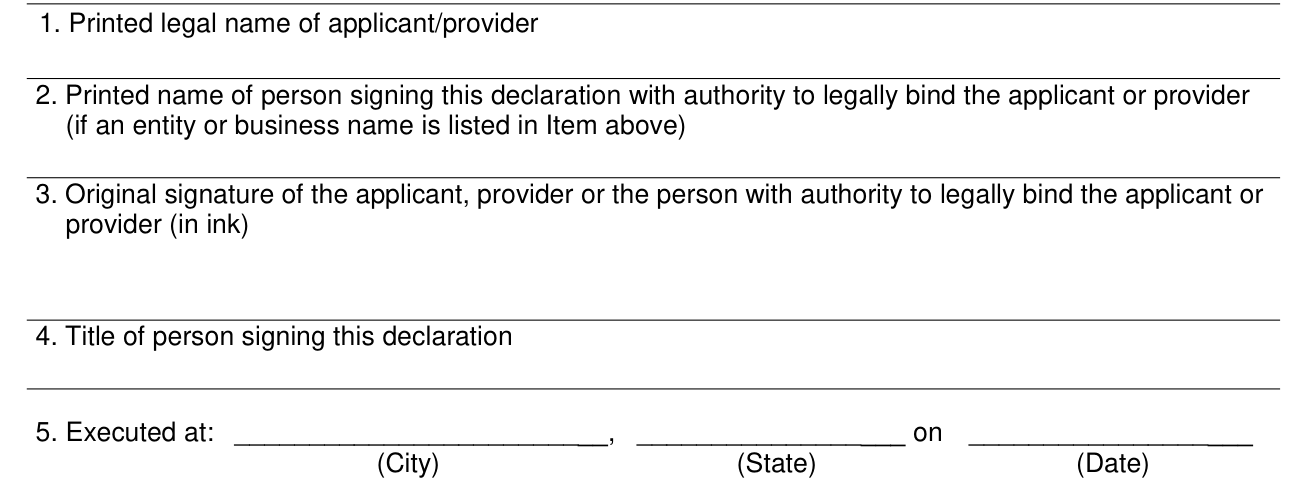
“I declare under penalty of perjury under the laws of the State of California that the information in this document and any attachments is true, accurate, and complete to the best of my knowledge and belief.”
Enter 1. Printed legal name of applicant/provider. Enter 2. Printed name of person signing this declaration with authority to legally bind the applicant or provider (if an entity or business name is listed in Item 1).
Legal name of applicant/provider must match name listed on associated application package.
3. Original signature of the applicant, provider or the person with authority to legally bind the applicant or provider (in ink).
Enter 4. Title of person signing this declaration and 5. Executed at: City, State, and Date.
Applicants and providers licensed pursuant to Division 2 (commencing with Section 500) of the Business and Professions Code, the Osteopathic Initiative Act, or the Chiropractic Initiative Act ARE NOT REQUIRED to have this form notarized. If notarization is required, the Certificate of Acknowledgement signed by the Notary Public must be in the form specified in Section 1189 of the Civil Code.
More rules for DHCS 6207
Submitting a complete and accurate Medi-Cal Disclosure Statement is required. Read all instructions when completing the Medi-Cal Disclosure Statement. Type or print clearly in ink. Do not use staples on this form or on any attachments. If applicant/provider must make corrections, line through, date, and initial in ink. Do not use correction fluid.
Do not use a pencil, correction tape, white out, highlighter pen, etc. on this form.
Do not leave any questions, boxes, lines, etc., blank. Check or write N/A if not applicable to you.
The consequences of not supplying the mandatory information requested are denial of enrollment as a Medi-Cal provider or denial of continued enrollment as a provider and deactivation of all provider numbers used by the provider to obtain reimbursement from the Medi-Cal program.
Sole-proprietor, partnership, corporation, subcontractor, pharmacy
You are an unincorporated sole-proprietor or an individual rendering provider adding to a group
If you, the applicant/provider, are an unincorporated sole-proprietor or an individual rendering provider adding to a group, proceed to Section II.
If you, the applicant/provider, are an unincorporated sole-proprietor, proceed to Section V. If you, the applicant/provider, are a rendering provider adding to a group, proceed to Section VIII.
In Section II, enter E. Driver's license number or state-issued identification number (Attach a current and legible copy).
You are a partnership, corporation, governmental entity, or nonprofit organization
If you, the applicant/provider, are a partnership, corporation, governmental entity, or nonprofit organization, proceed to Section III.
In the table, list all corporations, unincorporated associations, partnerships, or similar entities having 5% or more (direct or indirect) ownership or control interest, or any partnership interest, in the applicant/provider identified in Section I. Attach a separate Section III, Part Band C for each entity listed. Check here if this section does not apply and proceed to Section IV.
Corporations with ownership or control interest in the applicant or provider must provide all corporate business addresses and the corporation Taxpayer Identification Number issued by the IRS. For verification, a legible copy of the IRS Form 941, Form 8109-C, Letter 147-C, or Form SS-4 (Confirmation Notification) must be included.
In the table, list any individual that has 5% or more (direct or indirect) ownership or control interest or any partnership interest, in the applicant/provider identified in Section I. In addition, all officers of the corporation, directors, agents and managing employees of the applicant/provider must be reported in this section. Attach a separate Section IV, Part Band C for each individual listed.
You have subcontractors
“Subcontractor” means an individual, agency, or organization. It is one to which an applicant or provider has contracted or delegated some of its management functions or responsibilities of providing healthcare services, equipment, or supplies to its patients. It is also one with whom an applicant or provider has entered into a contract, agreement, purchase order, lease, or leases of real property, to obtain space, supplies, equipment, or services provided under the Medi-Cal Program.
You sell incontinence medical supplies or run a pharmacy
Does the applicant/provider intend to sell or currently sell incontinence medical supplies? If No, Pharmacy applicants/providers proceed to Section VII. All other applicants/providers proceed to Section VIII. If Yes, provide the following information: A. List the names and addresses of all current sources of capital, as defined in CCR, Title 22, Section 51000.5.
All pharmacy applicants or providers must complete Section VII.
Proceed to Section VIII.
Common questions about DHCS 6207
Does it need a notary?
Physicians, Pharmacy providers, Chiropractors, Osteopaths, Certified Nurse Midwives and Nurse Practitioners do not need to notarize this form. Durable Medical Equipment (DME) providers, Prosthetics, Orthotics, Medical Transportation providers, etc., must notarize this form.
When is this form not the right one?
All applicants and providers must complete Section I unless they are eligible to use the Medi-Cal Rendering Provider Application/Disclosure Statement/Agreement for Physician/Allied/Dental Providers (DHCS 6216) or the Medi-Cal Ordering/Referring/Prescribing Provider Application/Agreement/ Disclosure Statement for Physician and Nonphysician Practitioners (DHCS 6219).
Sources
[1] Medi-Cal Disclosure Statement, DHCS 6207 (Rev. 2/17), California Department of Health Care Services (the Official source link on this page).