
What Is the CalPERS Beneficiary Form?

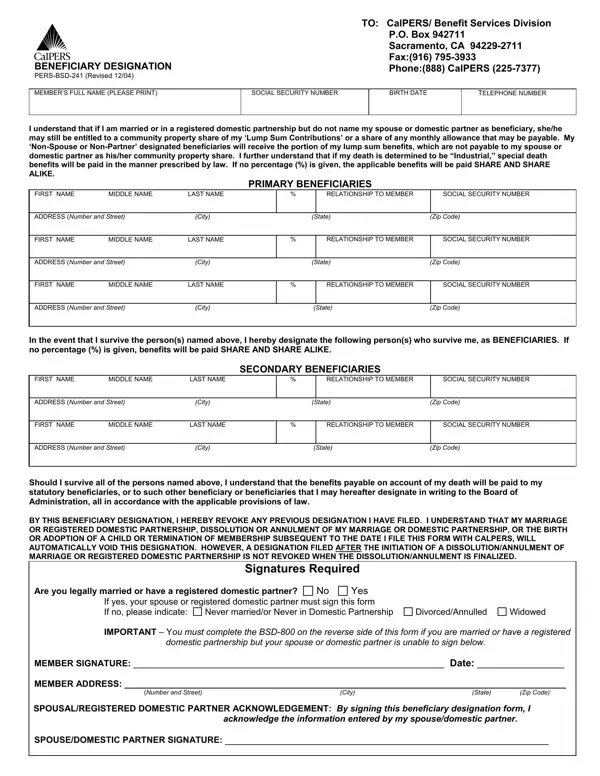
The CalPERS Beneficiary Designation Form (BSD-241) is the legal document that determines who receives your retirement contributions and death benefits. Every active and inactive CalPERS member should have a current designation on file. Members with at least 20 years of State service credit may qualify for a monthly death benefit allowance paid directly to their named beneficiary.

What the form covers:

When your designation is automatically revoked: CalPERS cancels your existing beneficiary designation when any of these life changes occur:

After any of these events, file a new designation right away. If your spouse or domestic partner cannot sign, the form provides alternative certification options including written acknowledgment or a court order. Spouses and domestic partners have legal rights to a portion of community property benefits, so both parties must sign or a valid exception must be documented.

Members who wish to designate a trust, organization, or estate as a beneficiary must provide the tax ID number and the trustee or representative's name on the form. Keep a copy of your completed form for your personal records.

See also: CalPERS Retirement Application Form and the FE-6 Claim for Death Benefits.

QuestionAnswer
Form NameCalpers Beneficiary Form
Form Length4 pages
Fillable?No
Fillable fields0
Avg. time to fill out1 min
Other namescalpers bsd241, calpers change in beneficiary, calper bsd 241, pers bsd 241 form

How to Edit Calpers Beneficiary Form Online for Free

Who Needs to Submit the CalPERS Beneficiary Form

All active and inactive CalPERS members must have a beneficiary designation on file. This includes state employees, school employees, and local public agency workers covered by CalPERS. Without a filed designation, CalPERS distributes benefits according to its statutory order of succession. That order may not match your wishes. File the BSD-241 form when you first enroll and again whenever a qualifying life event occurs.

You should also review your designation after any marriage, divorce, birth, or adoption. An old designation stays on file until you replace it. CalPERS does not automatically update your beneficiaries when your family changes, except in cases of automatic revocation.

What You Need to Complete the CalPERS Beneficiary Form

Gather this information for each person you plan to name before you start:

  • Full legal name (first, middle, last)
  • Complete mailing address (city, state, ZIP code)
  • Social Security number or CalPERS ID
  • Relationship to you (spouse, child, sibling, parent, etc.)
  • Percentage share of benefits (all percentages must add up to 100%)

You can fill out the form using our free online PDF editor. No software download is needed. The tool works in any browser.

Step 1: Click the "Get Form" button at the top of this page to open our editor.

Step 2: Once you open the editor, the document is ready to complete. You can fill blank fields, edit existing text, add signatures, and insert images.

Work through each section in order. Here is what each part requires:

1. Start completing your calper bsd 241 with a group of major blank fields. Collect all of the required information and be sure absolutely nothing is omitted!

Filling in section 1 of pers bsd 800

2. The subsequent step would be to fill in the next few fields: MIDDLE NAME, LAST NAME, RELATIONSHIP TO MEMBER, SOCIAL SECURITY NUMBER, SECONDARY BENEFICIARIES, FIRST NAME ADDRESS Number and, City, MIDDLE NAME, LAST NAME, City, State, Zip Code, RELATIONSHIP TO MEMBER, SOCIAL SECURITY NUMBER, and State.

Part no. 2 in filling in pers bsd 800

3. Completing MEMBER SIGNATURE Date MEMBER, SPOUSEDOMESTIC PARTNER SIGNATURE, and acknowledging the information is essential for the next step. Fill each field in its entirety. Do not leave any signature field blank.

Part number 3 for filling in pers bsd 800

4. All set to start working on this fourth section! Here you have all these MEMBERS NAME TYPED OR PRINTED, APPLICATION SUBMITTED, SOCIAL SECURITY NUMBER, BENEFICIARY DESIGNATION PERSBSD, Select either or and indicate, By checking this box I indicate, because, Never married or never in, Divorcedmarriage annulled or, Widowed, Date mmddyyyy, Date mmddyyyy, By checking this box I indicate, domestic partner did not sign this, and I do not know and have taken all empty form fields to fill out.

Learn how to complete pers bsd 800 portion 4

People generally get some points incorrect while filling in Select either or and indicate in this part. Be certain to revise everything you type in right here.

5. This last point to finalize this PDF form is pivotal. Make certain to fill in the appropriate form fields, such as domestic partner OR, My spouse or domestic partner has, written acknowledgement OR, My spouse or domestic partner is, incapacitating mental or physical, My spouse or domestic partner has, My spouse or domestic partner and, agreement that makes the community, I certify under penalty of perjury, MEMBERS SIGNATURE, PERSBSD Revised, and DATE SIGNED, prior to using the document. Neglecting to do this might end up in an incomplete and possibly invalid document!

PERSBSD Revised, My spouse or domestic partner has, and I certify under penalty of perjury inside pers bsd 800

Step 3: After double-checking all fields and details, click "Done" to save. Sign up for a free FormsPal account to download your completed calper bsd 241. Your changes save automatically and your information stays private.

Common Mistakes to Avoid on the CalPERS Beneficiary Form

These errors cause delays or invalid designations. Check each one before you submit:

  • Percentages that do not add up to 100% across all primary beneficiaries
  • Missing spouse or domestic partner signature without a valid exception noted
  • Using a nickname instead of the beneficiary's full legal name
  • Leaving the Social Security number field blank for any named beneficiary
  • Not updating the form after a marriage, divorce, birth, or adoption

Frequently Asked Questions about the CalPERS Beneficiary Form

What is the CalPERS Beneficiary Designation Form (BSD-241)?

The BSD-241 is the official CalPERS form used to name who will receive your retirement contributions and death benefits. All active and inactive CalPERS members should keep a current designation on file. Filing this form gives you direct control over how your CalPERS benefits are paid after your death.

How often should I update my CalPERS beneficiary designation?

Review your designation every few years and after any major life event. Marriage, divorce, the birth or adoption of a child, or the death of a named beneficiary each require a new form. Your old designation is automatically revoked when you marry or register a domestic partnership. Submit the updated form as soon as possible after each event.

Can I name more than one beneficiary?

Yes. The form lets you list both primary and secondary beneficiaries. If a primary beneficiary dies before you, CalPERS pays the secondary beneficiary. Each entry requires a percentage share, and all shares must total 100%.

What happens if I do not file a beneficiary designation?

If you have no designation on file, CalPERS pays your benefits according to the statutory order of succession. This order may not match your wishes. Filing a current BSD-241 is the only way to make sure your chosen beneficiary receives your benefits.

For related beneficiary and retirement forms, see the CalPERS Retirement Application Form, the Unum Beneficiary Designation Form, the Cigna Beneficiary Designation Form, or the AIG Beneficiary Designation Form.