Carefirst Cancellation Form PDF Details

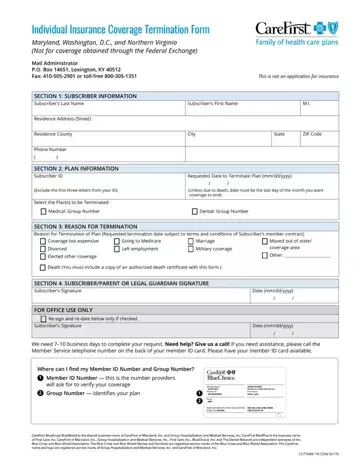
The CareFirst Cancellation Form is for residents of Maryland, Washington D.C., and Northern Virginia who need to terminate their CareFirst individual health insurance coverage. It applies to medical, dental, and vision plans enrolled directly with CareFirst, not through the Federal Exchange, an employer group, or a government program.

To complete the form, you will need your Member ID number, subscriber name and date of birth, plan name, and reason for cancellation. Common reasons include transitioning to Medicare, a change in marital status, moving out of the covered region, or selecting a new plan during open enrollment. For retroactive cancellations due to a subscriber's death, additional documentation may be required.

Submit the form before the last day of the month to terminate coverage at month's end. CareFirst needs a few business days to process cancellation requests. Failing to pay premiums before submitting this form may affect the termination date. A termination request can be withdrawn, but only before CareFirst begins processing it.

QuestionAnswer
Form NameCarefirst Cancellation Form
Form Length6 pages
Fillable?No
Fillable fields0
Avg. time to fill out1 min 30 sec
Other namescarefirst cancellation, carefirst insurance termination, carefirst reinstatement form, member cancellation form
States coveredMaryland, Washington D.C., Northern Virginia
Submission deadlineLast day of the month for month-end cancellation
Coverage typesIndividual medical, dental, and vision plans

How to Edit Carefirst Cancellation Form Online for Free

Submitting documents together with our PDF editor is straightforward. To fill out the carefirst cancellation form, follow the steps below:

Step 1: Choose the button "Get Form Here".

Step 2: You will be on the document edit page. You can add, enhance, highlight, check, cross, add or remove fields or text.

Fill out the carefirst plan termination form PDF and provide the details for each segment:

part 1 to completing carefirst cancellation form

Type in the details in the subscriber section: your Member ID, subscriber name, plan name, coverage type, and date of birth. Also complete the FOR OFFICE USE ONLY section and the signature fields with the required date.

carefirst cancellation form subscriber and plan details fields to fill out

Fill in the exchange information fields as needed: Maryland Health Connection (marylandhealthconnection.gov), DC Health Link (dchealthlink.com), or HealthCare.gov. Include your requested termination date and the reason for cancellation.

carefirst cancellation form termination date and exchange information fields to complete

Step 3: When you are done, hit the "Done" button to transfer the PDF document.

Step 4: Create a copy of each document. It will save you time and help you avoid issues later. Your information is not distributed or analyzed by us.

What You Need to Complete the CareFirst Cancellation Form

Before filling out the form, gather the following information:

  • Your Member ID number (printed on your CareFirst ID card)
  • Full subscriber name and date of birth
  • Plan name and coverage type (medical, dental, or vision)
  • Reason for cancellation (for example: Medicare transition, relocation, open enrollment change, or change in marital status)
  • Requested termination effective date

Frequently Asked Questions About the CareFirst Cancellation Form

Who should use the CareFirst Cancellation Form?

Residents of Maryland, Washington D.C., and Northern Virginia who enrolled in a CareFirst individual plan directly (not through the Federal Exchange, an employer, or a government-sponsored program) should use this form to cancel their coverage.

How long does CareFirst take to process a cancellation?

CareFirst typically needs a few business days to process termination requests. To ensure coverage ends at the close of the current month, submit the form before the last day of that month.

Can I cancel CareFirst coverage retroactively?

Retroactive cancellations are only permitted in limited cases, such as when a subscriber passes away. Standard cancellations are not retroactive. Failing to pay premiums before cancellation may affect your termination date.

Can I withdraw a cancellation request?

You can withdraw a termination request, but only before CareFirst begins processing it. Once processing starts, the cancellation cannot be reversed.

What if my coverage was provided through an employer or the Federal Exchange?

If your coverage was provided through an employer or obtained through the Federal Exchange, you cannot use this form. Contact your employer's HR department or the relevant exchange to cancel that type of coverage.

Related Health Insurance Forms

If you are changing or ending your health insurance coverage, these forms may also be useful:

Watch Carefirst Cancellation Form Video Instruction

Please rate Carefirst Cancellation Form

1 Votes
If you believe this page is infringing on your copyright, please familiarize yourself with and follow our DMCA notice and takedown process - click here to proceed .