
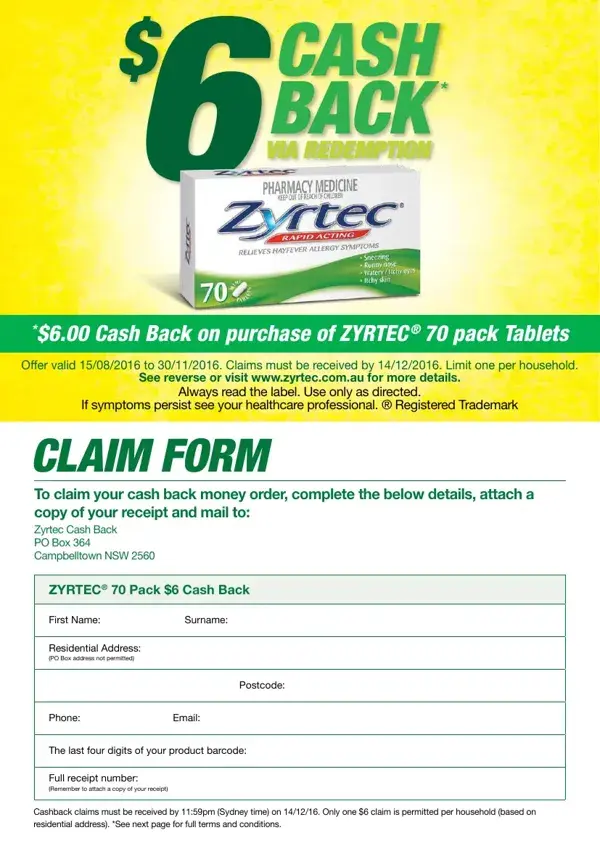
How to Fill Out and Submit the Cashback Claim Form
Follow these steps to complete and submit your ZYRTEC® cashback claim form correctly. Having all required documents ready before you begin will make the process faster and reduce the risk of errors on your claim submission.
- Download and print the form. Use the button on this page to open the Cashback Claim Form PDF. Print a clean copy on standard A4 paper. Make sure the printed copy is clear and all text is legible before filling it out.
- Enter your personal information. Write your full legal name, current mailing address, phone number, and email address in the personal information section. Use block capital letters to ensure all details are legible for the processing center.
- Record the barcode digits. Locate the barcode on your ZYRTEC® 70 pack product packaging. Find the last four digits of the barcode number and write them in the designated barcode field on the claim form. These digits are required to confirm which specific product was purchased.
- Enter your receipt number. Find the full transaction receipt number printed on your store receipt. This number is usually located near the top or bottom of the receipt. Enter the full number in the receipt number field on the claim form.
- Attach a copy of your receipt. Make a clear photocopy or printed scan of your original store receipt. The copy must show the product name, quantity purchased, the price paid, and the date of purchase. Attach this copy to the completed claim form before mailing.
- Review all information. Before sealing your envelope, check that every field is filled in accurately. Confirm that the barcode digits match your packaging and the receipt number matches your purchase receipt. Missing or incorrect information is the most common reason claims are rejected or delayed.
- Mail your completed claim. Place the completed form and receipt copy together in an envelope and mail to the claim processing address printed on the form. Keep photocopies of all documents for your own records until the rebate payment arrives.
What Information Do You Need Before You Start?
Gather the following information and documents before you begin filling out the cashback claim form. Having everything ready in advance will allow you to complete the form in one sitting without delays.
- Your full name and current mailing address for receiving the rebate payment
- A working phone number and email address for contact purposes
- The ZYRTEC® 70 pack product packaging with the barcode clearly visible
- Your original store purchase receipt showing the product, price, and date
- A pen for completing the printed form, or a compatible PDF editor for digital completion
- An envelope and postage stamp for mailing the documents
Keep your original receipt and product packaging separate from the copies you send. You may need to reference these original documents if the processing center requests additional information to verify your claim.
How Long Does a Cashback Claim Take to Process?
Mail-in cashback claims typically take four to six weeks to process after the submission deadline. Once the claim processing center receives your documents, they verify the information against the purchase records and eligibility criteria. If your claim is approved, the $6.00 rebate payment is sent by cheque or bank transfer to the address or bank account details you provided on the form. If you submitted your documents before the December 14, 2016 deadline and have not received your payment within eight weeks, contact the claim processing center and provide your receipt number and the date you mailed your submission.
Who Is Eligible to Claim the ZYRTEC Cashback Rebate?
The ZYRTEC® cashback promotion was open to Australian residents who purchased ZYRTEC® 70 pack Allergy Tablets at an authorized retail store during the promotional period from August 15 to November 30, 2016. The following conditions applied to all submitted claims:
- One claim per household only, regardless of how many qualifying products were purchased
- The purchase must have been made during the promotional period at an authorized retailer
- The completed claim form and all documents must have been submitted by December 14, 2016
- Purchases made for resale or business purposes were not eligible for the rebate
- Employee purchases and bulk purchases were excluded from the promotion
Common Questions About Cashback Claim Forms
Can I submit the claim form online?
This particular claim required submission by mail. You could complete the form digitally using a PDF editor, but you still needed to print, sign, and mail the completed form along with your receipt copy to the address shown on the form.
What if I have lost my purchase receipt?
A copy of your store receipt was required to verify your purchase and process the cashback claim. Without it, the claim could not be approved. Contact the retailer where you made the purchase and ask whether a duplicate receipt or transaction record is available before submitting your claim form.
Can I submit more than one cashback claim?
No. This promotion was limited to one claim per household address, regardless of the number of qualifying purchases made. Additional claims from the same household address were not accepted by the processing center.
What happens if my claim is returned or rejected?
If your claim was returned or rejected, the processing center would notify you with the reason. Common reasons include missing information, an unreadable receipt copy, incorrect barcode digits, or a claim submitted after the cutoff date. In many cases, you could correct the issue and resubmit within the allowed timeframe if the deadline had not passed.
Do I need to send my original receipt?
No. A clear photocopy or printed scan of your original receipt was sufficient. Keep the original receipt safely stored in case additional verification is needed during processing.
Related Claim Forms and Rebate Documents
If you need to fill out a different type of rebate or claim document, the following related forms are also available on this site:
- Mail-in Rebate Form for submitting product rebates by post
- Bravecto Rebate Form for claiming cash back on pet medication purchases
- Hunter Douglas Official Rebate Form for manufacturer rebate claims on home furnishing products
- 1450 Claim Form for standard insurance and benefit claim submissions
- Deposit Refund Form for requesting the return of a security or rental deposit payment
