
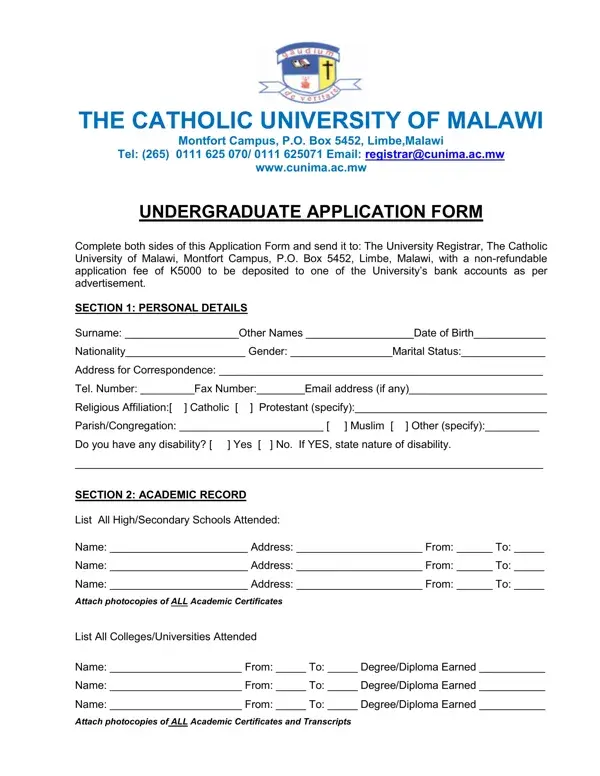
The Catholic University of Malawi (CUNIMA) is a private, faith-based institution located in Balaka, Malawi. It was established by the Catholic Bishops of Malawi and offers undergraduate degree programs across several faculties. The university accepts students from Malawi and neighboring countries who meet the academic entry requirements.
The application form covers several key areas. Prospective students must provide complete personal information, including their full name, date of birth, nationality, and contact details. The form also requires a detailed academic history, listing all secondary and higher education institutions attended along with relevant certificates and transcripts.
Program preferences are an important part of the application. Applicants choose from degree programs including Economics, Political Leadership, Social Work, and Business Administration. Financial support details must also be provided, indicating whether the student is self-funded or supported by an institution or sponsor.
A distinctive feature of the CUNIMA application is the mandatory recommendation from the applicant's religious leader. This reflects the university's Catholic values and commitment to character formation. Applicants must confirm the accuracy of all information provided, as any misrepresentation may result in withdrawal of admission.
The form concludes with sections reserved for official use. These include recommendations from the faculty dean, Deputy Vice Chancellor-Academic, and the Admissions Committee, followed by a final decision from the Chairperson of the University Senate.
| Question | Answer |
|---|---|
| Form Name | Catholic University Of Malawi Application Form |
| Form Length | 2 pages |
| Fillable? | No |
| Fillable fields | 0 |
| Avg. time to fill out | 30 sec |
| Other names | cunima, mwaiwao lungu cunima ac com, catholic university application form, weekend fees per academic year at catholic university of malawi |