Ccc 902I Form PDF Details

The ccc 902i form, issued by the U.S. Department of Agriculture's Commodity Credit Corporation (CCC), is used by the Farm Service Agency (FSA) to determine payment eligibility and payment limitations for individual farmers. It applies to individuals only. Entities, partnerships, and joint operations use the separate CCC-902E form instead.

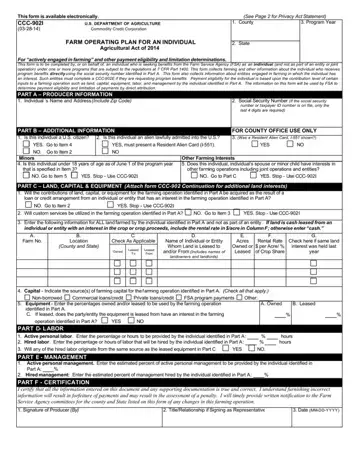
Required under the Agricultural Act of 2014, the ccc 902i form collects information across several key parts:

Part A - General Information: The applicant provides their full name, address, and social security number. The FSA uses this to track and allocate program benefits accurately.

Part B - Status as an Individual: This section confirms that the applicant is filing as a natural person. It distinguishes individual filers from legal entities and triggers the correct payment limitation rules under FSA requirements.

Part C - Land, Capital, and Equipment: Applicants list each farm they are associated with by farm number, county, state, and total acreage. The form asks whether the land is owned or leased and requires the name of any entity or individual from whom it is leased. Custom service arrangements are also documented here.

Parts D through G - Contribution Percentages: These sections capture what percentage of each resource the applicant contributes: land, capital, equipment, active personal labor, and active personal management. The FSA reviews these figures to verify "actively engaged in farming" status required for payment eligibility.

Part H - Certification and Signatures: The applicant signs the ccc 902i form to certify that all information is accurate and complete. Providing false information may result in civil or criminal penalties under federal law.

The form also includes a Privacy Act statement and an equal opportunity policy. If you have interests in more than one farming operation, a separate form may be required for each. Browse related USDA Department of Agriculture forms on FormsPal, including the CCC-10 form and CCC-526-C form.

QuestionAnswer
Form NameCcc 902I Form
Form Length2 pages
Issuing AgencyUSDA Farm Service Agency (FSA)
ProgramAgricultural Act of 2014 - Payment Eligibility
Fillable?Yes (via FormsPal PDF editor)
Avg. time to fill out30-60 min
Other namesccc 902 farm operating plan, usda ccc 902, ccc 902e, ccc 902
Who uses itIndividual farmers seeking FSA program payments

How to Edit Ccc 902I Form Online for Free

Our PDF editor makes it easy to complete the ccc 902i form online without printing. Follow these steps to fill out the form accurately before submitting it to your local FSA county office.

Step 1: Click the orange "Get form now" button at the top of the page to open the ccc 902i form in our online PDF editor.

Step 2: Once the editing page loads, you will find all available tools in the top menu. Use the text tool to enter your information into each field of the form.

stage 1 to writing usda form 902

To complete Part C of the form, fill in the following details for each farm you are associated with:

  • Farm number and location county and state
  • Whether the land is owned or leased (check the applicable box)
  • Name of the individual or entity from whom the land is leased, if applicable
  • Total acres owned or leased
  • Whether custom services will be used (YES or NO)
stage 2 to entering details in usda form 902

Step 3: In the contribution percentage section, enter your percentage for land, capital, equipment, labor, and management. Add your signature as the producer, your title or relationship if signing on behalf of another party, and the date in MM/DD/YYYY format.

usda form 902 Equipment Enter the percentages Signature of Producer By TitleRelationship if Signing as and Date MMDDYYYY fields to fill out

Step 4: Select "Done" to finalize the form. You can download the completed PDF, print it, or save it to your account for future reference.

Step 5: Submit the completed ccc 902i form to your local FSA county office. Contact the FSA in advance to confirm the accepted submission method for your county, whether in person, by mail, or through the USDA eAuthentication portal.

Frequently Asked Questions About the Ccc 902I Form

Who is required to file the ccc 902i form?

Any individual farmer who is a natural person (not a legal entity) applying for FSA program payments under the Agricultural Act of 2014 must complete this form. This includes owners, operators, and landlords who make a qualifying contribution to a farming operation and wish to claim payment eligibility.

What is the difference between the CCC-902I and CCC-902E forms?

The ccc 902i form is for individuals. The CCC-902E is for legal entities such as corporations, partnerships, and limited liability companies. If you are involved in both an individual farming operation and a legal entity, you must submit both forms to the FSA. FormsPal also provides access to the CCC-679 form and other related FSA documents.

What does "actively engaged in farming" mean?

To be considered actively engaged in farming, you must make a significant contribution to the farming operation in at least one of five areas: land, capital, equipment, active personal labor, or active personal management. The FSA reviews your contribution percentages on the ccc 902i form to verify that you qualify for FSA program payments.

How long does it take to complete this form?

The ccc 902i form typically takes 30 to 60 minutes to complete, depending on how many farming operations you are associated with. Using the FormsPal PDF editor, you can save your progress and return to finish it at any time.

Can I submit this form electronically?

Some FSA county offices accept the ccc 902i form through the USDA eAuthentication system. Check with your local FSA office to confirm which submission methods are accepted. You can also print the completed form and deliver it in person or by mail.

Watch Ccc 902I Form Video Instruction

Please rate Ccc 902I Form

1 Votes
If you believe this page is infringing on your copyright, please familiarize yourself with and follow our DMCA notice and takedown process - click here to proceed .
