
CERT-119 at a glance
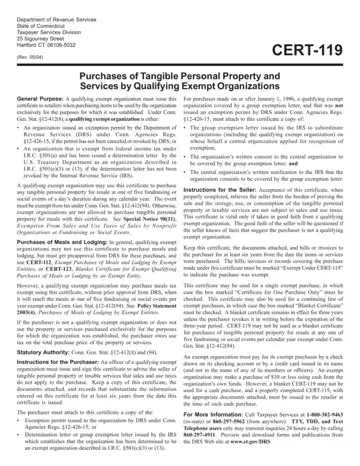
What it is: CERT-119 is Purchases of Tangible Personal Property and Services by Qualifying Exempt Organization, with Instructions for the Purchaser and Instructions for the Seller.
Who signs: An officer of a qualifying exempt organization must issue and sign this certificate to advise the seller of tangible personal property or taxable services that sales and use taxes do not apply to the purchase. Keep a copy of this certificate, the documents attached, and records that substantiate the information entered on this certificate for at least six years from the date this certificate is issued.
A qualifying exempt organization must issue this certificate to retailers when purchasing items to be used by the organization exclusively for the purposes for which it was established. Under Conn. Gen. Stat. § 12-412(8), a qualifying exempt organization is either an organization issued an exemption permit by the Department of Revenue Services (DRS) under Conn. Agencies Regs. § 12-426-15, if the permit has not been canceled or revoked by DRS; or an organization that is exempt from federal income tax under I.R.C. § 501(a) and has been issued a determination letter by the U.S. Treasury Department as an organization described in I.R.C. § 501(c)(3) or (13), if the determination letter has not been revoked by the Internal Revenue Service (IRS).
What to bring and attach to CERT-119
The purchaser must attach to this certificate a copy of the: Exemption permit issued to the organization by DRS under Conn. Agencies Regs. § 12-426-15; or Determination letter or group exemption letter issued by the IRS which establishes that the organization has been determined to be an exempt organization described in I.R.C. § 501(c)(3) or (13).
For purchases made on or after January 1, 1996, a qualifying exempt organization covered by a group exemption letter, and that was not issued an exemption permit by DRS under Conn. Agencies Regs. § 12-426-15, must attach to this certificate a copy of: The group exemption letter issued by the IRS to subordinate organizations (including the qualifying exempt organization) on whose behalf a central organization applied for recognition of exemption; The organization's written consent to the central organization to be covered by the group exemption letter; and The central organization's written notification to the IRS that the organization consents to be covered by the group exemption letter.
A filled-in CERT-119 example: a booster club officer buys paper
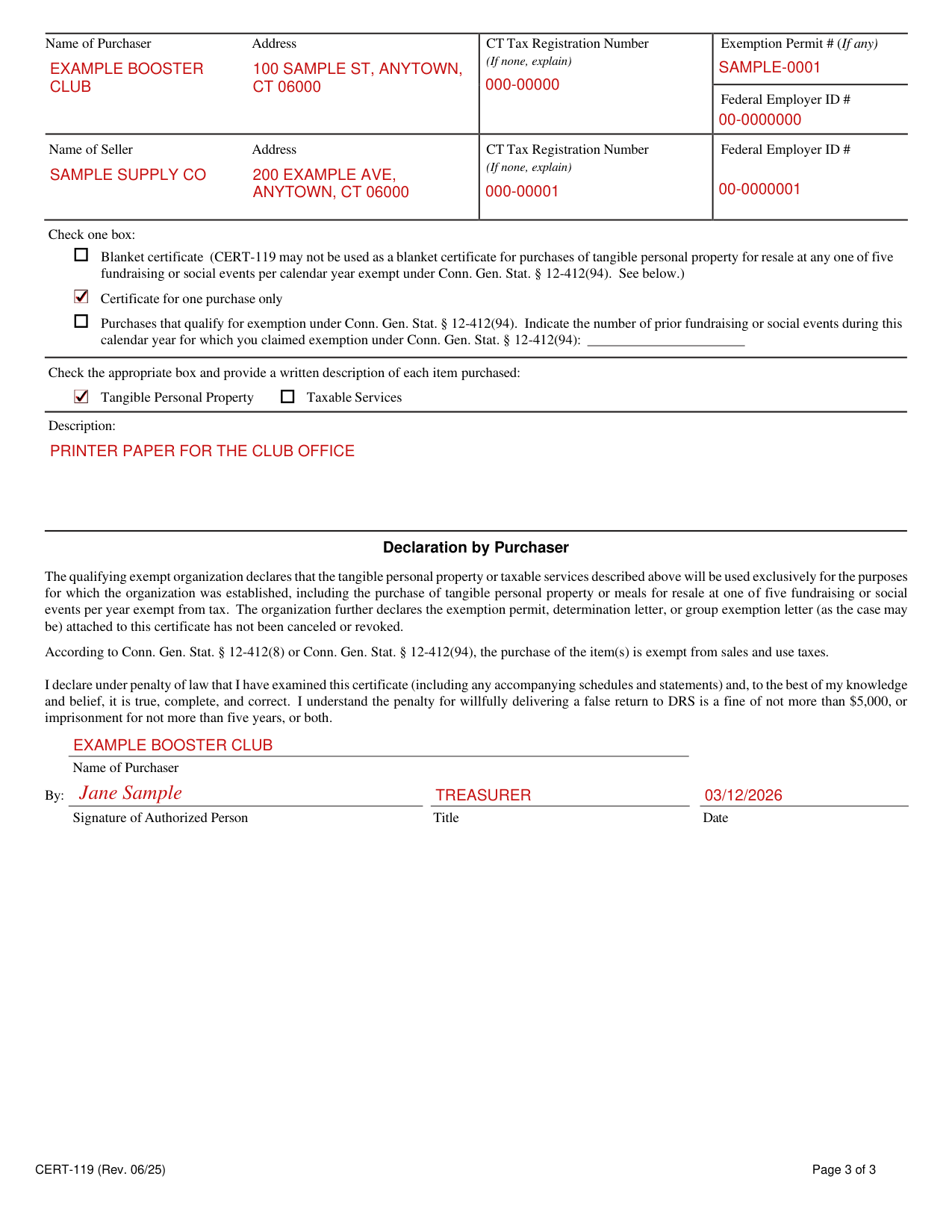
How to fill out CERT-119, box by box
Purchaser and Seller
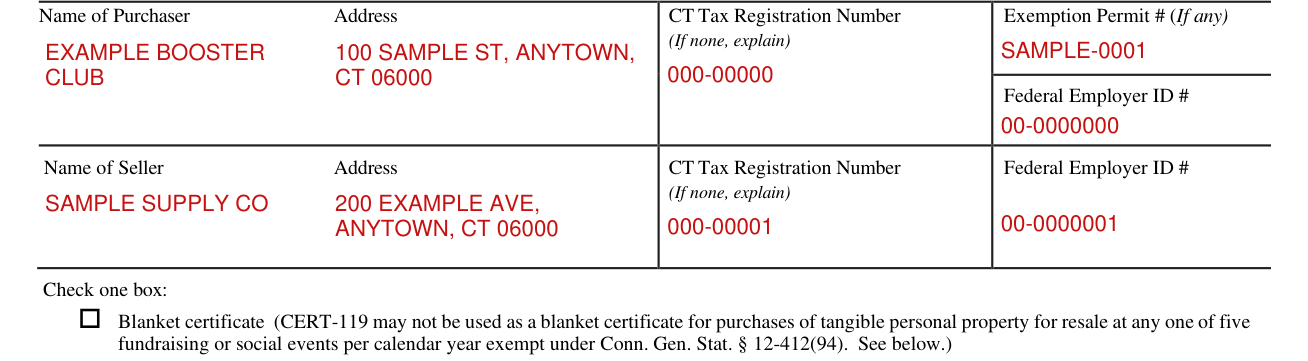
Enter the Name of Purchaser, Address, CT Tax Registration Number (If none, explain), Exemption Permit # (If any) and Federal Employer ID #.
Enter the Name of Seller, Address, CT Tax Registration Number (If none, explain) and Federal Employer ID #.
Check one box

This certificate may be used for a single exempt purchase, in which case the box marked “Certificate for One Purchase Only” must be checked.
This certificate may also be used for a continuing line of exempt purchases, in which case the box marked “Blanket Certificate” must be checked. A blanket certificate remains in effect for three years unless the purchaser revokes it in writing before the expiration of the three-year period.
CERT-119 may not be used as a blanket certificate for purchases of tangible personal property for resale at any one of five fundraising or social events per calendar year exempt under Conn. Gen. Stat. § 12-412(94).
An exempt organization may make a purchase of $10 or less using cash from the organization's own funds. However, a blanket CERT-119 may not be used for a cash purchase, and a properly completed CERT-119, with the appropriate documents attached, must be issued to the retailer at the time of each cash purchase. (checked October 20, 2026)
The boxes under Check one box are Blanket certificate, Certificate for one purchase only and Purchases that qualify for exemption under Conn. Gen. Stat. § 12-412(94); check one box.
Indicate the number of prior fundraising or social events during this calendar year for which you claimed exemption under Conn. Gen. Stat. § 12-412(94):
A qualifying exempt organization may use this certificate to purchase any tangible personal property for resale at one of five fundraising or social events of a day's duration during any calendar year. The event must be exempt from tax under Conn. Gen. Stat. § 12-412(94). Otherwise, exempt organizations are not allowed to purchase tangible personal property for resale with this certificate. See Special Notice 98(11), Exemption From Sales and Use Taxes of Sales by Nonprofit Organizations at Fundraising or Social Events.
Tangible Personal Property, Taxable Services and Description

Check the appropriate box, Tangible Personal Property or Taxable Services, and provide a written description of each item purchased in Description.
Declaration by Purchaser

The qualifying exempt organization declares that the tangible personal property or taxable services described in Description will be used exclusively for the purposes for which the organization was established, including the purchase of tangible personal property or meals for resale at one of five fundraising or social events per year exempt from tax.
The organization further declares the exemption permit, determination letter, or group exemption letter (as the case may be) attached to this certificate has not been canceled or revoked.
According to Conn. Gen. Stat. § 12-412(8) or Conn. Gen. Stat. § 12-412(94), the purchase of the item(s) is exempt from sales and use taxes.
I declare under penalty of law that I have examined this certificate (including any accompanying schedules and statements) and, to the best of my knowledge and belief, it is true, complete, and correct.
Enter the Name of Purchaser, then the Signature of Authorized Person, Title and Date.
More rules for CERT-119
If the purchaser is not a qualifying exempt organization or does not use the property or services purchased exclusively for the purposes for which the organization was established, the purchaser owes use tax on the total purchase price of the property or services.
If your situation is different
Purchases of Meals and Lodging
In general, qualifying exempt organizations may not use this certificate to purchase meals and lodging, but must get preapproval from DRS for these purchases, and use CERT-112, Exempt Purchases of Meals and Lodging by Exempt Entities, or CERT-123, Blanket Certificate for Exempt Qualifying Purchases of Meals or Lodging by an Exempt Entity.
However, a qualifying exempt organization may purchase meals tax exempt using this certificate, without prior approval from DRS, when it will resell the meals at one of five fundraising or social events per year exempt under Conn. Gen. Stat. § 12-412(94). See Policy Statement 2003(4), Purchases of Meals of Lodging by Exempt Entities.
The source of the funds
An exempt organization must establish the source of the funds used to purchase property or services with this certificate. This can be accomplished by a variety of methods, including making purchases using a check drawn on an exempt organization's checking account or by a credit card issued in the exempt organization's name.
Common questions about CERT-119
Is there a penalty?
I understand the penalty for willfully delivering a false return to DRS is a fine of not more than $5,000, or imprisonment for not more than five years, or both. (checked October 20, 2026)
Where to get help with CERT-119
For More Information: Call DRS at 860-297-5962. TTY, TDD, and Text Telephone users only may transmit inquiries 24 hours a day by calling 860-297-4911.
Sources
[1] CERT-119 (Rev. 06/25), Purchases of Tangible Personal Property and Services by Qualifying Exempt Organization, Connecticut Department of Revenue Services (the Official source link on this page).
