
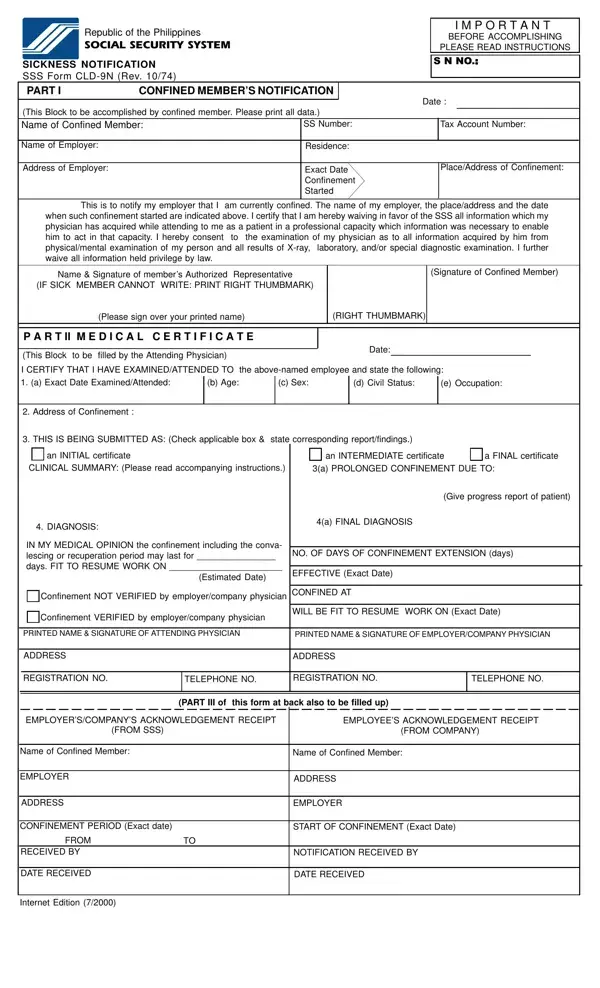
The CLD 9N form is the official SSS sickness notification document used in the Philippines to report an employee's sickness-related confinement to both the employer and the Social Security System (SSS). This legal form ensures compliance with SSS regulations and helps members access their sickness benefit reimbursement in a timely manner. Employers and employees must both be familiar with the form and its requirements to avoid delays in benefit processing.
Part I is completed by the confined SSS member. It covers the member's full name, Social Security number, personal details, the exact start and end dates of confinement, the attending physician's name, diagnosis, and a medical information waiver authorizing the SSS to access the physician's records. The employee must submit this part to the employer within 5 calendar days from the start of confinement to comply with SSS sickness notification requirements.
Part II is the medical certificate section, completed by the attending physician. It includes clinical examination findings, the initial diagnosis, and the expected recovery timeline. The physician indicates whether the certificate is an initial, intermediate, or final certification. For prolonged confinements, the physician submits intermediate certificates to update the patient's condition and provide a progress report. The final certificate confirms the member's recovery and the expected return-to-work date.
Part III is the employer's acknowledgment section. The company records the exact confinement period, the date the notification was received from the employee, and the method of receipt (phone, handcarried, or mail). The employer must sign this section and submit the completed CLD 9N sickness notification form to the nearest SSS branch within 5 calendar days from the date the employee notified the company.
Timely submission of the CLD 9N form is critical for SSS sickness benefit processing. The employee must notify their employer within 5 calendar days from the first day of confinement. In cases where the employee is physically unable to submit the form, an authorized representative may do so on their behalf. After receiving the employee's notification, the employer has 5 calendar days to submit the completed form to SSS. Failure to meet these deadlines may result in delayed processing, reduced benefit amounts, or rejection of the sickness benefit application.
An SSS member qualifies for the sickness benefit if they have paid at least 3 monthly contributions within the 12-month period immediately before the semester of the sickness. The member must be confined in a hospital or, in cases of confinement at home, must have a physician's certificate confirming that the illness or injury prevents them from performing their regular work. The daily sickness benefit is equal to 90% of the member's average daily salary credit, computed based on the contributions made during the covered semester.
The SSS sickness benefit is computed as 90% of the member's average daily salary credit (ADSC). The ADSC is derived from the monthly salary credits paid during the applicable semester. Employers who have advanced the sickness benefit pay to the confined employee may claim reimbursement from SSS by submitting the completed CLD 9N form along with the required supporting documents. The maximum number of compensable days per sickness is 120 days per calendar year for the same illness.
The most frequent reason for rejection or delay is incomplete certification by the attending physician in Part II. Ensure the physician provides a complete diagnosis, signs the medical certificate, and records the exact dates of the clinical examination. Mismatched confinement dates between Part I (employee declaration) and Part II (physician's certificate) also cause processing delays. Employers should verify that all three parts are complete before submitting the form to SSS.
Can the CLD 9N form be submitted online?
The SSS accepts the CLD 9N form at any SSS branch or through the My.SSS employer portal. You can use FormsPal to fill out the form online, then print and submit it to your employer or the SSS directly.
What happens if the 5-day notification deadline is missed?
If the employee fails to notify the employer within 5 calendar days due to a valid reason (such as continued hospitalization), the SSS may still process the benefit on a case-by-case basis. Supporting documentation such as a hospital record or medical certificate should be attached to the form.
Is the CLD 9N form the same as the SSS sickness benefit application?
The CLD 9N form is the sickness notification form. It is the first step in the sickness benefit process. Once the employer submits it to SSS, the SSS reviews the notification and processes the benefit based on the member's contribution history and the medical details in Part II.
For other SSS forms, see the SSS Employee Notification Form and the SSS Maternity Notification Form for maternity benefit claims.
| Question | Answer |
|---|---|
| Form Name | CLD 9N (SSS Sickness Notification Form) |
| Issuing Authority | Social Security System (SSS), Philippines |
| Form Length | 2 pages |
| Fillable? | No |
| Fillable fields | 0 |
| Submission Deadline | Within 5 calendar days of confinement notification |
| Avg. time to fill out | 30 sec |
| Other names | sss sickness notification form, sss form sickness, sss sickness notification form 2021, sss form notification, form sickness notification, sss notification form download |