
Cms100 Application Form PDF Details

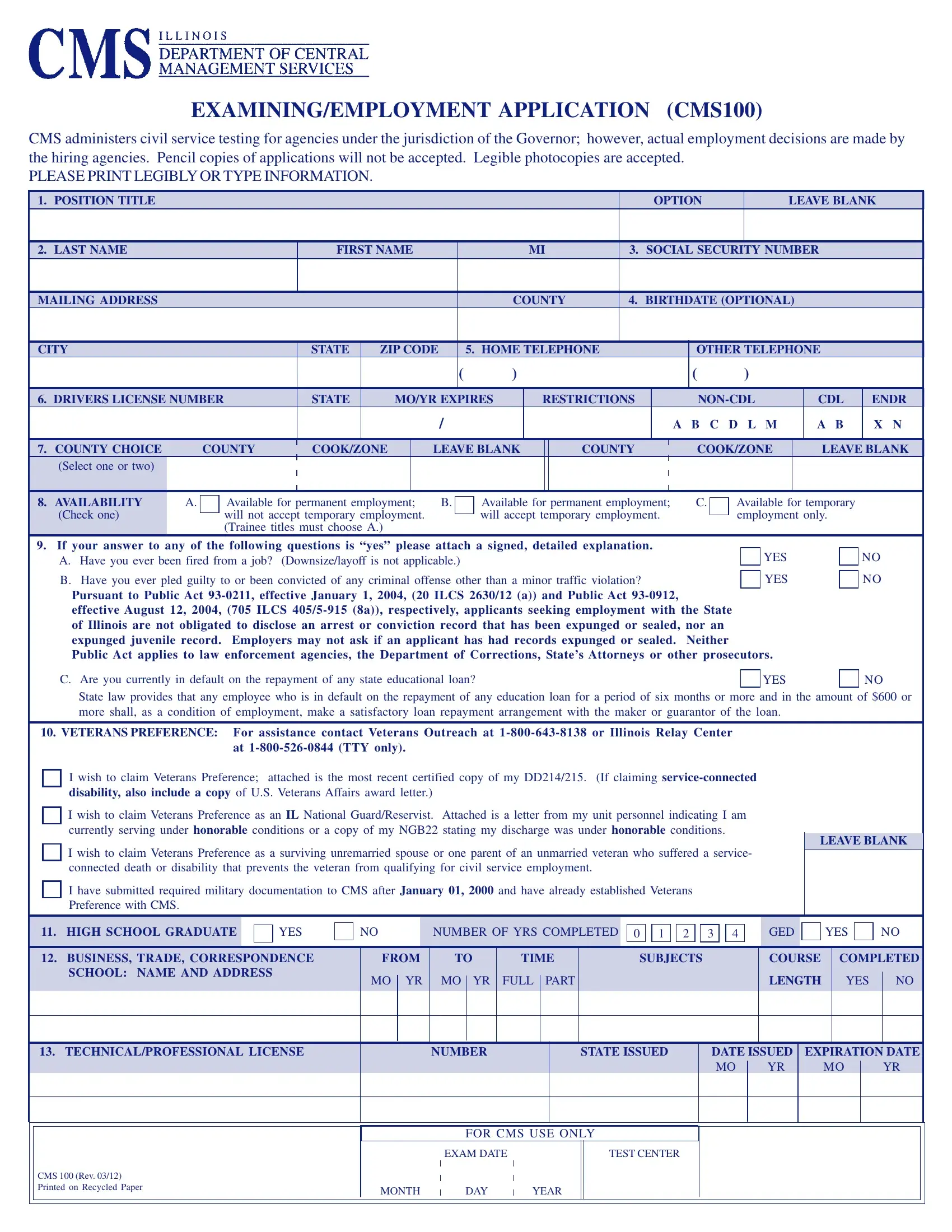
The CMS100 Application form plays a crucial role for individuals seeking employment within the state-run departments of Illinois, emphasizing the importance of providing accurate and detailed information to facilitate civil service testing and employment processes. Managed by the Central Management Services (CMS), the form serves as the initial step for applicants under the jurisdiction of the Governor, aiming to streamline the recruitment for various positions while ensuring a fair and efficient assessment. It's important for applicants to complete the form with care, as it requires comprehensive personal and professional details, including education, work history, and specific qualifications like driver's license information, veterans' preference, and any necessary licensure. With sections dedicated to assessing eligibility and preference for types of employment—permanent or temporary—and capturing a detailed employment history and educational background, the form also sensibly addresses legal obligations, such as child support and Selective Service registration, and adherence to non-discrimination policies. Notably, the application sets the stage for possibly being the actual test for certain titles, highlighting its significance in the hiring process. To avoid any delays or issues, applicants are advised against submitting pencil-written copies, ensuring all information is legibly printed or typed, thereby underscoring the expectations for clarity and precision in the application process.

QuestionAnswer
Form NameCms100 Application Form
Form Length6 pages
Fillable?No
Fillable fields0
Avg. time to fill out1 min 30 sec
Other namescms 100 employment application, illinois cms100, cms100 No Download Needed, cms 100 application 2021

Form Preview Example

EXAMINING/EMPLOYMENT APPLICATION (CMS100)

CMS administers civil service testing for agencies under the jurisdiction of the Governor; however, actual employment decisions are made by the hiring agencies. Pencil copies of applications will not be accepted. Legible photocopies are accepted.

PLEASE PRINT LEGIBLY OR TYPE INFORMATION.

1.

POSITION TITLE


OPTION


LEAVE BLANK


2.

LAST NAME


FIRST NAME


MI

3. SOCIAL SECURITY NUMBER


MAILING ADDRESS


COUNTY

4. BIRTHDATE (OPTIONAL)


CITY


STATE

ZIP CODE

5. HOME TELEPHONE


OTHER TELEPHONE


(

)


(

)


6.

DRIVERS LICENSE NUMBER

STATE


MO/YR EXPIRES


RESTRICTIONS


NON-CDL


CDL

ENDR


/


A B C D L M


A B

X N


7.

COUNTY CHOICE

COUNTY


COOK/ZONE


LEAVE BLANK


COUNTY


COOK/ZONE


LEAVE BLANK


(Select one or two)


8. AVAILABILITY

A.

(Check one)


Available for permanent employment;

B.

will not accept temporary employment.


(Trainee titles must choose A.)


Available for permanent employment;

C.

will accept temporary employment.


Available for temporary employment only.

9. If your answer to any of the following questions is “yes” please attach a signed, detailed explanation.


YES

A. Have you ever been fired from a job? (Downsize/layoff is not applicable.)


B. Have you ever pled guilty to or been convicted of any criminal offense other than a minor traffic violation?


YES

Pursuant to Public Act 93-0211, effective January 1, 2004, (20 ILCS 2630/12 (a)) and Public Act 93-0912,


effective August 12, 2004,

(705 ILCS 405/5-915 (8a)), respectively, applicants seeking employment with the State

of Illinois are not obligated to disclose an arrest or conviction record that has been expunged or sealed, nor an

expunged juvenile record.

Employers may not ask if an applicant has had records expunged or sealed.

Neither

Public Act applies to law enforcement agencies, the Department of Corrections, State’s Attorneys or other prosecutors.

NO

NO

C. Are you currently in default on the repayment of any state educational loan?

YES

NO

State law provides that any employee who is in default on the repayment of any education loan for a period of six months or more and in the amount of $600 or more shall, as a condition of employment, make a satisfactory loan repayment arrangement with the maker or guarantor of the loan.

10. VETERANS PREFERENCE: For assistance contact Veterans Outreach at 1-800-643-8138

or Illinois Relay Center


at 1-800-526-0844 (TTY only).


I wish to claim Veterans Preference; attached is the most recent certified copy of my DD214/215.

(If claiming service-connected


disability, also include a copy of U.S. Veterans Affairs award letter.)


I wish to claim Veterans Preference as an IL National Guard/Reservist. Attached is a letter from my unit personnel indicating I am currently serving under honorable conditions or a copy of my NGB22 stating my discharge was under honorable conditions.

I wish to claim Veterans Preference as a surviving unremarried spouse or one parent of an unmarried veteran who suffered a service- connected death or disability that prevents the veteran from qualifying for civil service employment.

I have submitted required military documentation to CMS after January 01, 2000 and have already established Veterans Preference with CMS.

LEAVE BLANK

11.

HIGH SCHOOL GRADUATE


YES

NO


NUMBER OF YRS COMPLETED

0 1 2 3 4

GED


YES

NO


12.

BUSINESS, TRADE, CORRESPONDENCE

FROM

TO

TIME


SUBJECTS

COURSE


COMPLETED


SCHOOL: NAME AND ADDRESS


MO


YR

MO


YR

FULL


PART


LENGTH


YES


NO


13. TECHNICAL/PROFESSIONAL LICENSE

NUMBER

STATE ISSUED

DATE ISSUED

MO YR

EXPIRATION DATE

MO YR

CMS 100 (Rev. 03/12) Printed on Recycled Paper

FOR CMS USE ONLY

EXAM DATE

TEST CENTER

MONTH DAY YEAR

How to Edit Cms100 Application Form Online for Free

You'll be able to complete cms 100 applications without difficulty using our PDF editor online. The tool is continually improved by our staff, getting useful functions and growing to be greater. With just a few simple steps, you may start your PDF editing:

Step 1: Click the "Get Form" button above. It's going to open up our pdf editor so that you can start filling in your form.

Step 2: Using this advanced PDF editor, you're able to do more than simply fill in forms. Try each of the functions and make your forms look great with custom textual content added in, or tweak the original input to excellence - all that comes along with the capability to incorporate your own photos and sign the file off.

When it comes to blanks of this particular PDF, here is what you need to know:

1. To start with, while filling out the cms 100 applications, start in the section with the following blank fields:

Tips to complete cms 100 application 2021 step 1

2. Once your current task is complete, take the next step – fill out all of these fields - at TTY only, I wish to claim Veterans, I wish to claim Veterans, I wish to claim Veterans, I have submitted required military, LEAVE BLANK, HIGH SCHOOL GRADUATE, YES, NUMBER OF YRS COMPLETED, GED, YES, BUSINESS TRADE CORRESPONDENCE, FROM TO TIME, SUBJECTS, and COURSE COMPLETED with their corresponding information. Make sure to double check that everything has been entered correctly before continuing!

Writing segment 2 of cms 100 application 2021

3. Completing NAME AND ADDRESS OF, HOURS MINOR EARNED DO NOT DO NOT, DATES ATTENDED LEVEL AND DATE OF, Undergraduate, Graduate, LIST UNDERGRADUATE AND GRADUATE, INDICATE THE ACTUAL NUMBER OF, DO NOT INCLUDE COURSES MORE, FIELDS OF STUDY, UNDERGRADUATE, GRADUATE, FIELDS OF STUDY, UNDERGRADUATE, GRADUATE, and LIST ACTUAL CREDIT HOURS is essential for the next step, make sure to fill them out in their entirety. Don't miss any details!

cms 100 application 2021 writing process outlined (step 3)

4. To move onward, the following section involves filling out a few fields. Examples of these are Accounting Actuarial Science, and Humanities Human Services, which are key to going forward with this PDF.

Accounting Actuarial Science, Accounting Actuarial Science, and Humanities Human Services of cms 100 application 2021

5. To finish your form, the last subsection requires a number of extra blanks. Typing in Accounting Actuarial Science, Humanities Human Services, and Attach separate sheet of paper for will certainly conclude the process and you'll definitely be done before you know it!

cms 100 application 2021 conclusion process described (step 5)

It is possible to make a mistake while completing the Accounting Actuarial Science, so make sure that you go through it again prior to when you send it in.

Step 3: Right after you've reread the details in the blanks, click on "Done" to complete your form. Obtain your cms 100 applications as soon as you sign up for a free trial. Easily access the pdf from your FormsPal account page, together with any modifications and changes conveniently preserved! FormsPal guarantees your information privacy by using a secure method that in no way saves or shares any personal data involved. Feel safe knowing your paperwork are kept protected when you work with our services!