
Cms100 Application Form PDF Details

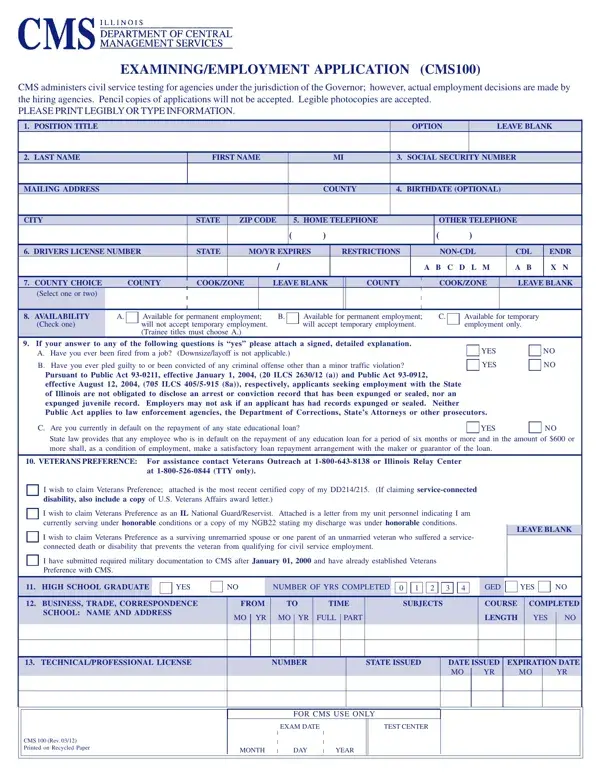
The CMS100 Application Form is the official employment application for civil service positions managed by the Illinois Department of Central Management Services (CMS). If you want to apply for a job with an Illinois state agency under the Governor's authority, this form is your starting point.

Who Needs This Form

The CMS100 is required for anyone applying to civil service positions within Illinois state agencies under the Governor's jurisdiction. This includes departments such as the Department of Human Services, the Department of Revenue, and the Department of Employment Security. Both permanent and temporary job seekers must complete this form.

Applicants who also need a general employment application can find one on FormsPal. Those applying for civil service positions in other states may need the Ohio Civil Service Application for positions in Ohio state government.

Information the CMS100 Requires

The form gathers detailed information across seven key areas. You will need to provide:

Key Rules for Completing the Form

All entries on the CMS100 must be typed or printed clearly in ink. The CMS does not accept forms completed in pencil. Incomplete or illegible applications may be delayed or disqualified. Check every section carefully before submitting.

For certain civil service titles, the CMS100 itself serves as the qualifying examination. The information you enter, especially your work and education history, is scored to rank applicants. Leaving sections blank can directly reduce your placement score and your chances of selection.

Non-discrimination policies apply throughout the Illinois civil service hiring process. All candidates are evaluated based on job-related qualifications. Those applying under Section 55-b may also need the Civil Service 55-B Form for state civil service accommodations.

QuestionAnswer
Form NameCms100 Application Form
Form Length6 pages
Fillable?No
Fillable fields0
Avg. time to fill out1 min 30 sec
Other namescms 100 employment application, illinois cms100, cms100 No Download Needed, cms 100 application 2021
JurisdictionState of Illinois
Issuing AgencyDepartment of Central Management Services (CMS)
PurposeCivil Service Employment Application
Form TypeGovernment Employment Form

How to Edit Cms100 Application Form Online for Free

You can complete the CMS100 application online using FormsPal's PDF editor. The editor works in your browser and lets you fill in, sign, and save the form without installing any software. Follow the steps below to get started.

Before You Begin

Gather the following documents and information before you open the form:

  • Social Security number and a government-issued photo ID
  • Addresses and contact information for all employers from the past 10 years
  • Official transcripts or school records from each institution you attended
  • Driver's license number and class (if required for the position you want)
  • Professional license numbers and expiration dates
  • DD-214 discharge papers if you are claiming veterans' preference

Step 1: Click the "Get Form" button at the top of this page. The PDF editor will open in your browser so you can start filling in your form right away.

Step 2: Use the editor's tools to type responses into each field. You can also add your signature electronically and attach any required supporting documents. Review each section carefully before moving on.

The CMS100 has several sections that require close attention. Here is a walkthrough of each part:

1. Start with your personal information at the top of the form. Enter your full legal name, current address, phone number, and your name as it appears on your Social Security card. This section also asks for your employment type preference (permanent or temporary) and your availability for work.

Tips to complete cms 100 application 2021 step 1

2. Complete the veterans' preference section. If you qualify as a veteran or surviving spouse, mark the correct box and note that your DD-214 must accompany your application. This section also covers your Selective Service registration status.

Writing segment 2 of cms 100 application 2021

3. Fill in the education section. Start with your high school or GED information, then your vocational or trade school training, and finally your college or university education. For each school, include your dates of attendance, the degree earned, and your major fields of study. Enter your credit hours accurately.

cms 100 application 2021 writing process outlined (step 3)

4. List your complete employment history, starting with your most recent job. For every position, include the employer name and address, your job title, start and end dates, hours per week, starting and ending salary, and your reason for leaving. Do not leave gaps in your work history unexplained.

CMS100 application employment history section

5. Complete the remaining sections, including your driver's license information, professional licenses, and required legal disclosures. Review the child support status section and the non-discrimination acknowledgment. Go back to the start of the form and review every field before you submit to catch any errors or missing answers.

cms 100 application 2021 conclusion process described (step 5)

Review the completed form one more time before you submit it. The CMS does not accept forms completed in pencil. Make sure all entries are typed or written clearly in ink. Step 3: After your final review, click "Done" to complete your form. Create a free FormsPal account to save and access your CMS100 application anytime. Your data stays private and secure.

Common Questions About the CMS100 Application

What is the CMS100 Application Form used for?
The CMS100 is Illinois's official civil service employment application. It is required for any person applying for a state government job within agencies under the Governor's authority, such as the Department of Human Services, the Department of Revenue, and the Department of Employment Security.

Can I fill out the CMS100 online?
Yes. Use FormsPal's free PDF editor to fill out and sign the CMS100 in your browser. Once finished, download the completed form and submit it to the Illinois state agency listed in the job posting. Always follow the specific submission instructions provided by the hiring agency.

How long does the CMS100 take to complete?
Most applicants spend 30 to 60 minutes completing the CMS100. Having your employment records, school transcripts, and license numbers ready before you start will reduce the time significantly.

Do I need to attach supporting documents?
Yes, for certain sections. Veterans claiming preference points must include their DD-214. Applicants with professional licenses should attach copies of those credentials. Check the specific job announcement for any agency requirements beyond the standard CMS100.

FormsPal also offers related civil service and government forms. You can find the Civil Service 55-B Form for Section 55-b accommodation requests, the Ohio Civil Service Application for state jobs in Ohio, and a general employment application for private-sector jobs. Browse additional Illinois government forms, including the Illinois Sworn Statement, in our forms library.