
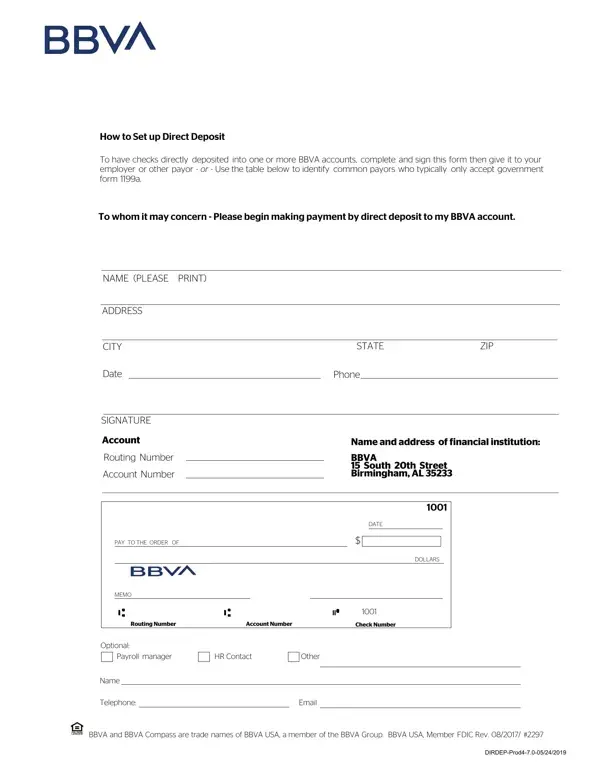
Compass Bank Online Form PDF Details

Setting up direct deposit is a practical step for efficient financial management, letting individuals receive paychecks and government benefits swiftly and securely. The Compass Bank online form is a key document for establishing direct deposits into BBVA accounts, making the payment process from employers or other payors straightforward and reliable.

To complete the Compass Bank direct deposit authorization form correctly, gather the following details before you begin: your full name and mailing address, your BBVA bank routing number, your account number, and your account type (checking or savings). These are the core fields that every direct deposit authorization requires.

For individuals receiving benefits from U.S. government agencies, the form provides specific guidance on using government form 1199a for agencies that require it. The form includes clear instructions on whom to contact across various government agencies for initiating direct deposit of Social Security, Supplemental Security Income, Civil Service Retirement, and Veterans Compensation and Pension benefits.

Key advantages of completing this direct deposit form include faster access to funds (often 1-2 business days sooner than paper checks), improved security since there is no physical check to lose or have stolen, and reduced paperwork for both employees and employers. BBVA bankers are available to assist with account monitoring and any questions that arise after submitting the form.

For similar direct deposit forms from other providers, you may also explore the Citibank direct deposit form or the ADP direct deposit enrollment form available on FormsPal.

QuestionAnswer
Form NameCompass Bank Online Form
Form Length2 pages
Fillable?No
Fillable fields0
Avg. time to fill out30 sec
Other namesdir_dep_payroll bbva compass bank direct deposit authorization form 2011

How to Edit Compass Bank Online Form Online for Free

You are able to complete Compass Bank Online Form effectively by using our PDFinity® PDF editor. Our tool is constantly evolving to grant the very best user experience possible, and that's because of our resolve for continuous development and listening closely to user feedback. It merely requires a couple of easy steps:

Step 1: Click on the "Get Form" button at the top of this page to access our editor.

Step 2: With the help of our online PDF tool, you'll be able to do more than just fill out blank form fields. Edit away and make your docs look great with customized textual content put in, or tweak the file's original content to perfection - all that supported by an ability to add almost any photos and sign the file off.

If you want to finalize this PDF document, be sure to enter the necessary information in each field:

1. First of all, when filling out the Compass Bank Online Form, begin with the section with the following fields:

Filling in part 1 in Compass Bank Online Form

2. Once the last part is completed, go on to type in the suitable information in these - PAY TO THE ORDER OF, MEMO, DOLLARS, Routing Number, Account Number, Check Number, Optional, Payroll manager, HR Contact, Other, Name, Telephone, Email, BBVA and BBVA Compass are trade, and DIRDEPProd.

How you can complete Compass Bank Online Form step 2

Concerning PAY TO THE ORDER OF and DOLLARS, be certain that you double-check them in this section. These two are the most significant fields in this form.

Step 3: Spell-check the information you've entered into the form fields and hit the "Done" button. After registering a free trial account with us, you will be able to download Compass Bank Online Form or send it via email right off. The form will also be available through your personal cabinet with all your modifications. FormsPal is committed to the confidentiality of all our users. All personal information handled by our system remains secure.

Common Mistakes to Avoid on This Form

When completing the Compass Bank direct deposit authorization form, watch out for these common errors:

  • Wrong routing number. Double-check your BBVA routing number before submitting. It differs from your account number and can be found at the bottom of your checks.
  • Incomplete employer information. Fill in all required fields for your employer or payroll department, including their full name, address, and contact information.
  • Missing signature. Your signature authorizes the direct deposit setup and is required for the form to be valid. Unsigned forms are rejected by the bank.

Related Direct Deposit Forms

If you need to set up direct deposit with a different bank or payroll provider, FormsPal also offers these related forms: