
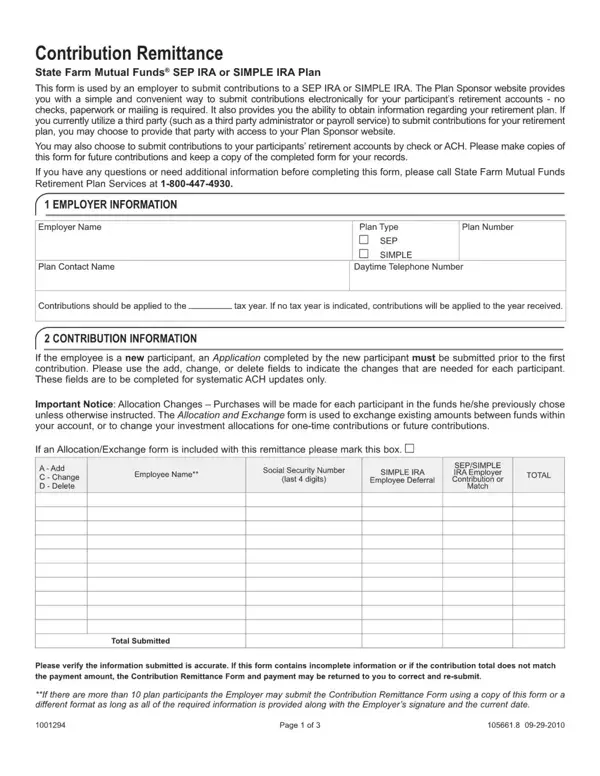
FormsPal's online PDF editor makes it simple to fill out, edit, and download this Contribution Remittance Form without installing any software. The editor runs in your browser, so you can complete the form from any device. Follow the steps below to finish your contribution remittance form in minutes.
How to Fill Out the Contribution Remittance Form Online
Step 1: Click the orange "Get Form Now" button at the top of this page. This opens the contribution remittance form in the FormsPal PDF editor.
Step 2: Enter your employer information. Most contribution remittance forms ask for the company name, plan name, plan number, and employer identification number (EIN).
Step 3: Add each employee record. List the employee name, Social Security number, and the contribution amount for the current pay period. Repeat for every plan participant.
Step 4: Fill in the total contribution amount at the bottom of the form. Verify each figure before moving on.
Step 5: Enter the remittance date and payment method. Some contribution remittance forms ask for a bank routing number and account number for electronic funds transfer.
Step 6: Review the completed form, then click "Done" to save or download your contribution remittance form as a PDF. You can also print it directly from the editor.
What Information Do You Need to Complete the Form?
Gather the details below before you start. Having them ready speeds up the process and helps you avoid errors.
Employer details: company name, mailing address, plan name, and plan number.
Employee details: full legal name, Social Security number, and pay period dates for each plan participant.
Contribution amounts: the dollar amount each employee deferred and any employer matching contribution for the plan year.
Bank information: the routing number and account number of the bank account where contributions will be deposited, if your plan requires electronic funds transfer.
Tax records: contribution amounts for tax reporting, especially for 401(k) plans and other tax-deferred retirement accounts where deductions may apply.
How to Submit a Completed Contribution Remittance Form
After filling out the contribution remittance form, choose a submission method based on your plan administrator's requirements.
Online portal: many plan administrators accept contribution remittance forms through a secure employer portal. Log in and upload the completed PDF.
Mail: print the form and mail it with a check or money order to the plan administrator's address shown on the form.
Electronic funds transfer: some plans allow you to send the form by email and initiate a direct bank transfer for the total contribution amount.
Need a related document? Also see the Schwab Contribution Transmittal Form and the HSA Contribution Coupon for other contribution remittance documents.
Frequently Asked Questions About Contribution Remittance Forms
What is the difference between a contribution remittance form and a contribution transmittal form?
Both forms document and submit plan contributions. The term remittance is more common for retirement benefit plans. The term transmittal is often used for brokerage and investment accounts. The Schwab Contribution Transmittal Form is a common example of the transmittal version.
How often do employers file a contribution remittance form?
Employers typically file a contribution remittance form every pay period. This may be weekly, biweekly, or monthly depending on the plan. Timely submission is required to comply with plan rules and federal regulations governing retirement and health benefit contributions.
Is a contribution remittance form required for 401(k) plans?
Yes. Most 401(k) plan administrators require a contribution remittance form with each contribution. The form records the employee deferral amount and any employer match, which the plan administrator records in each participant's account. Accurate remittance records also support tax filings at year end.
For other contribution-related forms, browse the PAG-IBIG Contribution Form or the Solicitation of Contributions Form in our collection.