
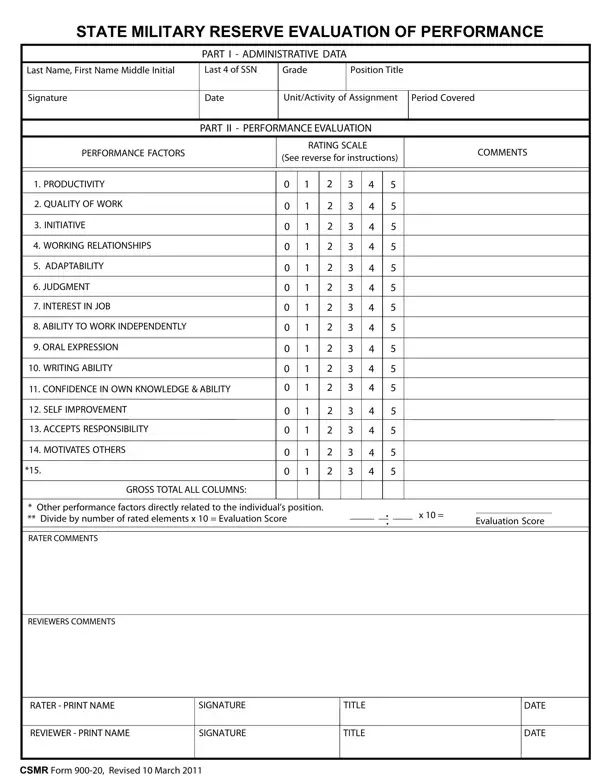
You can complete the CSMR Form 900-20 online without downloading any software. FormsPal's free PDF editor lets you fill in every field, add your signature, and save your completed evaluation in minutes.
Step 1: Open the CSMR Form 900-20
Click the "Get Form" button at the top of this page to open the CSMR Form 900-20 in FormsPal's online PDF editor. All required fields will be available for direct entry in your browser.
Step 2: Complete Part I – Administrative Data
Start with the administrative section. Enter the service member's name, grade, position title, unit of assignment, and the last four digits of their Social Security Number. Set the evaluation period start and end dates.
Step 3: Complete Part II – Performance Ratings
Rate the service member on all performance factors using the provided scoring scale. Complete each of the following fields: ORAL EXPRESSION, WRITING ABILITY, CONFIDENCE IN OWN KNOWLEDGE, SELF IMPROVEMENT, ACCEPTS RESPONSIBILITY, and MOTIVATES OTHERS. Then calculate the GROSS TOTAL ALL COLUMNS and fill in the Evaluation Score and RATER COMMENTS.
Double-check your WRITING ABILITY entry before moving on. It is easy to overlook and must be completed for a valid evaluation score.
Step 4: Rater and Reviewer Signatures
Complete the final section with REVIEWERS COMMENTS, RATER PRINT NAME, RATER SIGNATURE, REVIEWER PRINT NAME, REVIEWER SIGNATURE, TITLE, and DATE. All fields are required for the evaluation to be formally accepted.
Step 5: Save and Download
After reviewing all entries, click "Done" to finalize your CSMR Form 900-20. Register for a free FormsPal account to download the completed PDF or send it by email. Your form is saved in your account and accessible at any time.
Common mistakes to avoid on CSMR Form 900-20
- Leaving any Part II performance factor rating blank – every factor must have a score
- Using initials instead of the full printed name in the RATER PRINT NAME field
- Omitting the evaluation period dates from Part I
- Forgetting the REVIEWER SIGNATURE – the form requires both rater and reviewer sign-off
Related performance and military forms
- Performance evaluation template for assessing contractors and project staff
- 90-day performance review form for evaluating employees in their first three months
- Employee self-evaluation form for staff to assess their own performance
- Military power of attorney form for service members designating a legal agent
