
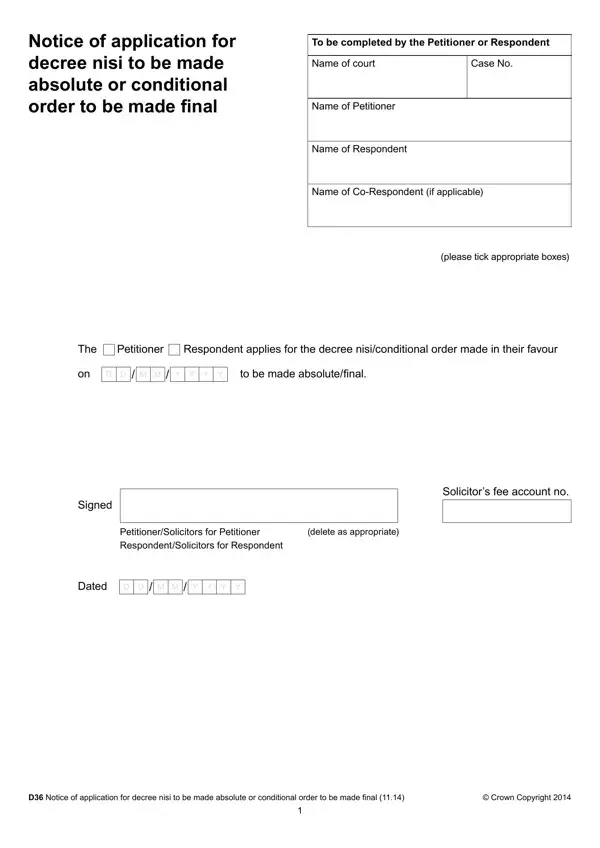
Before you begin, collect the court case number, the names of both parties in the divorce, and the date the conditional order was granted. The court cannot process your final order application until at least six weeks and one day have passed since that date. You can confirm this in your court correspondence or official divorce records.
Follow these steps to complete the D36 form online:
Step 1: Open the form on FormsPal.
Click the "Get Form" button at the top of this page. The form loads in your browser, so no downloads or additional software are needed. You can fill in each field directly within our online editor.
Step 2: Enter the case details.
Write the case number exactly as it appears in the court documents. Enter the full legal names of the petitioner and respondent. If a co-respondent was listed in the original divorce petition, include their name in the designated field.
Step 3: Confirm who is submitting the application.
Tick the box indicating whether the petitioner or the respondent is filing the form. Both parties have the right to file applications for the final order, so either name may appear here depending on who is submitting the form.
Step 4: Choose the type of order.
Indicate whether you are applying for a decree nisi to be made final or a conditional order to be made final. Your court documents from the earlier divorce proceedings will show which term applies to your case.
Step 5: Date and sign the form.
Add the date of the application. The petitioner or respondent must sign the form personally. If a solicitor is handling applications on your behalf, they must sign and enter their fee account number in the designated field.
Step 6: Save your completed form and send it to the court.
Download the finished form as a PDF using the save option on this website. Print the document and post it to the court, or check whether your local court accepts online submissions. After the court reviews the application and grants the final order, you will receive written confirmation by post. Store this in your personal records, as you may need it for financial, property, and other legal matters.
Frequently Asked Questions About the D36 Form
Who can submit the D36 form?
Both the petitioner and the respondent in the divorce case can file the D36 form. If the petitioner has not submitted applications after the required waiting period, the respondent may step in and file instead. The court will process the final order once a valid, completed application is received.
What are the implications of a long delay?
If more than 12 months pass after the conditional order without a final order application, the court will ask for an explanation of the delay. You cannot file the form without addressing this gap. The court may require a statement about the reasons before allowing divorce proceedings to move forward.
How do I confirm my eligibility to file?
Review your court records to find the exact date the conditional order was granted. You may file the D36 once six weeks and one day have elapsed. If there are ongoing financial disputes or children's court orders, those matters may also affect when the final order is granted. Contact your solicitor or the court if you are uncertain whether you can proceed.
What happens after the court receives my application?
After reviewing the form, the court issues the final divorce order and sends written confirmation to both parties. This confirmation is the legal proof that the marriage has ended. Keep it in your records alongside other important documents, as you will likely need it when updating accounts, property registrations, and other official records.
Can I save the form and return to it later?
Yes. On this website, you can save your progress and resume at any time. You can also download a completed copy directly from FormsPal without creating an account. Your data cannot be accessed by others, and the platform does not share your information.
You may also need these related divorce forms: Decree Nisi D187 Form, Divorce Decree Form, and Application for Divorce.
