
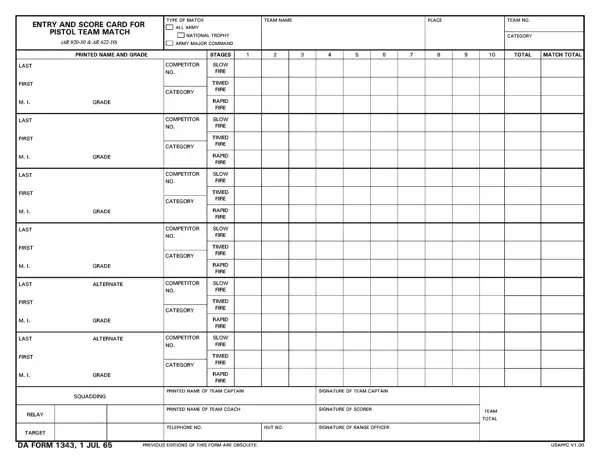
The DA Form 1343 is the official U.S. Army form for recording results from pistol team competitions. Its full title is "Entry and Score Card for Pistol Team Match." Army Regulations 920-30 and 622-10 govern the use of this form. It applies to all Army pistol team competitions, from unit-level events to national trophy matches.
Army competitive marksmanship has a long tradition within the military. Pistol shooting competitions test individual skill and team coordination. The DA Form 1343 plays a key role in maintaining accurate and fair records of these events. Without a standardized form, tracking results across different units and competitions would not be possible.
The form captures the identity of each team member taking part in the match. Each participant's full name and military grade are recorded in separate columns. The team name and team number also appear at the top of the form. This information ensures that results can be linked directly to the correct unit and personnel.
Scoring is broken down into three stages of fire on the DA Form 1343. The three stages are slow fire, timed fire, and rapid fire. Each team member gets a separate score for each stage. These individual stage scores are then combined into a total for each member. The form also calculates the overall team score from the individual totals.
Administrative fields make the DA Form 1343 a complete documentation tool. The form requires the printed name and signature of both the team captain and the team coach. Contact information for the coaching staff is also included. Eligibility statements are provided for different categories of matches. These statements ensure that all participants meet current Army regulatory requirements.
The form tracks several logistical details about the match itself. The squadding relay field identifies when the team fires during the event. The target type field specifies what kind of target is used. The match location and stage of competition are also recorded. These fields provide a complete picture of the event conditions.
The National Trophy Pistol Match is one of the major competitions where the DA Form 1343 is commonly used. This event draws competitors from across the Army each year. The form's structure is designed to handle the high volume of data generated during large competitions. Its standardized layout makes it easy for range officers to review and verify results.
Coaches and captains play an important role in completing the DA Form 1343. The team captain oversees each member's performance during the match. The team coach provides guidance and ensures that team procedures are followed. Their signatures at the end of the form confirm the accuracy of all recorded scores.
The information captured on the DA Form 1343 supports fair competition and accurate record-keeping. Results from these forms are used to track improvement over time, identify top performers, and prepare for future competitions. Units rely on this data when selecting team members for higher-level events. Accurate completion of the form is essential for both current results and future planning.
| Question | Answer |
|---|---|
| Form Name | Da Form 1343 |
| Form Length | 2 pages |
| Fillable? | No |
| Fillable fields | 0 |
| Avg. time to fill out | 30 sec |
| Other names | NAMEOFTEAMCOACH, SQUADDING, NAMEOFTEAMCAPTAIN, NATIONALTROPHY |
Da Form 1343 isn’t the one you’re looking for?