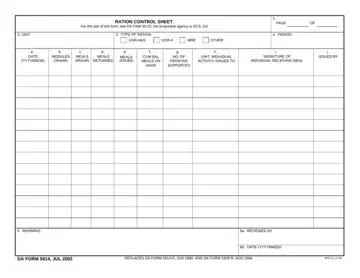
Completing the Ration Control Sheet PDF online with FormsPal is fast, secure, and requires no software installation. Follow the step-by-step guide below to fill out, sign, and save the document.
Step 1: Open the form. Click the orange "Get Form Now" button at the top of the page. The PDF will open in FormsPal's browser-based editor. No download is needed to begin editing.
Step 2: Enter your information. Use the text tool to click on each field and type the required data. You can also add checkmarks, highlight fields, draw freehand annotations, and insert images directly into the PDF document.
Complete all required sections of the form. The following information must be included for the form to be accepted:
- Unit name and authorized strength for the accounting period
- Inclusive dates of the ration draw period
- Type of rations drawn (UGR-H&S, UGR-A, MRE, or other authorized type)
- Quantity of rations drawn, returned, and the running net balance
- Field codes: REMARKS, REVIEWED BY, DATE (YYYYMMDD), DA FORM JUL, and APD LC v
- Signature of the issuing food service officer
- Countersignature of the reviewing officer or unit S4
Step 3: Add your signature. Use the signature tool in the right-side features panel to apply your esignature to the document. You can draw it with a mouse, upload a saved signature image, or type your name and select a signature style. The editor supports all standard PDF signature formats.
Step 4: Save and download. Click "Done" to finalize the PDF form. You can then download the completed document to your device, print it directly, or share it by email. FormsPal does not store or share your form data.
Step 5: Keep a copy. Retain a printed or digital copy of each completed form for your unit records in accordance with ARIMS retention requirements.
How to Complete Each Section of the Form
The form is divided into a header section and a recurring data entry grid. The header requires the unit identification, the supported dining facility name, and the inclusive dates of the accounting period being reported. Enter these fields accurately, since auditors use the header to locate the correct period when verifying accountability records.
The data entry grid has one row per ration transaction. Each row records the date of the transaction, the ration type code, the number of rations drawn, the number returned, and the net balance carried forward. If a unit draws rations on multiple days within the same accounting period, each day gets its own row. The running balance at the end of the last row equals the total meals consumed during the period.
The REMARKS field accepts brief explanatory notes, such as a notation for a training exercise, a tactical operation, or an unusual ration type authorization. Commanders use this field to document any variance from standard draw quantities so that reviewers can trace the reason without additional research.
After all rows are completed, the issuing food service officer signs in the REVIEWED BY field. A second officer, typically the unit S4 or commanding officer, reviews the entries and countersigns to confirm that the quantities match the supporting meal count documents. Never submit the form with only one signature, since missing countersignatures are the most common reason forms are returned for correction during an IG inspection.
Frequently Asked Questions About the DA Form 5914
What information does the form require?
The form requires the unit name and strength, the dates of the issuance period, the ration type, the number of meals drawn per category, the number of meals returned, and the cumulative balance. Both the issuing individual and a reviewing officer must sign and date the document to confirm accountability.
Can I fill out the Ration Control Sheet online?
Yes. FormsPal's free PDF editor lets you complete, sign, and save this PDF document entirely online without downloading any software. The esignature features work in any modern browser and produce a compliant signature for official Army forms.
What ration types does the form track?
The form is designed to record all authorized Army ration categories, including UGR-H&S, UGR-A, MRE, and supplemental rations. Each ration type is listed in a separate row so food service officers can track distribution accurately across multiple issuance periods.
Is the DA Form 5914 fillable as a standard PDF?
The July 2002 version of the form does not include embedded interactive fillable fields. However, FormsPal's text tool allows you to type directly into any area of the document, add your esignature, and produce a completed PDF copy ready for printing or digital distribution.
How long should completed forms be retained?
Army units must retain completed ration control documents in accordance with the ARIMS schedule for food service records. Consult your unit records management officer for the exact retention period applicable to your command.
What is the difference between UGR-H&S and UGR-A rations?
UGR-H&S rations arrive fully cooked and only need reheating, making them suitable for remote locations with limited field kitchen equipment. UGR-A rations require trained cooks and cooking equipment but allow more menu variety. Both types are tracked separately on the form to maintain accurate ration category accountability.
Common Mistakes to Avoid When Completing the Form
Food service officers and unit S4 personnel frequently encounter the same errors when preparing the Ration Control Sheet. Understanding these mistakes in advance reduces the chance of having a form rejected during an audit or IG review.
One of the most frequent errors is failing to carry forward the running balance correctly between rows. Each row's closing balance must equal the previous row's balance plus new meals drawn minus meals returned. A math error here cascades through the entire accounting period and requires the officer to recalculate every entry from the beginning.
Another common mistake is leaving the unit strength field blank or entering the wrong figure. Auditors compare the authorized strength against the number of meals drawn to verify that the ration draw is within authorized limits. A blank strength field or a figure that doesn't match the unit's morning report will trigger a discrepancy finding.
Submitting the form with only one signature is also a recurring issue. Both the issuing food service officer and the reviewing officer must sign. A form returned for a missing countersignature delays the accounting process and creates a gap in the unit's ration accountability record.
Related Army Forms
When managing unit food service and supply operations, you may also need these related forms: DA Form 5960, DA Form 5304, DA Form 5521, and the Army Certificate DA Form 87. You can also browse the Army Leaders Book Form, the DA Form 2064, and the Army Risk Assessment Form for additional unit administration resources.