
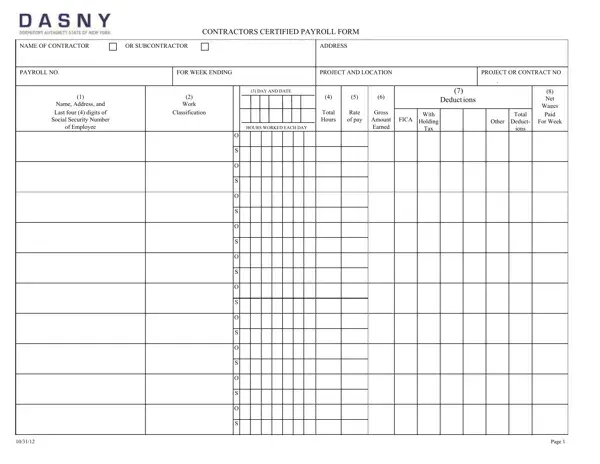
Managing payroll compliance on Dormitory Authority of the State of New York (DASNY) projects requires contractors and subcontractors to submit accurate weekly payroll records using this standardized form. Under New York Labor Law Article 8, all workers on public works projects funded or administered by DASNY must receive prevailing wages and applicable supplements, and the certified payroll form is the official mechanism for proving that compliance week by week.
The form captures two categories of information. The first identifies the contracting entity: the contractor or subcontractor name, business address, project name and location, payroll period start and end dates, and the DASNY project number. The second is a detailed employee roster covering each worker who was on the job during that pay period. For every employee, contractors must record the full name, home address, last four digits of the Social Security Number (for identification while protecting confidentiality), exact job classification, and the applicable prevailing wage rate tied to that classification and the project county.
Hours and wages are recorded in detail. Each worker's hours are broken down by day of the week, with straight-time hours and overtime hours listed separately. Gross wages are calculated by multiplying straight-time hours by the prevailing wage rate and adding the overtime premium (typically 1.5 times the base rate) for any hours beyond 8 in a single day or 40 in the week. The form then itemizes every deduction taken, including federal income tax withholding, state income tax withholding, FICA contributions (Social Security and Medicare), union dues, and any other authorized deductions. The net wages column shows what was actually paid, which must equal gross wages minus all listed deductions.
At the bottom of the form, an authorized signatory, typically an officer or payroll administrator of the contracting firm, must sign a certification statement. This statement attests under penalty of law that the payroll records are correct and complete and that the wages paid are not less than the applicable prevailing rates. False certification can result in criminal charges under New York Labor Law in addition to civil penalties.
Certified payrolls must be submitted to DASNY on a weekly basis throughout the life of the contract. Most DASNY project specifications require submission within seven days of the close of each payroll period. Contractors must retain copies of all submitted payroll records for at least three years after project completion, as DASNY reserves the right to audit records at any time. Failure to submit payrolls, or submission of incomplete or inaccurate records, can result in withholding of contract payments and debarment from future public works projects.
Contractors working on federally assisted DASNY projects alongside state-funded scopes may also need to complete the WH-347 certified payroll form, the federal equivalent required under the Davis-Bacon Act. Those working on other state agency projects may encounter the standard certified payroll form used more broadly across New York public works. Contractors engaged in New Jersey public projects may also need the NJEDA certified payroll form.
| Question | Answer |
|---|---|
| Form Name | DASNY Certified Payroll Form |
| Form Length | 1 pages |
| Fillable? | No |
| Fillable fields | 0 |
| Avg. time to fill out | 15 sec |
| Other names | CCPF dasny certified payroll form |
| Issuing Authority | DASNY (Dormitory Authority of the State of New York) |
| Reporting Frequency | Weekly |
| Applicable Law | New York Labor Law Article 8 |
| Related Federal Form | WH-347 (Davis-Bacon Act) |
| Retention Period | 3 years after project completion |
| State | New York |
Dasny Certified Payroll Form isn’t the one you’re looking for?