
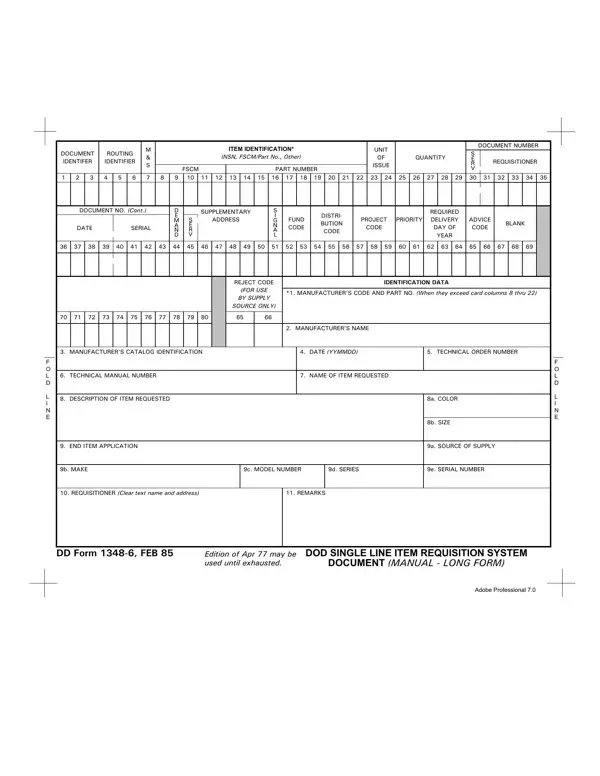
You can open this document, fill it in, and download a completed copy straight from your browser without creating an account. The form loads in our free online editor and all entries are printable once finished.
How to Fill Out the Form
Follow these steps to complete the document accurately:
- Open the form. Click the “Get Form” button at the top of this page to launch the online editor.
- Enter the document number. Provide a 14-character document number and the routing identifier for the originating unit.
- Identify the requested item. Fill in the manufacturer's code, national stock number, and a clear description of the item.
- Add quantity and unit of issue. Enter how many units are needed and choose the correct unit of measure.
- Include fund and project codes. Record the fund project code and distribution codes so the request is routed correctly.
- Review and download. Verify all fields for accuracy, then save or print the completed form for submission to your supply office.
Key Blocks on the DD Form 1348-6
Knowing what each section covers helps avoid common mistakes:
- Blocks 1 to 4 (Routing and Document Number): Identify the originating unit and the supply source processing the request.
- Blocks 20 to 27 (Item Identification): Cover the manufacturer's name, catalog number, and national stock number.
- Block 45 (Quantity): States the number of units required and the unit of issue.
- Blocks 50 to 51 (Delivery Address): Specify where the requested items should be delivered.
Related Military Supply and Logistics Forms
If you handle supply chain documentation, these related forms may also be useful:
- DD Form 1348 - the standard single line item requisition, a shorter version of this request document
- DD Form 1351-2 - travel voucher used by military personnel and government civilians
- DD Form 149 - application for correction of military records
- DD Form 93 - record of emergency data for service members
