
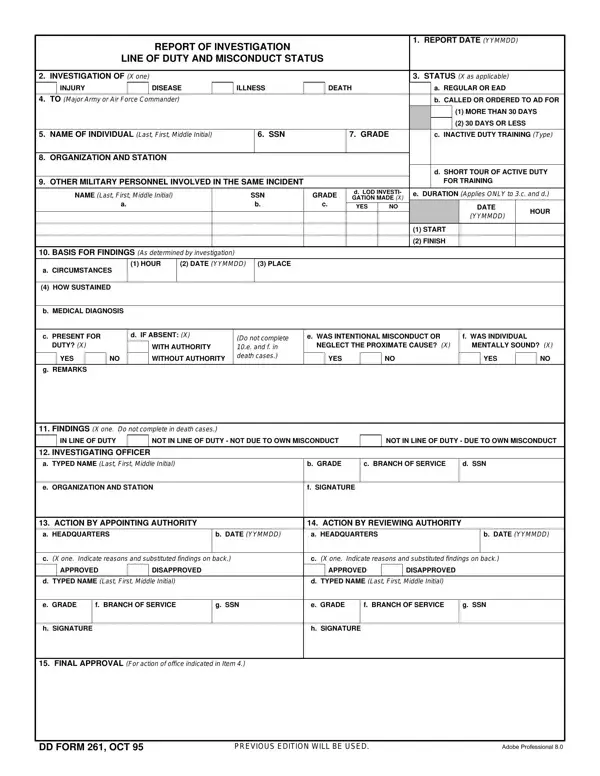
When working in the online editor for PDFs by FormsPal, you can easily complete or alter initial middle misconduct here and now. To have our editor on the cutting edge of efficiency, we work to implement user-driven features and improvements on a regular basis. We are routinely looking for suggestions - join us in revamping how you work with PDF forms. Starting is simple! All that you should do is follow the basic steps below:
Step 1: First of all, open the pdf tool by clicking the "Get Form Button" at the top of this site.
Step 2: Using this advanced PDF tool, you may do more than merely complete blank form fields. Try all of the features and make your forms appear sublime with custom text added, or modify the original input to excellence - all that comes along with an ability to incorporate your personal photos and sign the PDF off.
This PDF form will need some specific details. To ensure consistency, remember to take note of the suggestions further on:
1. When submitting the initial middle misconduct, ensure to include all needed blank fields in its relevant area. It will help facilitate the work, enabling your details to be handled without delay and properly.
2. Once the previous array of fields is completed, you're ready to insert the required details in c PRESENT FOR, DUTY X, d IF ABSENT X, WITH AUTHORITY, YES, WITHOUT AUTHORITY, Do not complete e and fin death, e WAS INTENTIONAL MISCONDUCT OR, f WAS INDIVIDUAL, NEGLECT THE PROXIMATE CAUSE X, MENTALLY SOUND X, YES, YES, g REMARKS, and FINDINGS X one Do notcompletein so you can proceed to the next stage.
It is easy to make a mistake while completing the DUTY X, therefore make sure that you take another look before you decide to send it in.
3. This 3rd segment should also be relatively uncomplicated, FINAL APPROVAL, For actionofofficeindicated inItem, DD FORM OCT, and PREVIOUS EDITION WILL BE USED - all of these blanks has to be completed here.
4. Filling in NAME OF INDIVIDUAL Last First, SSN, GRADE, APPOINTING AUTHORITY REASONS AND, and REVIEWING AUTHORITY REASONS AND is paramount in this step - make sure to don't rush and fill in every blank!
5. Finally, this final segment is precisely what you'll want to complete before submitting the document. The blanks under consideration are the following: APPROVING AUTHORITY REASONS AND, and DD FORM BACK OCT.
Step 3: Check all the details you've typed into the blanks and then click the "Done" button. Sign up with us right now and easily get access to initial middle misconduct, prepared for downloading. Each modification you make is conveniently kept, helping you to modify the file at a later stage anytime. We do not share the details that you provide whenever dealing with documents at our site.
Who Uses This Form
Military officers fill out this form when a service member gets hurt or sick on duty. The form helps decide if the event counts as a line of duty case. This matters because the ruling affects what medical care and pay the service member can get. All branches of the U.S. military use this form.
Common Questions
What does a line of duty ruling mean?
A line of duty ruling says whether an injury or illness happened while the service member was doing their job. A positive ruling helps the member get medical care and disability pay. A negative ruling may limit those benefits.
How long does the review take?
Most reviews finish within 30 to 90 days. More complex cases may take longer. The timeline depends on the facts of the case and how busy the command is at that time.
Does this form apply to all military branches?
Yes. The form is a Department of Defense standard. It applies to members of the Army, Navy, Air Force, Marine Corps, and Coast Guard.
Related Military Forms
You may also need these forms when working with military records:
- DD Form 93 - Record of Emergency Data for designating beneficiaries
- DD Form 149 - Application for Correction of Military Record
- DA Form 2173 - Statement of Medical Examination and Duty Status
- Military Investigation Templates - Blank investigation forms for military use
