
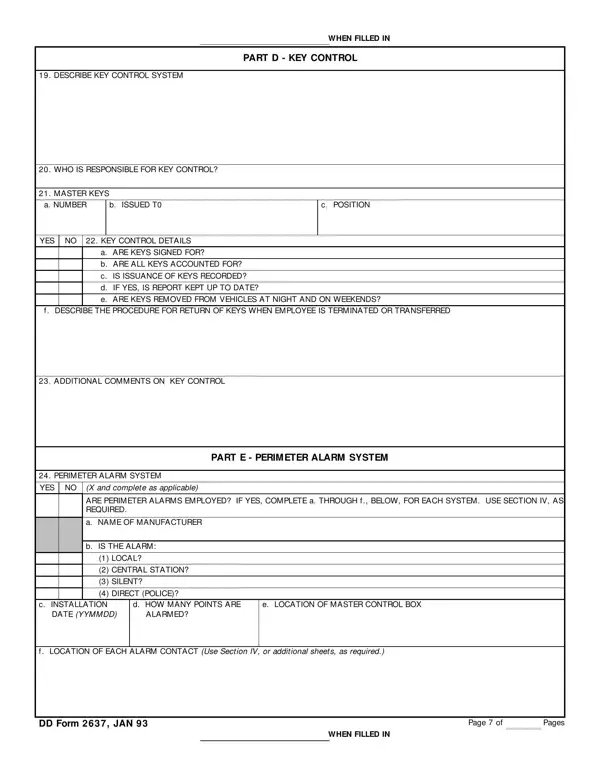
The DD Form 2637 covers four areas of physical security at DoD facilities. Each section records specific information that security officers must document and verify on a regular basis.
This section records who holds master keys and how key issuance is managed. Officers note whether key signing procedures are in place and whether a key control log is kept current. The form also asks whether keys are ever removed from vehicles and how issuance is recorded.
Officers document the alarm manufacturer, installation date, and how many points are alarmed. The form asks for the location of the master control box and each alarm contact. It also requires inspection dates, maintenance contract details, and the expected response time to an alarm.
This section confirms whether all perimeter areas are properly lit and records the type of lighting in use. Officers note whether lighting operates manually or automatically. The form also asks whether an auxiliary power source is available in case of an outage.
This part asks whether a guard service is engaged and covers their equipment, instructions, and communication systems. Officers document compensation arrangements and insurance coverage. Ongoing guard activity can be tracked using a security guard daily report alongside this form.
Together, these four sections create a complete physical security audit record. Facilities that also require system access control can use DD Form 2875 alongside DD Form 2637 for a full security documentation package.
| Question | Answer |
|---|---|
| Form Name | Dd Form 2637 |
| Form Length | 4 pages |
| Fillable? | No |
| Fillable fields | 0 |
| Avg. time to fill out | 1 min |
| Other names | dd form 2637 navy, T0, dd form 2637, YYMMDD |
Dd Form 2637 isn’t the one you’re looking for?