Please rate Dd Form 2861

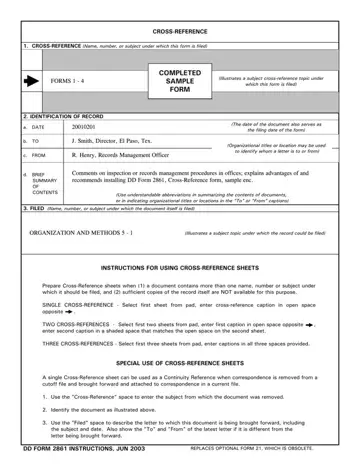
In the world of record keeping, efficiency and accessibility are paramount. Among the tools designed to enhance these qualities is the DD Form 2861, a key instrument for creating a streamlined, effective cross-reference system within organizations. This form assists in organizing documents that contain multiple names, numbers, or subjects that necessitate filing under various categories. By making use of the DD Form 2861, the preparation and retrieval of records become significantly more manageable, reducing the time and effort spent searching through files. It directs the preparation of cross-reference sheets when documents cannot be duplicated for filing under each pertinent subject and outlines the proper identification of such records, including the date, recipients, and a brief summary of the contents. Moreover, the form plays a critical role in maintaining continuity by facilitating the attachment of documents removed from cut-off files to current correspondence, ensuring a seamless information flow. Balanced against the cost of time and resources, the form proves an invaluable asset for achieving better results from record-keeping efforts, establishing sharper criteria for what needs cross-referencing and leveraging paperwork by-products to simplify the task. Designed with practicality in mind, the DD Form 2861 ensures more reliable file services, catering to the specific needs of those requiring access to filed materials, all the while avoiding excessive cross-referencing.
| Question | Answer |
|---|---|
| Form Name | Dd Form 2861 |
| Form Length | 5 pages |
| Fillable? | No |
| Fillable fields | 0 |
| Avg. time to fill out | 1 min 15 sec |
| Other names | constituent, crossreferencing, enc, dd form 2861 fillable |
Dd Form 2861 isn’t the one you’re looking for?
Please rate Dd Form 2861
