
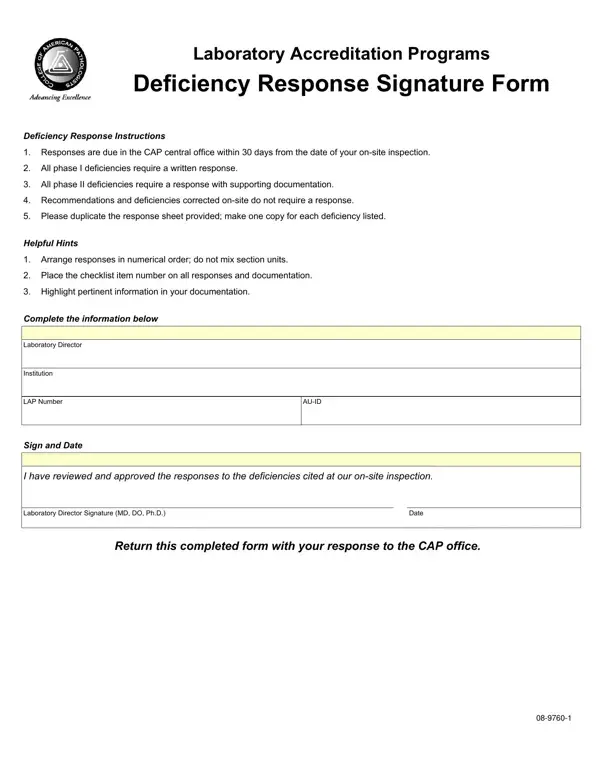
In laboratory accreditation, the deficiency response form gives laboratories a formal way to document corrective actions following an inspection by the College of American Pathologists (CAP). After an on-site inspection, inspectors identify deficiencies that the laboratory must address in writing within 30 days. The form organizes these deficiencies into two categories, each with distinct documentation requirements.
Phase I deficiencies require a written reply explaining what corrective action the laboratory has taken or plans to take. Each reply must describe the specific change made, who is responsible for the correction, and how the laboratory will prevent the issue from recurring. Number each item to match the corresponding deficiency in the inspection report. Keep the language direct and focused on measurable outcomes rather than vague commitments.
Common Phase I deficiency categories include documentation gaps, policy updates, personnel training records, and equipment maintenance logs. Laboratories should audit these areas in advance of scheduled inspections to reduce the number of deficiencies that require formal replies.
Phase II deficiencies require both a written reply and supporting documentation. Acceptable documentation includes updated standard operating procedures, training completion records, equipment calibration logs, quality control data, and photographs showing the corrected condition. Label each supporting document clearly and attach it to the matching numbered item in the submission packet.
When preparing Phase II documentation, use a cover sheet that lists the deficiency number, the type of deficiency, and the documents attached. This organizational structure makes it easier for reviewers to match each piece of evidence to the specific concern raised during the inspection.
The laboratory must return the completed form to the accreditation body within 30 days of the inspection date. The laboratory director must review and sign before submission, confirming that all corrective actions described are accurate and approved. Items corrected on-site during the visit and inspector recommendations do not require a written reply. Missing the submission deadline can result in delayed accreditation decisions or additional compliance reviews.
Organize items numerically, matching the inspector's numbering system. Highlight key information within each entry and keep each reply concise but complete. Avoid vague language such as "will comply" without specifying what action was taken and when. Concrete, time-bound statements are far more effective.
When a deficiency requires ongoing monitoring or systemic changes, attach a corrective action plan to document the remediation steps and timeline. For laboratories managing staff-specific compliance issues, a laboratory personnel form can help record individual responsibilities, training dates, and competency assessments.
What is the difference between a Phase I and Phase II deficiency?
Phase I deficiencies need only a written reply. Phase II deficiencies need a written reply plus physical documentation that proves the correction was made.
What happens if the laboratory misses the 30-day deadline?
Late submissions may trigger an additional review cycle or affect the laboratory's accreditation standing. Contact the accreditation body before the deadline if the laboratory needs more time.
Does the form need to be notarized?
No. The laboratory director's signature on the completed form is sufficient. The director's approval confirms that all information provided is accurate.
| Question | Answer |
|---|---|
| Form Name | Deficiency Response Form |
| Form Length | 1 pages |
| Fillable? | No |
| Fillable fields | 0 |
| Avg. time to fill out | 15 sec |
| Submission deadline | 30 days from inspection date |
| Accrediting body | College of American Pathologists (CAP) |
| Deficiency types | Phase I (written reply only), Phase II (written reply plus documentation) |
| Other names | cap deficiency response form signature page, cap deficiency response sheet, cap deficiency response forms, cap accreditation deficiency response sheet |
Deficiency Response Form isn’t the one you’re looking for?