
DHHS Incident Report Form PDF Details

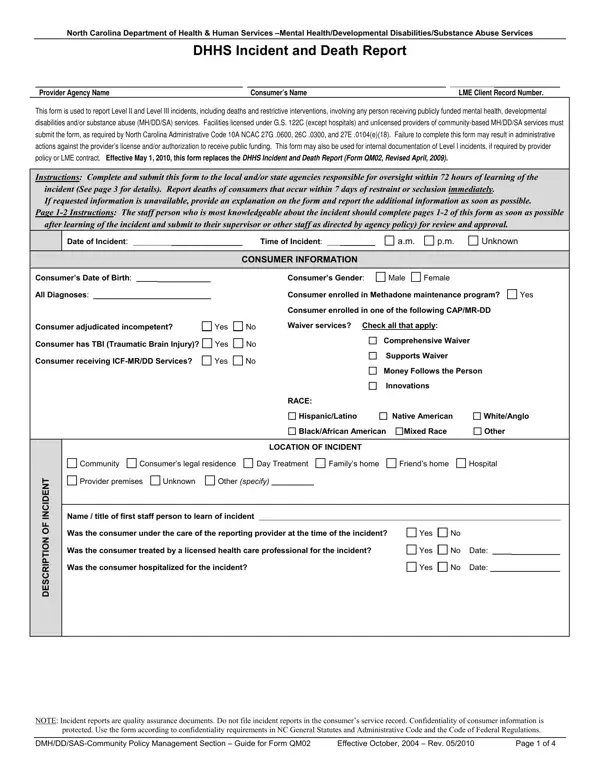
The Dhhs Incident Report form, mandated by the North Carolina Department of Health & Human Services, plays a crucial role in maintaining accountability and oversight within the mental health, developmental disabilities, and substance abuse services sectors. This comprehensive document is designed for the reporting of Level II and Level III incidents, which encompass severe categories including deaths and restrictive interventions, for individuals availing public mental health, developmental disabilities, or substance abuse services. Predominantly utilized by facilities licensed under G.S. 122C—excluding hospitals—and unlicensed community-based service providers, its completion is not optional but a compulsory requirement underscored by the North Carolina Administrative Code. Non-compliance threatens the provider with potentially grave consequences, ranging from administrative actions against their license to possible revocation of their authorization to receive public funds. Instituted on May 1, 2010, and superseding its predecessor (Form QM02, Revised April, 2009), this form dictates that providers submit pertinent details to locally and/or state responsible agencies within a tight 72-hour window following an incident's discovery. Moreover, it intricately outlines the need to report consumer deaths directly linked to restrictive intervention within a mere 7-day period post-occurrence, emphasizing the department's commitment to immediate and transparent reporting. This framework not only ensures the timely dissemination of information but also enforces a structured mechanism for internal incident documentation, subject to provider policy or contractual obligations with Local Management Entities (LMEs), thereby safeguarding consumer rights and upholding service quality across North Carolina.

QuestionAnswer
Form Name DHHS Incident Report Form
Form Length 4 pages
Fillable? Yes
Fillable fields 59
Avg. time to fill out 12 min
Other names incident form DHHS USDA, North Carolina incident report form, NC DHSR incident report forms, DHHS incident report

How to Edit DHHS Incident Report Form Online for Free

This guide provides a step-by-step approach to filling out the DHHS Incident Report Form to ensure compliance and effective communication of incident details.

1. Identify the Type of Incident

Determine the level of the incident (Level II or Level III) you are reporting. Level II incidents are moderate in severity, while Level III incidents are more severe, including deaths and situations needing immediate reporting.

2. Fill in Provider and Consumer Information

Enter the provider agency name, consumer's name, and the Local Management Entity (LME) client record number at the top of the form.

3. Document Incident Details

Record the date and time of the incident as accurately as possible. Under the description section, briefly describe the incident, including who was involved, what happened, when and where it occurred, and how it unfolded.

4. Complete Consumer Information Section

Provide detailed information about the consumer involved, including date of birth, diagnoses, and other pertinent details, such as whether the consumer has a traumatic brain injury (TBI) or is receiving specific services like Methadone maintenance or CAP/MR-DD Waiver services.

5. Report Any Restrictive Interventions Used

If any restrictive interventions such as physical restraint, isolation, or seclusion were used during the incident, document this. Specify whether the intervention is part of the consumer's Individual Service Plan and if it was administered appropriately.

6. Specify the Location and Nature of the Incident

Indicate where the incident occurred (e.g., community, provider premises, consumer's legal residence) and check the applicable type of incident from the options provided, such as injury, abuse allegation, medication error, or consumer behavior.

7. Attach Supporting Documents

If there are additional reports or documentation related to the incident, such as a Restrictive Intervention Details Report (Form QM03), attach these to the form.

8. Review and Approve the Form

The staff member most knowledgeable about the incident should fill out the form initially. After completion, a supervisor or designated staff member should review and approve it to ensure all information is accurate and complete before submission.

9. Submit the Form

Submit the completed form to the appropriate local and/or state oversight agencies within the required time frames.